
FsAutoComplete
 FsAutoComplete copied to clipboard
 ionide
fsac looking for not installed .net version
Unhandled exception: System.ComponentModel.Win32Exception (2): An error occurred trying to start process '/usr/lib/dotnet/dotnet6-6.0.108/dotnet' with working directory ****
is the output from the fsac:stderror buffer. Its running in a project with this global json
{
    "sdk": {
        "version": "6.0.109",
        "rollForward": "minor"
    }
}
Im running 0.57.0 for reference

Are you on Jammy using the new ubuntu-provided .NET SDKs? I'm not sure we work with or support those - we've moved forward to the 6.0.300+ series at the moment.

This is something we're going to have to figure out - for the past few years we've floated to the latest SDK (or very close to that). This includes a lot of MSBuild target changes (and tooling changes). 6.0.100 released in November last year, and 6.0.300 released in August, if that gives you a sense of the scope of change here. IMO (and speaking for myself and not for my daytime role as the .NET SDK PM) generally the distro-provided SDKs and runtimes will be fine for running .NET 6 applications, but not for developing .NET 6 applications. I think devs are going to want the more recent tooling.
Can you get any more detail from the error? I'm wondering if there are other messages that are hidden from us at the moment.
Process fsac stderr finished
Unhandled exception: System.ComponentModel.Win32Exception (2): An error occurred trying to start process '/usr/lib/dotnet/dotnet6-6.0.108/dotnet' with working directory '/home/karl/src/csharp-language-server'. No such file or directory
   at System.Diagnostics.Process.ForkAndExecProcess(ProcessStartInfo startInfo, String resolvedFilename, String[] argv, String[] envp, String cwd, Boolean setCredentials, UInt32 userId, UInt32 groupId, UInt32[] groups, Int32& stdinFd, Int32& stdoutFd, Int32& stderrFd, Boolean usesTerminal, Boolean throwOnNoExec)
   at System.Diagnostics.Process.StartCore(ProcessStartInfo startInfo)
   at System.Diagnostics.Process.Start()
   at System.Diagnostics.Process.Start(ProcessStartInfo startInfo)
   at Ionide.ProjInfo.SdkDiscovery.execDotnet(DirectoryInfo cwd, FileInfo binaryFullPath, IEnumerable`1 args) in /_//src/Ionide.ProjInfo/Library.fs:line 36
   at Ionide.ProjInfo.SdkDiscovery.versionAt(DirectoryInfo cwd, FileInfo dotnetBinaryPath) in /_//src/Ionide.ProjInfo/Library.fs:line 107
   at Ionide.ProjInfo.Init.init(DirectoryInfo workingDirectory, FSharpOption`1 dotnetExe) in /_//src/Ionide.ProjInfo/Library.fs:line 248
   at [email protected](Boolean projectGraphEnabled, DirectoryInfo stateDirectory) in /home/runner/work/FsAutoComplete/FsAutoComplete/src/FsAutoComplete/Parser.fs:line 131
   at System.CommandLine.Handler.<>c__DisplayClass14_0`2.<SetHandler>b__0(InvocationContext context)
   at System.CommandLine.Invocation.AnonymousCommandHandler.InvokeAsync(InvocationContext context)
   at System.CommandLine.Invocation.AnonymousCommandHandler.SyncUsingAsync(InvocationContext context)
   at System.CommandLine.Invocation.AnonymousCommandHandler.Invoke(InvocationContext context)
   at System.CommandLine.Invocation.InvocationPipeline.<>c__DisplayClass4_0.<<BuildInvocationChain>b__0>d.MoveNext()
--- End of stack trace from previous location ---
   at System.CommandLine.Builder.CommandLineBuilderExtensions.<>c__DisplayClass17_0.<<UseParseErrorReporting>b__0>d.MoveNext()
--- End of stack trace from previous location ---
   at [email protected]() in /home/runner/work/FsAutoComplete/FsAutoComplete/src/FsAutoComplete/Parser.fs:line 259
   at System.CommandLine.Builder.CommandLineBuilderExtensions.<>c__DisplayClass12_0.<<UseHelp>b__0>d.MoveNext()
--- End of stack trace from previous location ---
   at System.CommandLine.Builder.CommandLineBuilderExtensions.<>c__DisplayClass22_0.<<UseVersionOption>b__0>d.MoveNext()
--- End of stack trace from previous location ---
   at System.CommandLine.Builder.CommandLineBuilderExtensions.<>c__DisplayClass19_0.<<UseTypoCorrections>b__0>d.MoveNext()
--- End of stack trace from previous location ---
   at System.CommandLine.Builder.CommandLineBuilderExtensions.<>c.<<UseSuggestDirective>b__18_0>d.MoveNext()
--- End of stack trace from previous location ---
   at System.CommandLine.Builder.CommandLineBuilderExtensions.<>c__DisplayClass16_0.<<UseParseDirective>b__0>d.MoveNext()
--- End of stack trace from previous location ---
   at System.CommandLine.Builder.CommandLineBuilderExtensions.<>c.<<RegisterWithDotnetSuggest>b__5_0>d.MoveNext()
--- End of stack trace from previous location ---
   at System.CommandLine.Builder.CommandLineBuilderExtensions.<>c__DisplayClass8_0.<<UseExceptionHandler>b__0>d.MoveNext()

Process fsac stderr finished
here is the full error + stack trace
Can you try to find the path to the dotnet binary, set the DOTNET_ROOT environment variable to the directory containing that binary, and then restart the server?
I have a mild suspicion that our probing for dotnet isn't handling what I assume to be symlinks laid down by the ubuntu installs, and so this line of code isn't finding the dotnet binary correctly.
the plot thickens
You must install .NET to run this application.

App: /home/karl/.dotnet/tools/fsautocomplete
Architecture: x64
App host version: 6.0.9
.NET location: Not found

Learn about runtime installation:
https://aka.ms/dotnet/app-launch-failed

Download the .NET runtime:
https://aka.ms/dotnet-core-applaunch?missing_runtime=true&arch=x64&rid=ubuntu.22.04-x64&apphost_version=6.0.9

Process fsac stderr finished
You must install .NET to run this application.

App: /home/karl/.dotnet/tools/fsautocomplete
Architecture: x64
App host version: 6.0.9
.NET location: Not found

Learn about runtime installation:
https://aka.ms/dotnet/app-launch-failed

Download the .NET runtime:
https://aka.ms/dotnet-core-applaunch?missing_runtime=true&arch=x64&rid=ubuntu.22.04-x64&apphost_version=6.0.9

Process fsac stderr finished
but dotnet --list-sdks prints 6.0.109 [/usr/lib/dotnet/dotnet6-6.0.109/sdk]
@baronfel nevermind, im a moron. That fixed it. somewhere in my sleep deprived (new dad) brain i set DOTNET_ROOT to /bin/local/dotnet
hey, glad to hear it! So you did have to set the variable manually in order to succeed?
it is.
fish_add_path ~/.dotnet
fish_add_path ~/.dotnet/tools
are both added to the path. Consequently i did recently re-generate the env files for doom emacs
Since those are on your PATH, you should be able to remove the DOTNET_ROOT environment variable entirely. This line shows the probing logic, but it goes:
- env var (your current mechanism)
- PATH probing (which should work for you, based on what you've told me)
- last-chance default install directory probing (which would not work for you, based on what we know of your directory layout)
@baronfel hey, following the link to that line in your comment I noticed something, the sdksPath dotnet root below it does a path combine, and combines with "Sdks" as in the plural of "sdk"
/// <summary>
    /// provides the path to the `dotnet` binary running this library, respecting various dotnet <see href="https://docs.microsoft.com/en-us/dotnet/core/tools/dotnet-environment-variables#dotnet_root-dotnet_rootx86%5D">environment variables</see>.
    /// Also probes the PATH and checks the default installation locations
    /// </summary>
    let dotnetRoot =
        lazy (tryFindFromEnvVar () |> Option.orElseWith tryFindFromPATH |> Option.orElseWith tryFindFromDefaultDirs)

    let sdksPath (dotnetRoot: string) =
        System.IO.Path.Combine(dotnetRoot, "Sdks")
However, while looking at my dotnet root folder i don't have that, I have the singular version for some reason..
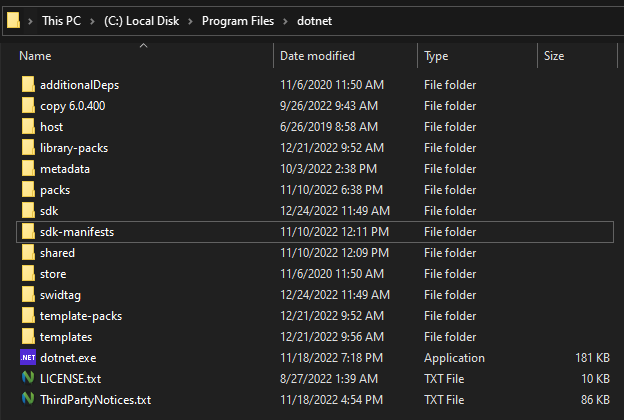
I'm curious, is my folder name correct and the path combining with "Sdks" incorrect, or have I somehow messed up how my folder name?
Should I rename this folder to "sdks" or "Sdks"?

This is an unfortunate naming that's tripping you up. The dotnetRoot intended by the sdksPath function is the root of a particular version of the .NET SDK (i.e. one of the subfolders of the sdk directory in your screenshot). Underneath this 'root' there's an Sdks folder where the individual MSBuild SDKs live:
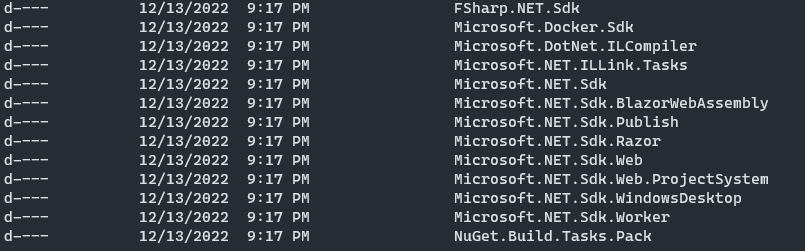
MSBuild SDKs are a pattern for automatically including certain props/targets based on a naming convention. Yes the term SDK is highly overloaded in this context.
I guess my issue is related to this one but I don't know what to do to fix it.
Unhandled exception: System.ComponentModel.Win32Exception (2): An error occurred trying to start process '/usr/lib/dotnet/dotnet6-6.0.108/dotnet' with working directory '/home/mattias/test_fsharp'. No such file or directory
   at System.Diagnostics.Process.ForkAndExecProcess(ProcessStartInfo startInfo, String resolvedFilename, String[] argv, String[] envp, String cwd, Boolean setCredentials, UInt32 userId, UInt32 groupId, UInt32[] groups, Int32& stdinFd, Int32& stdoutFd, Int32& stderrFd, Boolean usesTerminal, Boolean throwOnNoExec)
   at System.Diagnostics.Process.StartCore(ProcessStartInfo startInfo)
   at System.Diagnostics.Process.Start(ProcessStartInfo startInfo)
   at Ionide.ProjInfo.SdkDiscovery.execDotnet(DirectoryInfo cwd, FileInfo binaryFullPath, IEnumerable`1 args) in /_//src/Ionide.ProjInfo/Library.fs:line 38
   at Ionide.ProjInfo.SdkDiscovery.versionAt(DirectoryInfo cwd, FileInfo dotnetBinaryPath) in /_//src/Ionide.ProjInfo/Library.fs:line 118
   at Ionide.ProjInfo.Init.init(DirectoryInfo workingDirectory, FSharpOption`1 dotnetExe) in /_//src/Ionide.ProjInfo/Library.fs:line 298
   at [email protected](Boolean projectGraphEnabled, DirectoryInfo stateDirectory, Boolean adaptiveLspEnabled) in /home/runner/work/FsAutoComplete/FsAutoComplete/src/FsAutoComplete/Parser.fs:line 150
   at System.CommandLine.Handler.<>c__DisplayClass15_0`3.<SetHandler>b__0(InvocationContext context)
   at System.CommandLine.Invocation.AnonymousCommandHandler.InvokeAsync(InvocationContext context)
   at System.CommandLine.Invocation.AnonymousCommandHandler.SyncUsingAsync(InvocationContext context)
   at System.CommandLine.Invocation.AnonymousCommandHandler.Invoke(InvocationContext context)
   at System.CommandLine.Invocation.InvocationPipeline.<>c__DisplayClass4_0.<<BuildInvocationChain>b__0>d.MoveNext()
--- End of stack trace from previous location ---
   at System.CommandLine.Builder.CommandLineBuilderExtensions.<>c__DisplayClass17_0.<<UseParseErrorReporting>b__0>d.MoveNext()
--- End of stack trace from previous location ---
   at [email protected]() in /home/runner/work/FsAutoComplete/FsAutoComplete/src/FsAutoComplete/Parser.fs:line 318
   at System.CommandLine.Builder.CommandLineBuilderExtensions.<>c__DisplayClass12_0.<<UseHelp>b__0>d.MoveNext()
--- End of stack trace from previous location ---
   at System.CommandLine.Builder.CommandLineBuilderExtensions.<>c__DisplayClass22_0.<<UseVersionOption>b__0>d.MoveNext()
--- End of stack trace from previous location ---
   at System.CommandLine.Builder.CommandLineBuilderExtensions.<>c__DisplayClass19_0.<<UseTypoCorrections>b__0>d.MoveNext()
--- End of stack trace from previous location ---
   at System.CommandLine.Builder.CommandLineBuilderExtensions.<>c.<<UseSuggestDirective>b__18_0>d.MoveNext()
--- End of stack trace from previous location ---
   at System.CommandLine.Builder.CommandLineBuilderExtensions.<>c__DisplayClass16_0.<<UseParseDirective>b__0>d.MoveNext()
--- End of stack trace from previous location ---
   at System.CommandLine.Builder.CommandLineBuilderExtensions.<>c.<<RegisterWithDotnetSuggest>b__5_0>d.MoveNext()
--- End of stack trace from previous location ---
   at System.CommandLine.Builder.CommandLineBuilderExtensions.<>c__DisplayClass8_0.<<UseExceptionHandler>b__0>d.MoveNext()

Process fsac stderr finished
❯ dotnet --version
7.0.203
❯ dotnet --list-sdks
7.0.203 [/usr/share/dotnet/sdk]
I don't know why it's looking for dotnet-6.6.0. Is there a config file somewhere that I should have changed? I just removed all the things related to dotnet before upgrading to 7.0 but this error appears
I have ~/.dotnet/tools in my PATH

We need some information from you here @mattiasdrp to figure out what's up.
- Are you using Ionide or another LSP client to run FSAC?
- What are the values of the following environment variables:
- DOTNET_HOST_PATH
- DOTNET_ROOT
- What is the value of
which dotnet? - Do you have a
dotnetbinary in/usr/share/dotnet? - What is the output of
dotnet --versionfrom the/home/mattias/test_fsharpdirectory? - What is the output of
dotnet --infofrom that same directory?
- Are you using Ionide or another LSP client to run FSAC?
I'm using lsp-mode on emacs 29
- What are the values of the following environment variables:
- DOTNET_HOST_PATH
No value
- DOTNET_ROOT
/usr/lib/dotnet/dotnet6-6.0.108 (looks like we found the culprit but I don't know where it's set)
- What is the value of
which dotnet?
/usr/share/dotnet/dotnet
- Do you have a
dotnetbinary in/usr/share/dotnet?
Yes
- What is the output of
dotnet --versionfrom the/home/mattias/test_fsharpdirectory?
7.0.203
- What is the output of
dotnet --infofrom that same directory?
❯ dotnet --info
.NET SDK:
 Version:   7.0.203
 Commit:    5b005c19f5

Runtime Environment:
 OS Name:     ubuntu
 OS Version:  22.04
 OS Platform: Linux
 RID:         ubuntu.22.04-x64
 Base Path:   /usr/share/dotnet/sdk/7.0.203/

Host:
  Version:      7.0.5
  Architecture: x64
  Commit:       8042d61b17

.NET SDKs installed:
  6.0.408 [/usr/share/dotnet/sdk]
  7.0.203 [/usr/share/dotnet/sdk]

.NET runtimes installed:
  Microsoft.AspNetCore.App 6.0.16 [/usr/share/dotnet/shared/Microsoft.AspNetCore.App]
  Microsoft.AspNetCore.App 7.0.5 [/usr/share/dotnet/shared/Microsoft.AspNetCore.App]
  Microsoft.NETCore.App 6.0.16 [/usr/share/dotnet/shared/Microsoft.NETCore.App]
  Microsoft.NETCore.App 7.0.5 [/usr/share/dotnet/shared/Microsoft.NETCore.App]

Other architectures found:
  None

Environment variables:
  DOTNET_ROOT       [/usr/lib/dotnet/dotnet6-6.0.108]

global.json file:
  Not found

Learn more:
  https://aka.ms/dotnet/info

Download .NET:
  https://aka.ms/dotnet/download
yes, so you probably have your distro's packages installed instead of the MS-provided packages. This is very common (and infuriating to me that they have different behaviors) and you're seeing a mismatch because the two systems are interacting unfortunately. You're using MS's packages for the 6.04xx and 7.0.2xx SDKs, and for the dotnet binary itself (due to PATH), but Ionide prefers the DOTNET_ROOT env var (which the distro-provided packages do set).
I removed all dotnet and set
❯ cat /etc/apt/preferences.d/microsoft-dotnet.pref
Package: *
Pin: origin "packages.microsoft.com"
Pin-Priority: 1001
Before installing it again
There shouldn't be anything related to the distro-provided package, no?
We probably need to update the logic in proj-info to actually check the discovered values for env vars - I was just looking at it and it turns out that we don't verify that the file exists on that branch like we do on the other two. If we had being doing that validation, then you never would have noticed the incorrect environment variable because we would have skipped it and found the copy on your PATH instead.
In the short term you can also either forcibly set that env var to a useful value, or find whatever has set it and remove that setting. Then you should start to work regardless of patch release schedule.
I tried setting DOTNET_ROOT to /usr/share/dotnet/dotnet but got a new error:
You must install .NET to run this application.

App: /home/mattias/.dotnet/tools/fsautocomplete
Architecture: x64
App host version: 7.0.5
.NET location: Not found

Learn about runtime installation:
https://aka.ms/dotnet/app-launch-failed

Download the .NET runtime:
https://aka.ms/dotnet-core-applaunch?missing_runtime=true&arch=x64&rid=ubuntu.22.04-x64&apphost_version=7.0.5

Process fsac stderr finished
(and I have the same error if setting DOTNET_ROOT to ~/.dotnet)
Great! I'll close this for now, since it was an issue with setting up your .NET environment.