
ionicons
 ionicons copied to clipboard
 ionic-team
USING THE ICONS IN OFFLINE WEBSITE
Hello team, thank you for the good work, unfortunately i am unable to find a solution to using ionicons offline here is my code and the preview. any guidance is welcome thanks.


Which file do i refrence to get them to work offline?


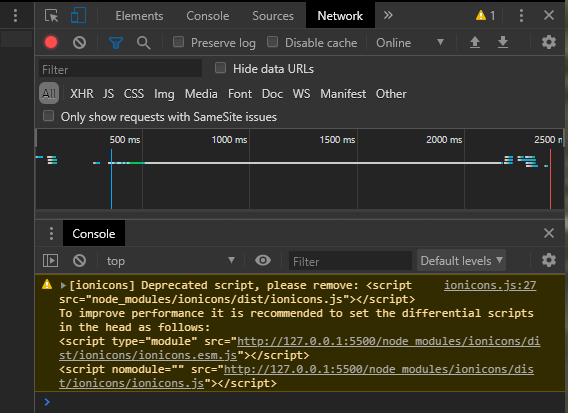
@fkaris This works for me:
<script type="module" src="node_modules/ionicons/dist/ionicons/ionicons.esm.js"></script>
<script nomodule src="node_modules/ionicons/dist/ionicons/ionicons.js"></script>

You can just copy the node_modules/ionicons/dist/ionicons to your public folder, and add following code in your index.html
<script src="/ionicons/ionicons.esm.js" type="module"></script>
<script nomodule src="/ionicons/ionicons.js"></script>
It's work fine for me.

Regarding the 2nd script tag with the nomodule attribute (fallback for older browsers without ES6 modules support): Since Ionicons v5.3.0 the file node_modules/ionicons/dist/ionicons/ionicons.js is not present anymore. Was the fallback simply removed meanwhile or was it moved to a different file? The official instructions only mention v4.7.4 which still included this file. Last version that included the file seems to be 5.2.3.

The proposed solution to copy the node_modules/iconicons/dist folder to the assets folder is still accessing the server via Internet, just that it's our own server instead of the unpkg.com server. You can see the GET requests for individual icons in the DevTools, which happen only at the moment the icon needs to be displayed (in a SPA app, this can be even after the app's code has been downloaded and we started working offline).
Is there a way to use an icon font as we used to be able in version 4? Like this:
<link href="https://unpkg.com/[email protected]/dist/css/ionicons.min.css" rel="stylesheet">
So it is a single download.


Seems impossible to preload ionicons for offline usage. Switching to Font Awesome. Thanks
I used vite-plugin-static-copy, which is basically the same as copying to /public/ manually. But it does not clutter your project files and always uses the latest Ionicons supplied with Ionic.
npm install vite-plugin-static-copy --save-dev
vite.config.js:
import vue from '@vitejs/plugin-vue';
import { viteStaticCopy } from 'vite-plugin-static-copy';

export default defineConfig({
  plugins: [
    vue(),
    viteStaticCopy({
      targets: [
        {
          src: 'node_modules/ionicons/dist/ionicons/**/*',
          dest: '/ionicons/',
        },
      ],
    }),
  ],
});
index.html:
<script type="module" src="/ionicons/ionicons.esm.js"></script>
<script type="module" src="/ionicons/ionicons.js"></script>

It is also possible to include the SVG code directly on the page, without loading ionicons.js.
import {
mailOutline,
}  from 'ionicons/icons';
<ion-icon slot="start" :ios="mailOutline" :md="mailOutline"></ion-icon>
Sadly this does not seem to be documented, but if you create a new Ionic project with sidepanel then the boilerplate code does it this way.