
ionic-framework
 ionic-framework copied to clipboard
 ionic-team
bug: popover alignment property renders incorrect location in frameworks
Prerequisites
- [X] I have read the Contributing Guidelines.
- [X] I agree to follow the Code of Conduct.
- [X] I have searched for existing issues that already report this problem, without success.
Ionic Framework Version
- [ ] v4.x
- [ ] v5.x
- [X] v6.x
- [ ] Nightly
Current Behavior
When using various combinations of side and alignment on an inline ion-popover, the popover renders at the incorrect location when opened. This occurs in all three framework integrations (Angular/React/Vue), but not in core.
The linked repo has buttons for all combinations of side and alignment; here are the specific issues I noticed:
side="top"shows the popover too low, overlapping the button. This occurs with all values ofalignment, including when it isn't set at all.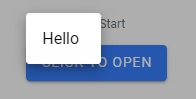
- For
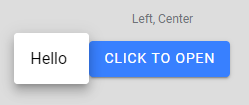
sides ofright,left,start, andend, and analignmentofcenter, the popover is rendered a pixel or two lower than the top edge of the button, when it should be vertically centered.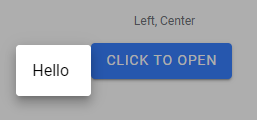
- For the same
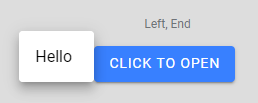
sides as the above, and analignmentofend, the popover is also rendered a few pixels lower than the button's top edge (slightly lower than withalignment="center"), when it should be raised higher so the bottom edges align.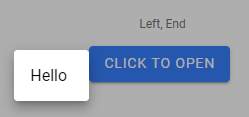
Expected Behavior
Here are corresponding screenshots from the position test in core, which shows the correct behavior:
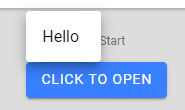
Steps to Reproduce
- Clone repo (note the branch),
npm install,ionic serve - Click buttons corresponding to described side/alignment values (headers list side, then alignment)
Code Reproduction URL
https://github.com/amandaejohnston/sandbox-ionic-angular/tree/popover-positions
Ionic Info
[WARN] Error loading @capacitor/ios package.json: Error: Cannot find module '@capacitor/ios/package'

       Require stack:
       - C:\Users\moogl\AppData\Roaming\npm\node_modules\@ionic\cli\lib\project\index.js
       - C:\Users\moogl\AppData\Roaming\npm\node_modules\@ionic\cli\lib\index.js
       - C:\Users\moogl\AppData\Roaming\npm\node_modules\@ionic\cli\index.js
       - C:\Users\moogl\AppData\Roaming\npm\node_modules\@ionic\cli\bin\ionic
[WARN] Error loading @capacitor/android package.json: Error: Cannot find module '@capacitor/android/package'

       Require stack:
       - C:\Users\moogl\AppData\Roaming\npm\node_modules\@ionic\cli\lib\project\index.js
       - C:\Users\moogl\AppData\Roaming\npm\node_modules\@ionic\cli\lib\index.js
       - C:\Users\moogl\AppData\Roaming\npm\node_modules\@ionic\cli\index.js
       - C:\Users\moogl\AppData\Roaming\npm\node_modules\@ionic\cli\bin\ionic

Ionic:

   Ionic CLI                     : 6.18.1 (C:\Users\moogl\AppData\Roaming\npm\node_modules\@ionic\cli)
   Ionic Framework               : @ionic/angular 6.1.6
   @angular-devkit/build-angular : 12.1.4
   @angular-devkit/schematics    : 12.2.14
   @angular/cli                  : 12.1.4
   @ionic/angular-toolkit        : 4.0.0

Capacitor:

   Capacitor CLI      : 3.3.3
   @capacitor/android : not installed
   @capacitor/core    : 3.3.3
   @capacitor/ios     : not installed

Utility:

   cordova-res : not installed globally
   native-run  : 1.5.0

System:

   NodeJS : v16.13.0 (C:\Program Files\nodejs\node.exe)
   npm    : 8.1.0
   OS     : Windows 10
Additional Information
No response

Repro https://stackblitz.com/edit/angular-ueypjw?file=src%2Fmain.tsx
This is still occurring in react (not core)
- Visit the docs https://ionicframework.com/docs/api/popover#side-and-alignment-demo
- Click the "react" as framework in demo space
- Click the Stackblitz link
- Notice the bug below:
BUG

Should appear like it does in the docs

Related issues: https://github.com/ionic-team/ionic-framework/issues/24780
For us this becomes a much larger issue because we're trying to display a list of options in an ion-popover - because it's a list - the items to select are pushed off the screen.
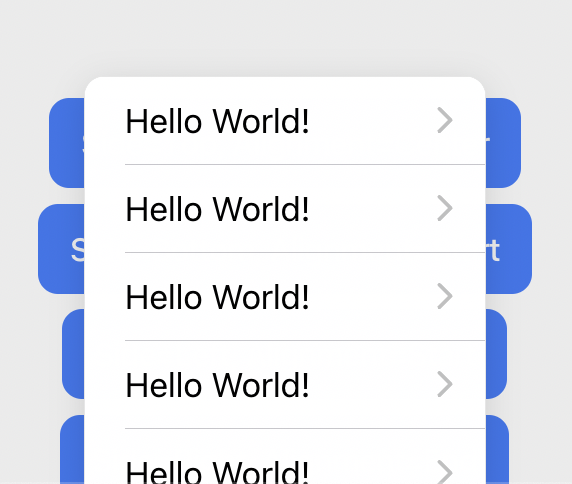
The interesting thing here is that the caret is in the correct position - but but the content is not (The image below I modified the inline style to move the content up to show the caret)


Is there a fix planned for the next release? It's really annoying, I can't publish my app with this bug... Any workaround?

For the moment I found a work around fixing the popover to the top:
ion-popover::part(content) {
    top: 5vh;
}
At least it doesn't change position randomly...
Seems that the top style when being calculated isn't reduced by popover content height somewhere here or here
Bug is available since v6.0.0

@piotr-cz yes, I investigated a bit as well:
Inspecting the popover element, it came out that it's the div with class .popover-content which gets the styling supposed to center it.
(In my app, my screen is 740x360, and the popover 250x296)
When it goes well, 32px is used, which is (360 - 296) / 2:
top: calc(32px + var(--offset-y, 0px));
left: calc(245px + var(--offset-x, 0px));
transform-origin: left top;
When it goes wrong, 180px is used, which is (360 - 0) / 2:
top: calc(180px + var(--offset-y, 0px));
left: calc(245px + var(--offset-x, 0px));
transform-origin: left top;
It's like it didn't got time to calculate the popover height 🤔
This calcul is made by a function called calculateWindowAdjustment
https://github.com/ionic-team/ionic-framework/search?q=calculateWindowAdjustment
I didn't get further reading code.
@Lechevallier As You have written, might be that the content of .popover-content element isn't visible at the time when calculation is being made and so it's dimensions are being retrieved as 0px x 0px
I solved this issue by simply adding keepContentsMounted=true
and it magically worked correctly!

@tekno0ryder thanks for your help, however I'm afraid it won't work in all situations. As said in the documentation, "This feature only works with inline popovers".
Hello everyone! Recently I addressed a different bug that logically overlaps with the behavior described here (https://github.com/ionic-team/ionic-framework/issues/24716).
Can someone test with the nightly build and let me know if the problem continues to persist on your end?
npm install @ionic/angular@nightly
I have validated against the original reproduction and the issue appears to be resolved by my changes.
The nightly changes that would address this would be available in the next patch release (6.3.7).

Hi, good news!
I'm using react, will the fix be available for @ionic/react as well?
Thanks a lot
Hello everyone! Recently I addressed a different bug that logically overlaps with the behavior described here (#24716).
Can someone test with the
nightlybuild and let me know if the problem continues to persist on your end?npm install @ionic/angular@nightlyI have validated against the original reproduction and the issue appears to be resolved by my changes.
The nightly changes that would address this would be available in the next patch release (6.3.7).
Thanks,
Tested on "@ionic/react": "^6.3.7-nightly.20221115" still the issue exists and i have to use keepContentMounted={true} to work properly
Hello everyone, thank you for the quick verification that that fix does not apply directly to all instances of this bug.
Can you test this updated dev-build?
6.3.8-dev.11668625226.1db1de88
To install for a specific target, you will just apply:
npm install @ionic/[email protected]
and replace react with vue or angular.
I've independently verified this change against local reproductions for Vue and React and it appears to correctly position the popover now.
Thanks!
Edit:
Note the dev-build is just a snapshot of the work in progress branch. There may be some additional changes I need to make before it is merge ready.
npm install @ionic/[email protected]
Unfortunately still exists, sample code: Stackblitz
Change keepContentMounted to true to see how it should behave
@tekno0ryder here is an updated version of your sample: https://stackblitz.com/edit/angular-zqsedm-ecuf7w?file=src%2Fmain.tsx
The package-lock.json was still resolving to @ionic/[email protected], which does not contain the dev-build changes. This is just a quirk of Stackblitz; installing locally will resolve the correct package.
Note: In my dev-build other overlays are broken. Don't use the dev-build outside of quick verification. I will post an updated dev-build that does not impact other overlays once CI passes.
@tekno0ryder here is an updated version of your sample: https://stackblitz.com/edit/angular-zqsedm-ecuf7w?file=src%2Fmain.tsx
The
package-lock.jsonwas still resolving to@ionic/[email protected], which does not contain the dev-build changes. This is just a quirk of Stackblitz; installing locally will resolve the correct package.Note: In my dev-build other overlays are broken. Don't use the dev-build outside of quick verification. I will post an updated dev-build that does not impact other overlays once CI passes.
Thanks it works great 👏🏽
Btw even in my local machine I had to install the correct version for @ionic/core
Thanks for the issue! This issue is being locked to prevent comments that are not relevant to the original issue. If this is still an issue with the latest version of Ionic, please create a new issue and ensure the template is fully filled out.
![ionitron-bot[bot] avatar](https://avatars.githubusercontent.com/in/8640?v=4 "Published by a pub.dev verified publisher")