

 ionic-team
bug: iOS back transitions between <ion-tabs> pages not animating
Bug Report
Ionic version:
[x] 4.3.1
Current behavior:
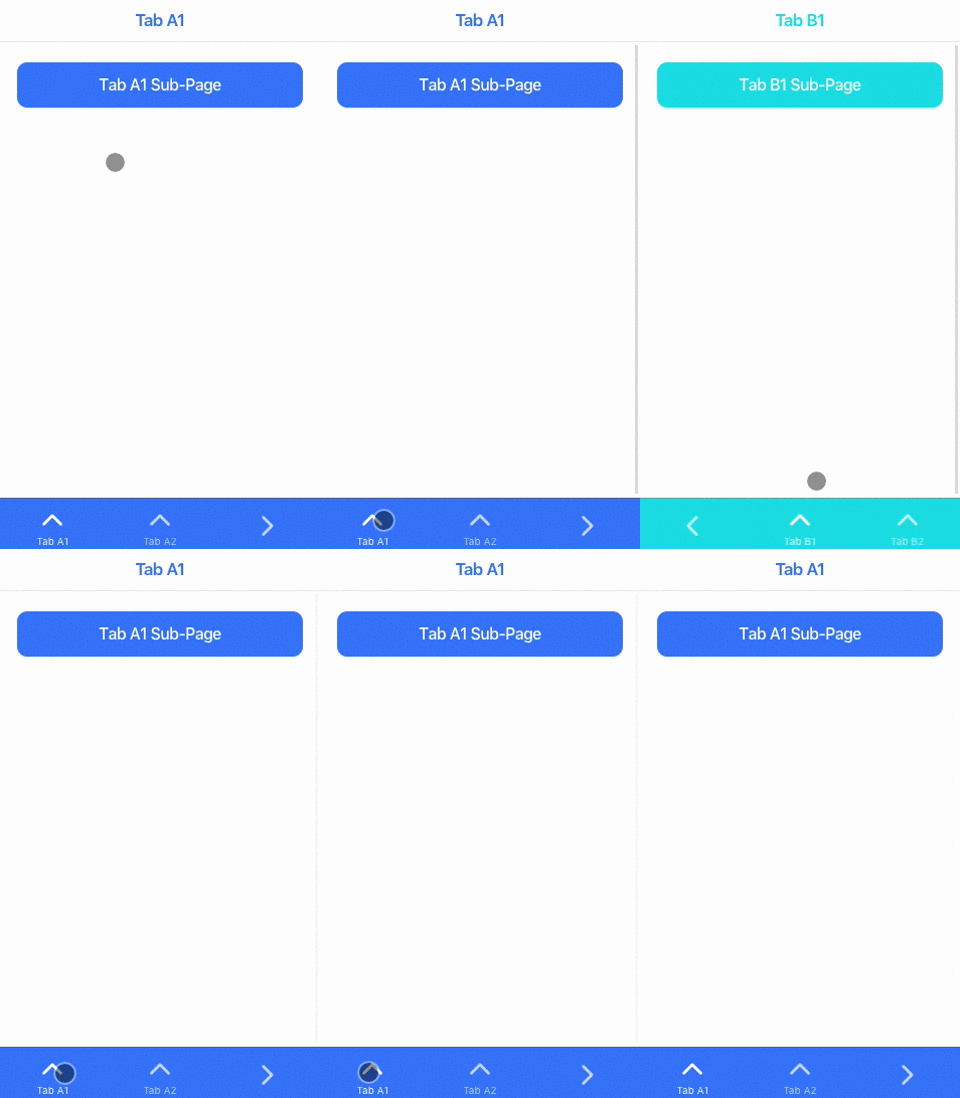
Demo app confirgured with { mode: 'ios' } and has 2 <ion-tabs> pages. Navigating forward from Tabs A to Tabs B pages animates as expected. Navigating back from Tabs B to Tabs A does not animate. Removing the { mode: 'ios' } config line shows Android style animations working correctly forwards and back.
Expected behavior:
Navigating back from Tabs B to Tabs A page should animate.
Steps to reproduce:
- Create a new app
- Change app.module to run in iOS mode
- Create 2
pages, and navigate forward and back between each one
Related code:
Basic demo is available at: https://github.com/benmarsh/ionic-multi-tabs-test
Other information:
Ionic info:
Ionic:

   ionic (Ionic CLI)             : 4.12.0 (/usr/local/lib/node_modules/ionic)
   Ionic Framework               : @ionic/angular 4.3.1
   @angular-devkit/build-angular : 0.13.8
   @angular-devkit/schematics    : 7.3.8
   @angular/cli                  : 7.3.8
   @ionic/angular-toolkit        : 1.5.1

System:

   NodeJS : v11.12.0 (/usr/local/Cellar/node/11.12.0/bin/node)
   npm    : 6.7.0
   OS     : macOS Mojave

You can even use the ionic CLI to generate a tabs app and the tabs won't animate. Steps:
ionic start-> starter template: tabsionic serve/ionic cordova run ios/ionic cordova run android- Navigate to another tab, and notice there's no animation, same as is documented in the OP

Also experiencing this issue with ALL "back" transitions in my app in iOS display mode. MD mode works fine.

@lincolnthree I ended up writing my own simple transition to replace the default one, so.. kinda
@benmarsh Hmmm.. ok. Any pointers on that? I'd love to know how to get at least something working. It would be much appreciated.
Related issue: https://github.com/ionic-team/ionic/issues/19337 (with test case)

Small update on this. It looks like once animations break, all future ios-style router animations break as well.
This includes forward AND back animations.
One interesting thing to note is that once animations have 'broken', forward-direction route changes occur instantaneously, while back-direction route changes appear to wait for approximately the time the animation would have taken to play out.

@lincolnthree Check out https://gist.github.com/benmarsh/6401a4c58a4b48e305c217c6552c182e for the simplified version of the transition. It's based on the included Ionic transition and I've left in the commented out code so you can see what has been removed. I've not had any animation problems with using this reduced down version. Add { navAnimation: simpleTransitionAnimation } to the app config to override the default (https://ionicframework.com/docs/utilities/config)
@benmarsh Oh...my...god.
You are a life-saver. This has been a thorn in my side for months. It's interesting to me that the transition basically works, but that something in the default causes it to break.
If I'm reading this correctly, it looks like most of what was removed has to do with animating the toolbars and titles. Curious. I may try to dig in to this when I can get a chance.
For now... THANK YOU!
Now to figure out how to only apply this when on iOS :)
@liamdebeasi one thing I'm noticing in this commented out animation code is that there's a querySelector for .querySelector(':scope .ion-page'). Is it possible this matches incorrect elements when multiple .ion-pages exist/are nested? Seems this might be why tabs break (and even though I'm not using tabs, I do have .ion-page type elements to create sub-view areas that work with ion-header/ion-content/ion-footer in my app... I think that would (to this query) behave much like tabs.)
Possible this could be the cause of the issue, which might explain why the animation works when navigating forward, but then breaks subsequently once pages have been added to the dom.
Just a hunch. Will need to test this when I get back to the mobile side. For now I'm just going to take this gift and appreciate it :D
Import Config:
import { Config, IonMenu, ModalController, Platform } from "@ionic/angular";
constructor(private config: Config) {}
And then just:
await this.platform.ready();

if (this.platform.is('mobile') && this.platform.is('ios')) {
    this.config.set('navAnimation', simpleTransitionAnimation);
}
Brilliant:
await this.platform.ready();

if (this.platform.is('mobile') && this.platform.is('ios')) {
    this.config.set('navAnimation', simpleTransitionAnimation);
}
Where config is Config imported from "@ionic/angular":
import { Config, IonMenu, ModalController, Platform } from "@ionic/angular";
constructor(private config: Config) {}

any news on this?, i'm having the same problem with animations. i tried to implement the suggested new animation but got a bunch of errors, and after trying to fix them no animation at all, i'm using ionic/angular 5.0.4

@gggiiia: i found a solution for ionic5.
include this in app.module.ts:
IonicModule.forRoot({
  navAnimation: fixAnimation
}),
and this in a new file:
import { Animation, NavOptions, createAnimation } from '@ionic/core';

const DURATION = 500;
const EASING = 'cubic-bezier(0.36,0.66,0.04,1)';

export function fixAnimation(_: HTMLElement, navEl: TransitionOptions): Animation {

	let transitionElement: any = navEl;

    const enteringEl = transitionElement.enteringEl;
    const leavingEl = transitionElement.leavingEl;

	const backDirection = (transitionElement.direction === 'back');
	const rootTransition: Animation = createAnimation('')
	if(!backDirection) {

		const squareA: Animation = createAnimation('')
			.addElement(enteringEl)
			.duration(transitionElement.duration || DURATION)
			.easing(EASING)
			.beforeStyles({ 'opacity': 1 })
            .fromTo('transform', 'translateX(99.5%)', 'translateX(0%)');

		const squareB: Animation = createAnimation('')
			.addElement(leavingEl)
			.duration(transitionElement.duration || DURATION)
			.easing(EASING)
            .fromTo('transform', 'translateX(0%)', 'translateX(-20%)')
			.fromTo('opacity', '1', '0.8')

		rootTransition.addAnimation([squareA, squareB]);
	}
	else {

		const squareA: Animation = createAnimation('')
			.addElement(leavingEl)
			.duration(transitionElement.duration || DURATION)
			.easing(transitionElement.easing || EASING)
            .fromTo('transform', 'translateX(0%)', 'translateX(99.5%)');


		const squareB: Animation = createAnimation('')
			.addElement(enteringEl)
			.duration(transitionElement.duration || DURATION)
			.easing(transitionElement.easing || EASING)
			.fromTo('opacity', '0.8', '1')
            .fromTo('transform', 'translateX(-20%)', 'translateX(0%)');

		rootTransition.addAnimation([squareA, squareB]);

	}

    return rootTransition;

};

export interface TransitionOptions extends NavOptions {
  progressCallback?: ((ani: Animation | undefined) => void);
  baseEl: any;
  enteringEl: HTMLElement;
  leavingEl: HTMLElement | undefined;
}

export const getIonPageElement = (element: HTMLElement) => {
  if (element.classList.contains('ion-page')) {
    return element;
  }

  const ionPage = element.querySelector(':scope > .ion-page, :scope > ion-nav, :scope > ion-tabs');
  if (ionPage) {
    return ionPage;
  }
  // idk, return the original element so at least something animates and we don't have a null pointer
  return element;
};

@tobiasbambullis Great, works like a charm!
For iOS 12 we had to remove the empty string in createAnimation('')
Just createAnimation() seems to be sufficient.


@tobiasbambullis workaround fixes navigating from/to tabs, but doesn't fix the problem with navigating between tabs. @brandyscarney It would be really great if the ionic team could fix this issue, and get the animations to look native for each platform. Both used to work in ionic 2/3.


None of the above solutions have worked for me either, and so far after migrating from Ionic 5 to 6.0.0-rc.2, same issue exists for iOS.


I have found a different workaround.. have not yet deployed it to a production app but in localhost, xcode and android studio seems to work fine. I've used Vue 3, but this can just as easily be applied to React or Angular too..
I have removed the tab and href from the ion-tab-component and added a click handler that uses the router to change route. Based on the current route, it then sets the component's selected attribute.
Hope this helps
<ion-tab-button
  v-for="route in routes"
  :key="route.id"
  :selected="currentRoute === route.path"
  @click="handleRouteChange(route.path)"
>
  <ion-icon :icon="icons[route.icon]" />
  <ion-label>{{ route.label }}</ion-label>
</ion-tab-button>
Script:
import { useRouter } from "vue-router";
...
setup() {
   const router = useRouter();
   return {
      router,
    };
  },
  data() {
    return {
      currentRoute: this.$route.path,
    };
  },
  methods: {
    handleRouteChange(route) {
      this.router.push(route);
    },
  },
  watch: {
    "$route.path": function (newRoute) {
      this.currentRoute = newRoute;
    },
  },
Remove pointer events for good measure:
<style lang='scss' scoped>
ion-tab-button {
  ion-icon,
  ion-label {
    pointer-events: none;
  }
}
</style>
And my route object looks as following:
    {
      id: 1,
      label: "Home",
      path: "/home",
      icon: 'homeOutline'
    },
