

 ioBroker
Rules: Cron not working
Describe the bug
If you use CRON as trigger, the configured values are not copied to the generated java script.
To Reproduce
Steps to reproduce the behavior:
- Create a new script with "Rules"
- Configure CRON as trigger, eg.: "20 5 * * 1-5"

- Click on '.Rules / JS' (at the top right corner)
- Check the generated script code. You will see something like "0 * * * *"

Expected behavior
The generated script-code should looks like "schedule("20 5 * * 1-5", async fu...."
Screenshots & Logfiles
see above
Versions:
- JavaScript - Adapter: 5.2.13
- JS-Controller version: 3.3.23
- Node version: 12.22.4
- Operating system: Debian GNU/Linux 10 (buster) 4.14.78-cubox
Additional context

@GermanBluefox Seems there is a name mixup in TriggerSchedule.js ...the result is written out as attribute "text" but ocode is generated with "cron" and also the ComplexCron Component seems to expect "cron" (?) .... Will be intersting to fix this backward compatible (ok you just need to use "text" if present ...) but thsts too deep React for me ... :-)

@GermanBluefox and even worse ...
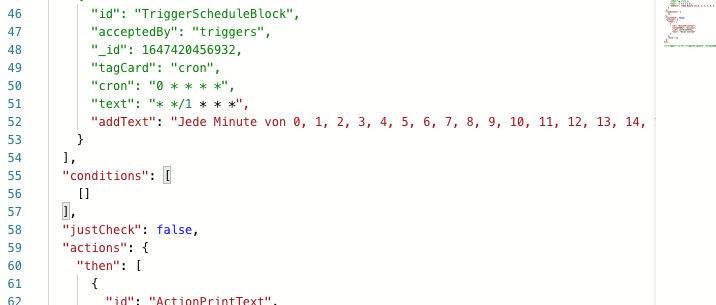
a cron like */1 renders the "comment" from rules config ineffective :-)))
