
ioBroker.javascript
 ioBroker.javascript copied to clipboard
 ioBroker
Global TS constants/functions are not defined in JS scripts (again)
I have the same problem as described in #687:
I use global files, to store object ids to being able to switch them out in one place and use the constant in all my scripts.
My global files are all Typescript as well as most of my non-global scripts. This worked in version 4.9.8, but does not work since 4.10.1. (I could not check 4.10.0 as iobroker did not want to install this). The most up-to-date version I tested was 5.0.14, which does also show the described behavior.
Steps to reproduce the behavior:
- Have a TypeScript file "Konstanten" in global with a constant, e.g.
const ID_DEV_WZ_Fernbedienung_1_PRESS_SHORT:string = getIdByName("WZ.Fernbedienung:1.PRESS_SHORT", true)[0];
- Add a JavaScript non-global script to any folder and try to use the contstant, e.g.:
on ({id: ID_DEV_WZ_Fernbedienung_1_PRESS_SHORT, change: "any"},
function(){
// do something
}
);
- See error
| javascript.0 | 2021-03-14 20:17:44.747 | error | (16554) ReferenceError: ID_DEV_WZ_Fernbedienung_1_PRESS_SHORT is not defined |
|---|---|---|---|
| javascript.0 | 2021-03-14 20:17:44.747 | error | (16554) ^ |
| javascript.0 | 2021-03-14 20:17:44.747 | error | (16554) on({ id: ID_DEV_WZ_Fernbedienung_1_PRESS_SHORT, change: "any" }, function () { |
Expected behavior The constants should be available in non-global scripts.
Versions: Adapter version: 4.10.1 to 5.0.14 ( I tested versions 4.10.1, 4.10.10, 4.11.0, 5.0.14) JS-Controller version: 3.2.16 Node version: v10.22.0 Operating system: linux
Work around The downgrade to 4.9.8 did fix my problem.
See also #726, which might be related.

I don't know which of the many PRs from the 4.9-4.10 era causes this, but it has to do with how statements in global TypeScripts are transformed in order to work around the limitation that TypeScript only understands modules, not "scripts". One possible solution in Node.js keeps getting delayed since a few years now.
I can look into another special case for scripts that:
- only define constants
- don't define classes, interfaces or types
- don't use
import - don't use top-level
await
But I don't know if that actually solves the problem in a real-world scenario, where it could actually be easier to move the const definitions into global JavaScript instead.

Hi AlCalzone,
thank you for looking into this. According to your hint, I tried to do something else than constants and, thus, I converted the file in a class containing public static variables as I did not want to loose the typing. That works with 5.0.14.
I will try to change this into get accessors, so that the variables cannot be changed, but it is already good enough to work for my use case.
Thanks again!
Stefan
P.S. For everybody who is interested. My constants for my device-ids are now managed inside a class:
class Constants {

    public static get ID_DEV_WZ_Fernbedienung_1_PRESS_SHORT():string { return getIdByName("WZ.Fernbedienung:1.PRESS_SHORT", true)[0]; }
    ....
}
Example for usage:
on ({id: Constants.ID_DEV_WZ_Fernbedienung_1_PRESS_SHORT, change: "any"},
    function() {
        // do something
    }
);
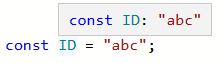
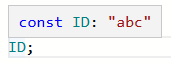
FYI, you don't lose the typing when you switch to JavaScript.
Example:
global JS:
non-global TS:
Thank you AlCalzone for the explanation. I am not sure if I fully understand your examples as I am still learning JS/TS, but I will try to read a little bit more about typing in JS/TS.
It was meant to show you that the tooltip contains the correct type without needing to use Typescript.
AlCalzone, thank you very much for the explanation! I did not get the fact that these are tooltips! Sorry.
Maybe to prevent problems like this, it would be easier to enforce your strategy to not allow TS scrips as global scripts or at least to show a warning until the solution in Node.js is available? Then everybody can decide if they would like to use this as an unsupported feature or not.
This issue has been automatically marked as stale because it has not had recent activity. It will be closed if no further activity occurs within the next 7 days. Please check if the issue is still relevant in the most current version of the adapter and tell us. Also check that all relevant details, logs and reproduction steps are included and update them if needed. Thank you for your contributions. Dieses Problem wurde automatisch als veraltet markiert, da es in letzter Zeit keine Aktivitäten gab. Es wird geschlossen, wenn nicht innerhalb der nächsten 7 Tage weitere Aktivitäten stattfinden. Bitte überprüft, ob das Problem auch in der aktuellsten Version des Adapters noch relevant ist, und teilt uns dies mit. Überprüft auch, ob alle relevanten Details, Logs und Reproduktionsschritte enthalten sind bzw. aktualisiert diese. Vielen Dank für Eure Unterstützung.
![stale[bot] avatar](https://avatars.githubusercontent.com/in/1724?v=4 "Published by a pub.dev verified publisher")
This issue has been automatically marked as stale because it has not had recent activity. It will be closed if no further activity occurs within the next 7 days. Please check if the issue is still relevant in the most current version of the adapter and tell us. Also check that all relevant details, logs and reproduction steps are included and update them if needed. Thank you for your contributions. Dieses Problem wurde automatisch als veraltet markiert, da es in letzter Zeit keine Aktivitäten gab. Es wird geschlossen, wenn nicht innerhalb der nächsten 7 Tage weitere Aktivitäten stattfinden. Bitte überprüft, ob das Problem auch in der aktuellsten Version des Adapters noch relevant ist, und teilt uns dies mit. Überprüft auch, ob alle relevanten Details, Logs und Reproduktionsschritte enthalten sind bzw. aktualisiert diese. Vielen Dank für Eure Unterstützung.
I'm having the same problem, but in TS scripts: global/const.ts
const USERDATA = {
  USER_HOME: '0_userdata.0.user_home',
  // ...
};
common/test.ts
console.log(USERDATA);
Results in:
ReferenceError: USERDATA is not defined
Is this the same issue or should I create a new one? (Or am I doing something wrong?)
Edit: Functions are actually working, but constants/variables are not.

Hi,
something must be really wrong with global scripts.
It seems there is a problem in global scripts defined as TS.
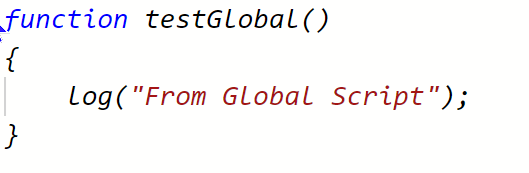
My examples:
Global Script:
My "common" scripts:
JS:
 TS: (don't know why console log is not shown in debug window, but in the "Protocol" section, the error is displayed)

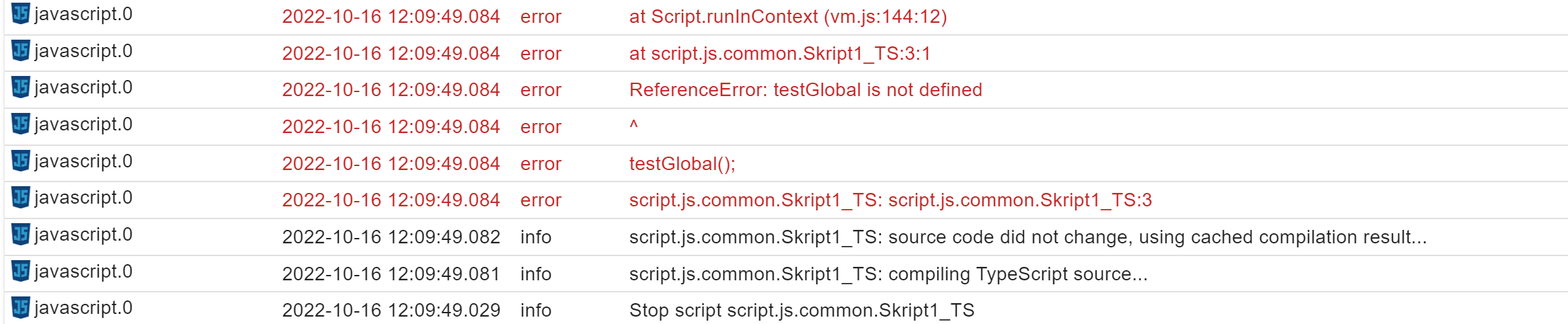
Any idea what's wrong? Seems I can't use global TS scripts at all.
Thanks Christof


Hi, I use the adapter version 6.0.3. In the debug mode I've observed that only the global scripts with type JavaScript are copied at the beginning at the script. The global Typescripts are not copied at the beginning which explains the behavior. Any idea? Thanks Christof
As you might have guessed of no further actions in the issue the answer is no. Noone had time so far. If you like provide a PR with a fix
I have this on my to do list but I won't be able to work on it before January
Sorry, I thought it might have been not a classical bug as this problem was gone at some point in time. Regaring PR: I contributed in some areas but this problems is a bit too complex to dive into. As it is no showstopper as the work around is to not use TS global scripts, I'll be patient ;-) Thanks for your support!
Hey, sorry to bump this. I've just upgraded to version 6.1.4 and now my global scripts cannot access each others interfaces, classes and enums anymore.
If there is anything I can do to help resolve this problem, please let me know.
