

 invoke-ai
[bug]: Installer can't find protobuf
Is there an existing issue for this?
- [X] I have searched the existing issues
OS
Linux
GPU
cuda
VRAM
12GB
What happened?
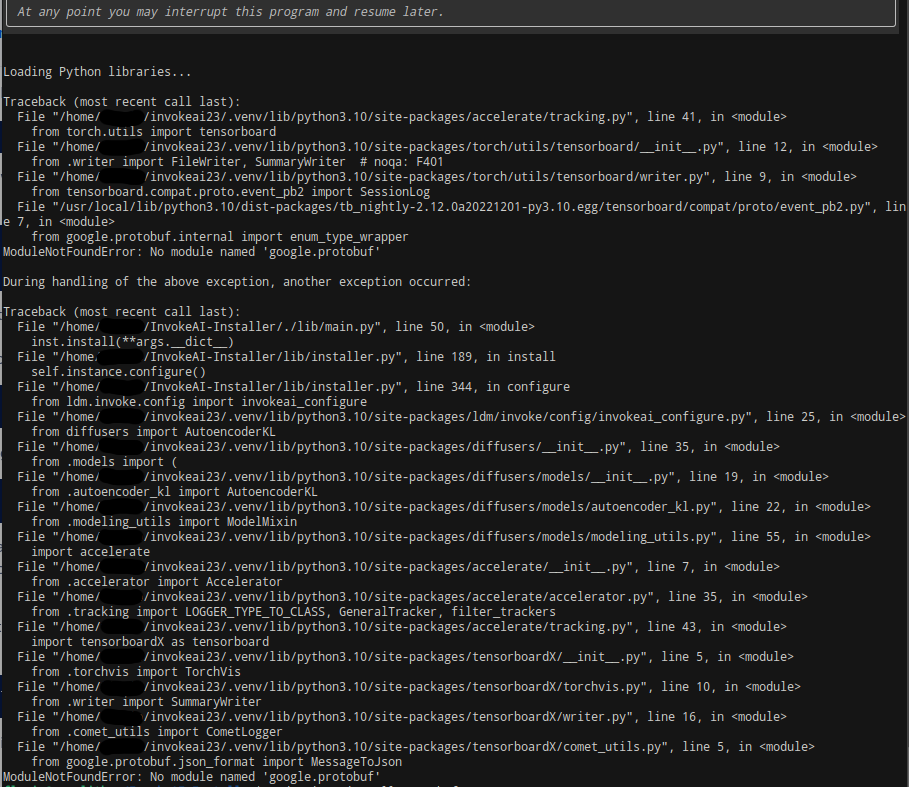
Hello, I ran the new 2.3 install.sh to update an existing setup but it exits with the following errors. Protobuf is installed both inside the environment and outside.
File "/usr/local/lib/python3.10/dist-packages/tb_nightly-2.12.0a20221201-py3.10.egg/tensorboard/compat/proto/event_pb2.py", line 7, in <module>
    from google.protobuf.internal import enum_type_wrapper
ModuleNotFoundError: No module named 'google.protobuf'
Maybe it's a version problem, but I'm not able to figure it out. Thank you for any help!
Screenshots

Additional context
No response
Contact Details
No response

it seems you've got Torch installed in your global environment (dist-packages). I suspect this is throwing some kind of a wrench in the works. It's not a configuration we test for. Could you please try to sudo pip uninstall torch (while NOT in an active virtual env), and then re-run the installer?
I did sudo pip uninstall torch and re-ran the installer, still error. I don' understand why it would still use the system python setup while inside the virtual env.
I should add that the installation and the resulting invoke.sh seems to be working "fine", I'm just not sure if those errors are affecting the setup.
Interesting, it seems the error is actually coming from tensorboard. You might want to try the same uninstall/reinstall step with that package. Ultimately you don't want any additional packages installed in your global system environment. But good to know that the application actually works for you despite the errors.
According to pip tensorboard was not installed on my system, but I found a directory and removed it to be safe. Anyway the installation script now doesn't use other packages but it's the same error. (I also switched to the default directory in case it had anything to do with it, this was an attempt at a "clean" install.)
Loading Python libraries...

Traceback (most recent call last):
  File "/home/___/invokeai/.venv/lib/python3.10/site-packages/accelerate/tracking.py", line 41, in <module>
    from torch.utils import tensorboard
  File "/home/___/invokeai/.venv/lib/python3.10/site-packages/torch/utils/tensorboard/__init__.py", line 12, in <module>
    from .writer import FileWriter, SummaryWriter  # noqa: F401
  File "/home/___/invokeai/.venv/lib/python3.10/site-packages/torch/utils/tensorboard/writer.py", line 9, in <module>
    from tensorboard.compat.proto.event_pb2 import SessionLog
  File "/home/___/invokeai/.venv/lib/python3.10/site-packages/tensorboard/compat/proto/event_pb2.py", line 5, in <module>
    from google.protobuf import enum_type_wrapper
ModuleNotFoundError: No module named 'google.protobuf'
There has been no activity in this issue for 14 days. If this issue is still being experienced, please reply with an updated confirmation that the issue is still being experienced with the latest release.
![github-actions[bot] avatar](https://avatars.githubusercontent.com/in/15368?v=4 "Published by a pub.dev verified publisher")
Due to inactivity, this issue was automatically closed. If you are still experiencing the issue, please recreate the issue.