
InvokeAI
 InvokeAI copied to clipboard
 invoke-ai
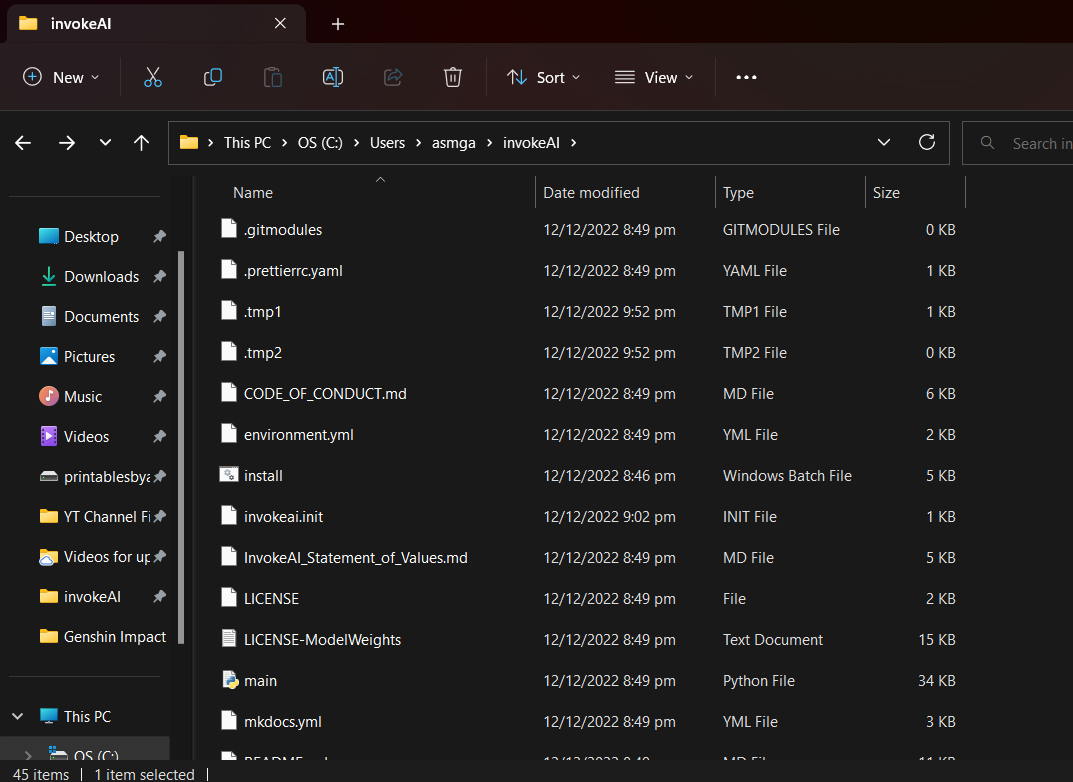
invoke.bat missing. I follow every instruction in the manual
Is there an existing issue for this?
- [X] I have searched the existing issues
OS
Windows
GPU
cuda
VRAM
No response
What happened?
After install invoke.bat is missing. OS I use is windows 11
Screenshots
Additional context
No response
Contact Details
No response

Same problem here. Just tried a fresh install, updated python and all other somftwere, also tried on a VM but no luck. Invoke.bat is not located in any folder even if installer says everything installed as it should..

at which point in the instructions does it fail (asking since this screenshot looks like a repo clone instead of the automated installer folder)
This should be the most easy instructions to follow: https://invoke-ai.github.io/InvokeAI/installation/INSTALL_AUTOMATED/

Same problem here. Just tried a fresh install, updated python and all other somftwere, also tried on a VM but no luck. Invoke.bat is not located in any folder even if installer says everything installed as it should..
When I did the Installation on a Windows Notebook, I had the invoke.bat inside the folder where I installed to ($HOME/InvokeAI/invoke.bat), but not tested the final revision on Windows
I have the same problem, I finished the installation but the invoke.bat file is missing. I also use Windows 11.

- which instructions did you follow?
- which directory are you looking for the bat?
Same here. Installed using automated installer, windows 11, looking for invoke.bat in ~./invokeai/ (default installation path)

Having the exact same issue here as well no invoke.bat on Windows 11. Do we have a copy of the .bat code that could be pasted in so we can make our own for those of us with this issue in the meantime ?

Sorry - mixed things up in my broken brain.exe - just remember that there was a different error on my windows 10 machine in the last test (also don't have a old folder anymore)
But the template to the batfile is here ;)


I'm finding that it's trying to install to the root of my drive. So for those of you who are also having this issue, do you find invoke.bat at C:/invoke.bat?

Turns out I had python 3.8 installed and it was causing issues. Updating to 3.11, removing the old Python38 folder from the PATH environmental variable, and restarting my terminal fixed it.
Edit: Nevermind, I got an error about 3.11 being too new so I'm gonna downgrade to 3.10.
Error Details
ERROR: Ignored the following versions that require a different python version: 0.55.2 Requires-Python <3.5; 1.21.2 Requires-Python >=3.7,<3.11; 1.21.3 Requires-Python >=3.7,<3.11; 1.21.4 Requires-Python >=3.7,<3.11; 1.21.5 Requires-Python >=3.7,<3.11; 1.21.6 Requires-Python >=3.7,<3.11
ERROR: Could not find a version that satisfies the requirement torch==1.12.1 (from versions: none)
ERROR: No matching distribution found for torch==1.12.1
Folks, could somebody see if this version clears up the problem?
InvokeAI-installer-2.2.4-windows.zip

Turns out I had python
3.8installed and it was causing issues. Updating to 3.11, removing the old Python38 folder from the PATH environmental variable, and restarting my terminal fixed it.
The install script didn't complain that version 3.8 is too old? It is supposed to.
@lstein Nope, the new installer you linked gets another error and immediately exits.

Side Node: If I was a normal user, I'd have no way of knowing what the error was since double clicking on the .bat file, starting the install, then getting the error causes the terminal window to immediately close because there's no pause statement or anything. There might be a way to avoid that.
And the install script didn't complain about 3.8, no.
@BryceBarbara
I'm finding that it's trying to install to the root of my drive. So for those of you who are also having this issue, do you find invoke.bat at
C:/invoke.bat?
The script is supposed to offer you the option of installing the invokeai directory anywhere, including on an external drive. The default location is C:\Users\your-name\invokeai . Before the script installed to C:\ , what path did you choose?
@BryceBarbara
I'm finding that it's trying to install to the root of my drive. So for those of you who are also having this issue, do you find invoke.bat at
C:/invoke.bat?The script is supposed to offer you the option of installing the
invokeaidirectory anywhere, including on an external drive. The default location is C:\Users\your-name\invokeai . Before the script installed to C:\ , what path did you choose?
Prior to updating to 3.11, it didn't even ask about what path to use. It'd just do things after the initial "Press any key to continue" and then exit.
Nope, the new installer you linked gets another error and immediately exits.
I'm really hating batch file scripting now. I'll find and fix the line with the bad set. Unfortunately I don't know of a way to catch this type of syntax error and call pause.
Yeah, using a .bat file is gonna introduce these sort of issues and I'd recommend against using it. Although it's more complicated, I'd recommend using a powershell script.
Yeah, using a .bat file is gonna introduce these sort of issues and I'd recommend against using it. Although it's more complicated, I'd recommend using a powershell script.
Actually we're rewriting everything as a python script to get portability. But for now the .bat file is what we've got. Unfortunately I can't reproduce the set related crash on the Windows machine I have access to (Windows 10 pro, powershell). Would you mind commenting out the @echo off statement at the top of the script and running it again so that I can see which set is triggering the error? Thanks.
Relevant Error Log
C:\Users\Home-Primary\Downloads\InvokeAI-Installer>set /p selection=Select the path to install InvokeAI's directory into [C:\Users\Home-Primary]:
Select the path to install InvokeAI's directory into [C:\Users\Home-Primary]:
set was unexpected at this time.

C:\Users\Home-Primary\Downloads\InvokeAI-Installer>     if  == "" set selection=C:\Users\Home-Primary
Thanks. That helped pin down the problem. Please give this version a try
InvokeAI-installer-2.2.4-windows.zip
(As Bullwinkle used to say "This time for sure!")
And the install script didn't complain about 3.8, no
H'mmm. I've only tested the version checking part of the code by setting the minimum requirements to something high (like 3.12.1.) and seeing if the version checker complained. What does python -V print out when you are using 3.8, or is it gone from your system now?
Thanks. That helped pin down the problem. Please give this version a try
InvokeAI-installer-2.2.4-windows.zip
(As Bullwinkle used to say "This time for sure!")
Yeah, that worked.
And the install script didn't complain about 3.8, no
H'mmm. I've only tested the version checking part of the code by setting the minimum requirements to something high (like 3.12.1.) and seeing if the version checker complained. What does
python -Vprint out when you are using 3.8, or is it gone from your system now?
Sorry, it's been purged from my system 😢
Thanks. That helped pin down the problem. Please give this version a try InvokeAI-installer-2.2.4-windows.zip (As Bullwinkle used to say "This time for sure!")
Yeah, that worked.
Just to confirm, since I can hardly believe my ears at this point, the most recent Windows 2.2.4 installer bat script worked and you got a functional install? You got a runtime invokeai directory with a working invoke.bat?
Thanks. That helped pin down the problem. Please give this version a try InvokeAI-installer-2.2.4-windows.zip (As Bullwinkle used to say "This time for sure!")
Yeah, that worked.
Just to confirm, since I can hardly believe my ears at this point, the most recent Windows 2.2.4 installer bat script worked and you got a functional install? You got a runtime
invokeaidirectory with a working invoke.bat?
I Confirm. It works ¡¡¡¡ . Zilion Thanks.
I've never been happier to close an issue in my life. Thanks all for bearing through this!
So you have to uninstall the previous version right? How is it done in Windows? That conda thing doesnt work from a command prompt or am i doing it wrong?