

 invoke-ai
[bug]: Unable to import models in the browser based WEB-UI
Is there an existing issue for this?
- [X] I have searched the existing issues
OS
Windows
GPU
cuda
VRAM
12
What happened?
So the issue is basically as it is said on the title. I can, without any problems, import models with the CLI. But as soon as I try to load them on the Browser Based UI, it simply doesnt work. It seems that InvokeAI can't link to the model.
Screenshots
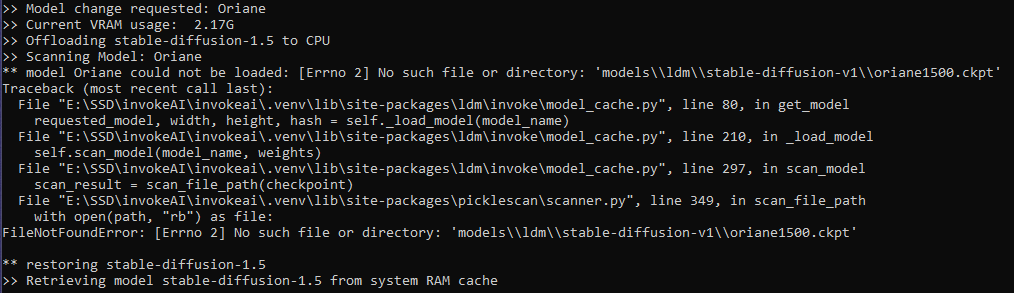
Additional context
Note that it only happens on the Browser Based UI
Contact Details
No response

WORKAROUND
I found a way to load models by directly editing the models.yaml file, adding the line default: true for the model I want to load.
If anyone finds something easier, feel free to tell me !
So, you import a model from CLI using !import_model, and then start web-ui, choose a new model, and this happens? Right?

So, you import a model from CLI using !import_model, and then start web-ui, choose a new model, and this happens? Right?
yup? i'm using CLI to import my .ckpt files, but As soon as I try to select them from the webGUI it gives me this error. I really think the problem comes from the webUI implementation since my workaround of modifying the default model in models.yaml seems to work everytimes
There has been no activity in this issue for 14 days. If this issue is still being experienced, please reply with an updated confirmation that the issue is still being experienced with the latest release.
![github-actions[bot] avatar](https://avatars.githubusercontent.com/in/15368?v=4 "Published by a pub.dev verified publisher")