
InvokeAI
 InvokeAI copied to clipboard
 invoke-ai
[bug]: Cannot load anything but v1-5-pruned-emaonly.ckpt
Is there an existing issue for this?
- [X] I have searched the existing issues
OS
Windows
GPU
cuda
VRAM
No response
What happened?
I cannot load custom models or even the 1.5 inpainting model I have attached a screenshot, it is trained on 1.5.
If I choose a different model from the dropdown menu it will say "Model Changed" but it hasn't. If I choose to load it via settings then it doesn't load, in CMD it gives an error which is in the screenshot.
The location for files match what is in the models.yaml file which itself is located in: C:\Users\cpgsa\invokeai\configs
Models.yaml is attached.
Screenshots

Additional context
models.yaml:
stable-diffusion-1.5: description: The newest Stable Diffusion version 1.5 weight file (4.27 GB)
weights: models/ldm/stable-diffusion-v1/v1-5-pruned-emaonly.ckpt config: configs/stable-diffusion/v1-inference.yaml width: 512 height: 512 vae: ./models/ldm/stable-diffusion-v1/vae-ft-mse-840000-ema-pruned.ckpt default: true
nutronicsteve-2: description: CUSTOM MODEL weights: models/ldm/stable-diffusion-v1/CUSTOMMODEL.ckpt width: 512 height: 512
inpainting-1.5: weights: models/ldm/stable-diffusion-v1/sd-v1-5-inpainting.ckpt config: configs/stable-diffusion/v1-inpainting-inference.yaml vae: models/ldm/stable-diffusion-v1/vae-ft-mse-840000-ema-pruned.ckpt description: RunwayML SD 1.5 model optimized for inpainting
Contact Details

You need to setup a config entry too for the model. If it is a 1.x model of SD, then you can just copy paste the config from the other examples. It'll 99% be the same one.
nutronicsteve-2:
description: CUSTOM MODEL
weights: models/ldm/stable-diffusion-v1/CUSTOMMODEL.ckpt
config: configs/stable-diffusion/v1-inference.yaml
width: 512
height: 512

You need to setup a config entry too for the model. If it is a 1.x model of SD, then you can just copy paste the config from the other examples. It'll 99% be the same one.
nutronicsteve-2:
description: CUSTOM MODEL
weights: models/ldm/stable-diffusion-v1/CUSTOMMODEL.ckpt
config: configs/stable-diffusion/v1-inpainting-inference.yaml
width: 512
height: 512
Ok I can do that, but what is stopping the inpainting model from loading?
You need to setup a config entry too for the model. If it is a 1.x model of SD, then you can just copy paste the config from the other examples. It'll 99% be the same one.
nutronicsteve-2:
description: CUSTOM MODEL
weights: models/ldm/stable-diffusion-v1/CUSTOMMODEL.ckpt
config: configs/stable-diffusion/v1-inpainting-inference.yaml
width: 512
height: 512
Ok I can do that, but what is stopping the inpainting model from loading?
Made a small correction to the config in the above reply.
What's the issue with the inpainting model? What error does it throw?
You need to setup a config entry too for the model. If it is a 1.x model of SD, then you can just copy paste the config from the other examples. It'll 99% be the same one.
nutronicsteve-2:
description: CUSTOM MODEL
weights: models/ldm/stable-diffusion-v1/CUSTOMMODEL.ckpt
config: configs/stable-diffusion/v1-inpainting-inference.yaml
width: 512
height: 512
Ok I can do that, but what is stopping the inpainting model from loading?
Made a small correction to the config in the above reply.
What's the issue with the inpainting model? What error does it throw? Here you go:
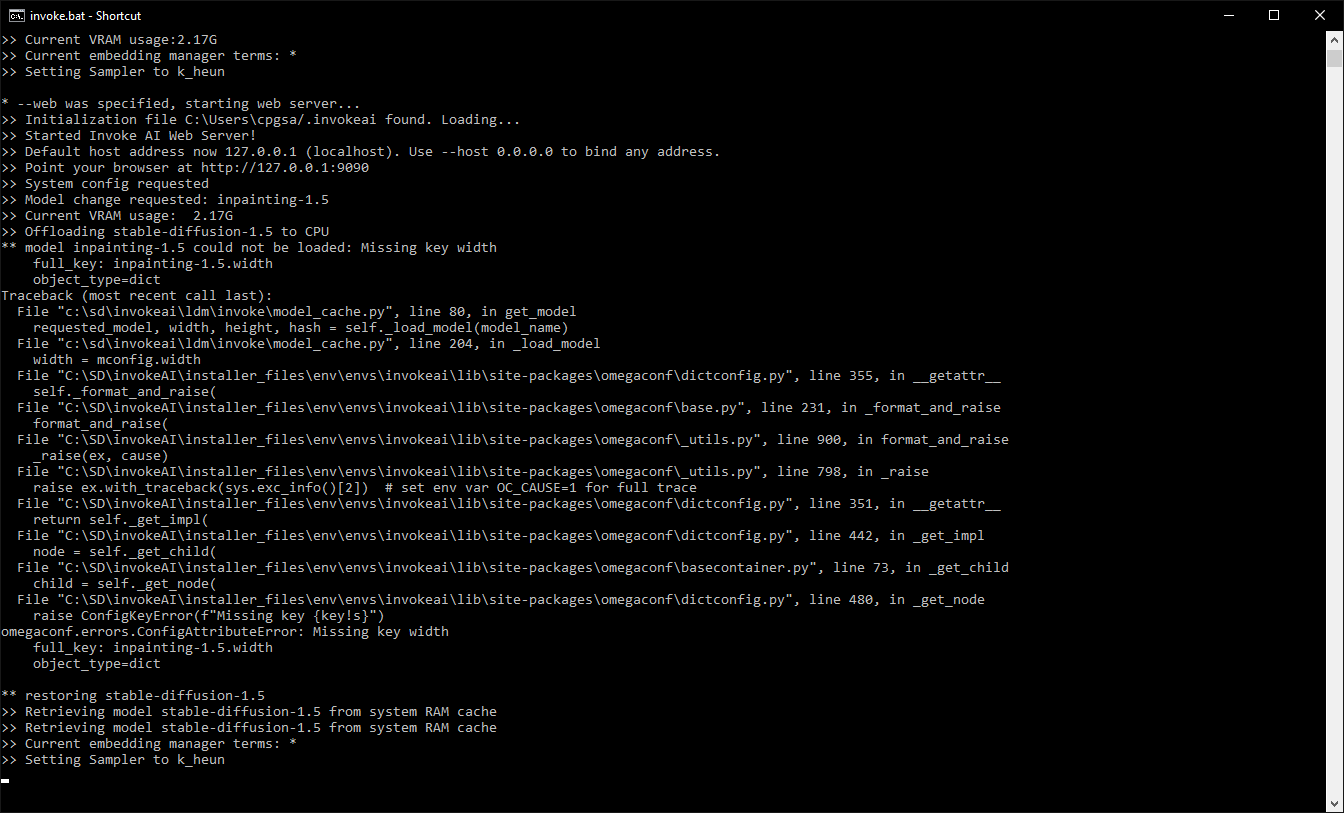
@githubUser01946 That's actually a bug from our end. The inpainting config needs to have width and height defined. Add width: 512 and height: 512 to that and it'll work.
@githubUser01946 That's actually a bug from our end. The inpainting config needs to have width and height defined. Add width: 512 and height: 512 to that and it'll work.
Ok so my new models file looks like this:
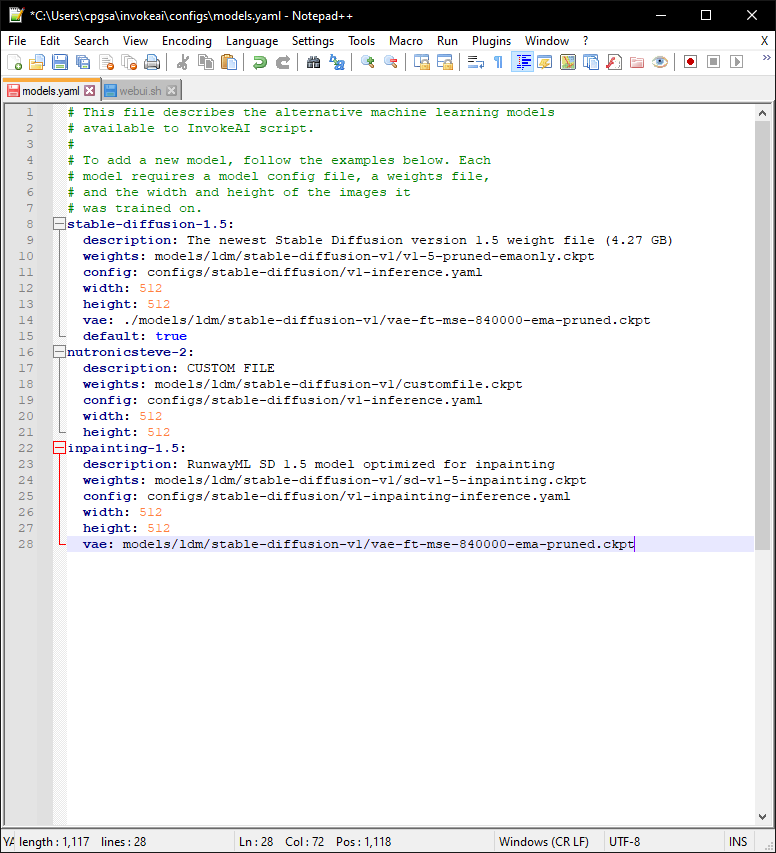 It's located in: C:\Users\cpgsa\invokeai\configs
When I try to load the custom model this happens:
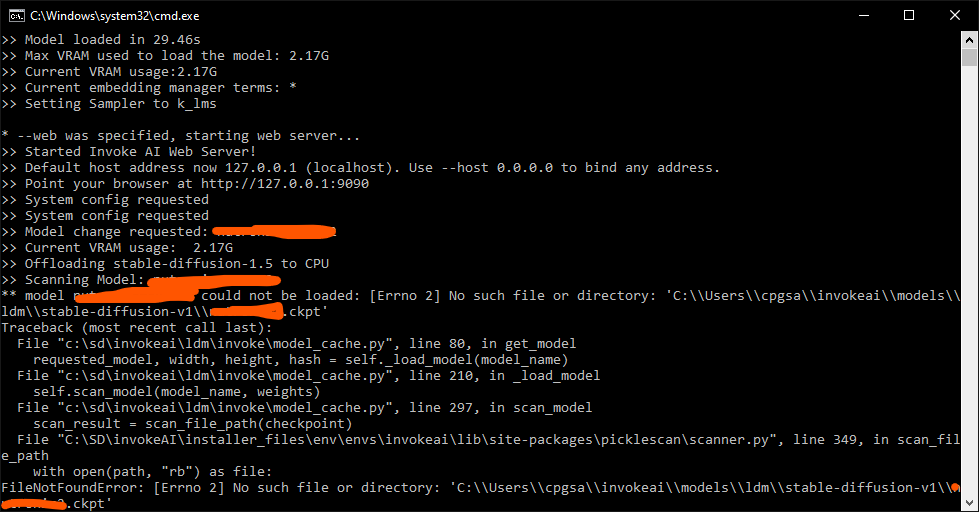 ALL models are in: C:\Users\cpgsa\invokeai\models\ldm\stable-diffusion-v1 as this was what I was told on Discord.
I have updated today via the update bat file and moved the .invokeai file to C:\Users\cpgsa\invokeai as stated.
Hang in there for a bit. There's some pathing issues due to recent changes. We're resolving them right now. Check once again after that and see if it works for you. I'll ping you when those changes are live so you can update.
I have ran the updater and it has done its thing. I have changed .invoke to invokeai.init and I am still getting [Errno 2] No such file or directory as recent screenshots have shown yet the v1-5-pruned-emaonly.ckpt file is loading fine.
I have also noticed that there are extra \ when its looking for the path i.e 'C:\\Users\\cpgsa\\invokeai\\models\\ldm\\stable-diffusion-v1\\ when it should obviously be 'C:\Users\cpgsa\invokeai\models\ldm\stable-diffusion-v1\.
I have changed the model locations in models.yaml to C:\Users\cpgsa\invokeai\models\ldm\stable-diffusion-v1\ as I was told to on Discord.
I have ran the updater and it has done its thing. I have changed .invoke to invokeai.init and I am still getting
[Errno 2] No such file or directoryas recent screenshots have shown yet the v1-5-pruned-emaonly.ckpt file is loading fine.I have also noticed that there are extra
\when its looking for the path i.e'C:\\Users\\cpgsa\\invokeai\\models\\ldm\\stable-diffusion-v1\\when it should obviously be'C:\Users\cpgsa\invokeai\models\ldm\stable-diffusion-v1\.I have changed the model locations in models.yaml to C:\Users\cpgsa\invokeai\models\ldm\stable-diffusion-v1\ as I was told to on Discord.
We've redone the install process. There's a new RC up. https://github.com/invoke-ai/InvokeAI/releases/tag/2.2.4-rc2
This should hopefully fix any pathing issues you have.