

 invoke-ai
[bug]: AnythingV3 returns black images from time to time
Is there an existing issue for this?
- [X] I have searched the existing issues
OS
Windows
GPU
cuda
VRAM
24GB
What happened?
I keep trying to generate images with anythingv3 and sometimes it returns a black image. The generation shows promising steps in fast and in precise preview, but the final image is black. If I try to reduce the requested resolution it generates the image, sometimes if I change the cfg scale or the prompt it will generate an image, but most of the time it still fails. There are no errors displayed anywhere.
Screenshots
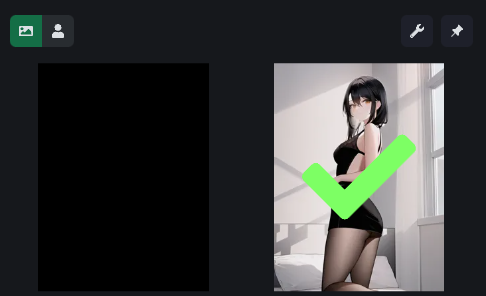
Additional context
I tried using fp16, fp32, pruned and noema but the results were always erratic and the black images kept happening.
I understand this is a longshot because the model being used is not a standard model, but this error does not happen in a1111.
Is there a way to call the generation from the terminal to see if this happens there as well?
Contact Details
No response

Here is the terminal view directly to the one image generated.
Screenshot of the console

Transcript of the console
Do you want to generate images using the
1. command-line
2. browser-based UI
3. open the developer console
Please enter 1, 2 or 3: 2
Starting the InvokeAI browser-based UI..
* Initializing, be patient...
>> Initialization file C:\Users\criesca/.invokeai found. Loading...
>> InvokeAI runtime directory is "J:\data"
>> Patchmatch initialized
>> GFPGAN Initialized
>> CodeFormer Initialized
>> ESRGAN Initialized
>> Using device_type cuda
>> Current VRAM usage:  0.00G
>> Scanning Model: anything-3.0
>> Model Scanned. OK!!
>> Loading anything-3.0 from H:/stable-diffusion-webui/models/Stable-diffusion/unoptimized/Anything-V3.0-pruned-fp16.ckpt
>> Calculating sha256 hash of weights file
>> sha256 = 812cd9f9d9a0cb62aaad605173fd64dea13cc8ead9a18ca8eca5bc94aba58583 (4.35s)
   | LatentDiffusion: Running in eps-prediction mode
   | DiffusionWrapper has 859.52 M params.
   | Making attention of type 'vanilla' with 512 in_channels
   | Working with z of shape (1, 4, 32, 32) = 4096 dimensions.
   | Making attention of type 'vanilla' with 512 in_channels
   | Using faster float16 precision
   | Loading VAE weights from: H:/stable-diffusion-webui/models/Stable-diffusion/unoptimized/Anything-V3.0.vae.pt
>> Model loaded in 33.31s
>> Max VRAM used to load the model: 2.17G
>> Current VRAM usage:2.17G
>> Current embedding manager terms: *
>> Setting Sampler to k_dpmpp_2_a

* --web was specified, starting web server...
>> Initialization file C:\Users\criesca/.invokeai found. Loading...
>> Started Invoke AI Web Server!
Point your browser at http://localhost:9090 or use the host's DNS name or IP address.
>> System config requested
>> Image generation requested: {'prompt': 'black hair, black outfit, bedroom, intricate, detailed [hand, ugly, blurry, low resolution, animated, cartoon, lowres, text, error, cropped, worst quality, low quality, jpeg artifacts, ugly, duplicate, morbid, mutilated, out of frame, extra fingers, mutated hands, poorly drawn hands, poorly drawn face, mutation, deformed, blurry, dehydrated, bad anatomy, bad proportions, extra limbs, cloned face, disfigured, gross proportions, malformed limbs, missing arms, missing legs, extra arms, extra legs]', 'iterations': 1, 'steps': 60, 'cfg_scale': 14, 'threshold': 0, 'perlin': 0, 'height': 1024, 'width': 768, 'sampler_name': 'k_dpmpp_2', 'seed': 45031875, 'progress_images': False, 'progress_latents': True, 'save_intermediates': 5, 'generation_mode': 'img2img', 'init_mask': '...', 'seamless': False, 'hires_fix': False, 'init_img': 'outputs/init-images/image.50419433.png...', 'strength': 0.5, 'fit': True, 'variation_amount': 0}
ESRGAN parameters: False
Facetool parameters: False
{'prompt': 'black hair, black outfit, bedroom, intricate, detailed [hand, ugly, blurry, low resolution, animated, cartoon, lowres, text, error, cropped, worst quality, low quality, jpeg artifacts, ugly, duplicate, morbid, mutilated, out of frame, extra fingers, mutated hands, poorly drawn hands, poorly drawn face, mutation, deformed, blurry, dehydrated, bad anatomy, bad proportions, extra limbs, cloned face, disfigured, gross proportions, malformed limbs, missing arms, missing legs, extra arms, extra legs]', 'iterations': 1, 'steps': 60, 'cfg_scale': 14, 'threshold': 0, 'perlin': 0, 'height': 1024, 'width': 768, 'sampler_name': 'k_dpmpp_2', 'seed': 45031875, 'progress_images': False, 'progress_latents': True, 'save_intermediates': 5, 'generation_mode': 'img2img', 'init_mask': '', 'seamless': False, 'hires_fix': False, 'init_img': <PIL.Image.Image image mode=RGB size=768x1024 at 0x225822F13C0>, 'strength': 0.5, 'fit': True, 'variation_amount': 0}
>> Setting Sampler to k_dpmpp_2
>> using provided input image of size 768x1024
>> This input is larger than your defaults. If you run out of memory, please use a smaller image.
>> image will be resized to fit inside a box 768x1024 in size.
>> after adjusting image dimensions to be multiples of 64, init image is 768x1024
>> Ksampler using model noise schedule (steps >= 30)
Generating:   0%|                                                                                | 0/1 [00:00<?, ?it/s]>> Sampling with k_dpmpp_2m starting at step 30 of 60 (30 new sampling steps)
100%|██████████████████████████████████████████████████████████████████████████████████| 30/30 [00:09<00:00,  3.14it/s]
{'prompt': 'black hair, black outfit, bedroom, intricate, detailed [hand, ugly, blurry, low resolution, animated, cartoon, lowres, text, error, cropped, worst quality, low quality, jpeg artifacts, ugly, duplicate, morbid, mutilated, out of frame, extra fingers, mutated hands, poorly drawn hands, poorly drawn face, mutation, deformed, blurry, dehydrated, bad anatomy, bad proportions, extra limbs, cloned face, disfigured, gross proportions, malformed limbs, missing arms, missing legs, extra arms, extra legs]', 'iterations': 1, 'steps': 60, 'cfg_scale': 14, 'threshold': 0, 'perlin': 0, 'height': 1024, 'width': 768, 'sampler_name': 'k_dpmpp_2', 'seed': 45031875, 'progress_images': False, 'progress_latents': True, 'save_intermediates': 5, 'generation_mode': 'img2img', 'init_mask': '', 'seamless': False, 'hires_fix': False, 'init_img': 'outputs/init-images/image.50419433.png', 'strength': 0.5, 'fit': True, 'variation_amount': 0}
>> Image generated: "J:\data\outputs\001098.4232fc16.45031875.png"
Generating: 100%|████████████████████████████████████████████████████████████████████████| 1/1 [00:10<00:00, 10.11s/it]
>> Usage stats:
>>   1 image(s) generated in 14.02s
>>   Max VRAM used for this generation: 12.04G. Current VRAM utilization: 2.17G
>>   Max VRAM used since script start:  12.04G
Maybe the safety_checker (NSFW checker) kicked in at the last step of the image generation. Have you tried disabling it?
You can disable NSFW checker by adding --no-nsfw_checker option into .invokeai file in your user home directory, i.e. C:\Users\<YOURNAME>\.

It has never been enabled in my installation, so I am pretty sure that is not it. Any other ideas?
@addianto How can I load a downloaded model? I didn't download inpanting1.5 due to connection problems, but now I have it downloaded, I placed it in the folder invokeAI\models\ldm\stable-diffusion-v1, but it doesn't appear as a selectable option.

I had the same problem and it was caused by adding the AnythingV3 VAE to the models config file. Once I removed that, the images that previously were black would show correctly (the seeds that worked would generate the same output, so I suspect that VAE file is not compatible with InvokeAI).

@jlcebrian Gracias! I am going to test that and see if that fixes it. Thank you very much.
I had the same problem and it was caused by adding the AnythingV3 VAE to the models config file. Once I removed that, the images that previously were black would show correctly (the seeds that worked would generate the same output, so I suspect that VAE file is not compatible with InvokeAI).
I have not gotten a black frame since I removed the vae. I will keep trying.