
InvokeAI
 InvokeAI copied to clipboard
 invoke-ai
[bug]: Invoke.bat not created in folder
Is there an existing issue for this?
- [x] I have searched the existing issues
OS
Windows
GPU
cuda
VRAM
12Gb
What happened?
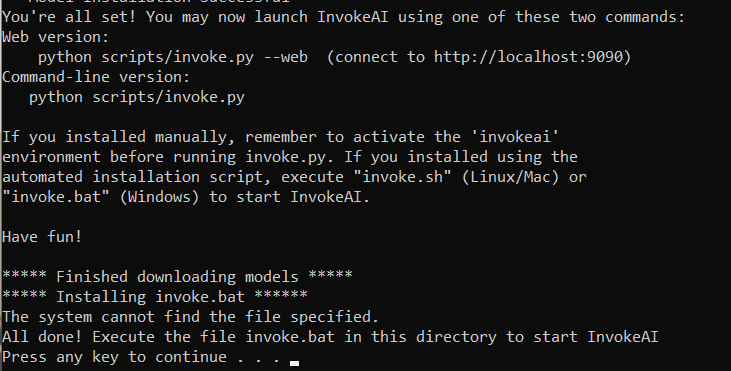
The installer goes well but to the very end it stops at "installing invoke.bat". In the folder there're all files but invoke.bat.
Screenshots
** Model Installation Successful ** You're all set! You may now launch InvokeAI using one of these two commands: Web version: python scripts/invoke.py --web (connect to http://localhost:9090) Command-line version: python scripts/invoke.py
If you installed manually, remember to activate the 'invokeai' environment before running invoke.py. If you installed using the automated installation script, execute "invoke.sh" (Linux/Mac) or "invoke.bat" (Windows) to start InvokeAI.
Have fun!
***** Finished downloading models ***** ***** Installing invoke.bat ****** The system cannot find the file specified. All done! Execute the file invoke.bat in this directory to start InvokeAI Press any key to continue . . .




I solved it by using this installer: invokeAI-src-installer-windows.zip
Note: On "Installing pip dependencies", it takes a while, it will eventually move on.
I solved it by using this installer: invokeAI-src-installer-windows.zip
Note: On "Installing pip dependencies", it takes a while, it will eventually move on.
This is the zip I used to install, and no invoke.bat either. Tried installing again and no luck...

I solved it by using this installer: invokeAI-src-installer-windows.zip Note: On "Installing pip dependencies", it takes a while, it will eventually move on.
This is the zip I used to install, and no invoke.bat either. Tried installing again and no luck...
You sure? The one I linked is not the same version as in the github page
I solved it by using this installer: invokeAI-src-installer-windows.zip
Note: On "Installing pip dependencies", it takes a while, it will eventually move on.
I tried you method, and despite the TERMINAL saying that it was successful, still no invoke.bat file in the folder.
I solved it by using this installer: invokeAI-src-installer-windows.zip
Note: On "Installing pip dependencies", it takes a while, it will eventually move on.
This worked for me, thank you!

In the installer you can edit this line -
echo ***** Installing invoke.bat ****** change this line to this >>copy binary_installer\invoke.bat.in .\invoke.bat echo All done! Execute the file invoke.bat in this directory to start InvokeAI
thanks! it worked
echo ***** Installing invoke.bat ****** copy installer\invoke.bat .\invoke.bat >> Change to "copy binary_installer\invoke.bat.in .\invoke.bat" echo All done! Execute the file invoke.bat in this directory to start InvokeAI
Should work

I solved it by using this installer: invokeAI-src-installer-windows.zip
Note: On "Installing pip dependencies", it takes a while, it will eventually move on.
This worked for me too and I also did another thing wrong, I didn't make a new token and put it on "READ" I copied a token that I made a while ago, that was set to "WRITE" And I can imagine, this might be something that caused the issue.
I solved it by using this installer: invokeAI-src-installer-windows.zip Note: On "Installing pip dependencies", it takes a while, it will eventually move on.
This is the zip I used to install, and no invoke.bat either. Tried installing again and no luck...
You sure? The one I linked is not the same version as in the github page
My apologies, I thought it was the same. Tried it and it worked. Much appreciated.

I had this problem too. What I've ended up doing is taking the invoke.bat.in file from the binary_installer folder and copied it into the root folder where invoke.bat was supposed to go. I then removed the .in file extension, leaving it as invoke.bat.
Ran it and it appears to work. I haven't tried all features yet, so I don't know if there's some roadblock waiting for me but I did a test image and it generated just fine.

I had this problem too. What I've ended up doing is taking the invoke.bat.in file from the binary_installer folder and copied it into the root folder where invoke.bat was supposed to go. I then removed the .in file extension, leaving it as invoke.bat.
Ran it and it appears to work. I haven't tried all features yet, so I don't know if there's some roadblock waiting for me but I did a test image and it generated just fine.
That did the trick for me, thanks!

I also copied the file, renamed and it ran, but I am stuck in a loop. I run it, it asks for model downloads, I skip that, it just closes the window. I even tried downloading the models (again) and it still just closes and doesn't run.

I have both the regular installation and the source code installation. This trick worked great for the source code installation but did not work for the regular installation. The regular installation starts but than cuts off.
Same issue here, just downloaded and installed, but no invoke.bat file created. Installing collected packages: pip Attempting uninstall: pip Found existing installation: pip 22.2.2 Uninstalling pip-22.2.2: Successfully uninstalled pip-22.2.2 Successfully installed pip-22.3.1 ***** Updated pip ***** The system cannot find the path specified. ----- requirements file copy failed ----- Press any key to continue . . .
In install.bat
set err_msg=----- requirements file copy failed -----
copy installer\py3.10-windows-x86_64-cuda-reqs.txt requirements.txt
if %errorlevel% neq 0 goto err_exit
should be
set err_msg=----- requirements file copy failed -----
copy binary_installer\py3.10-windows-x86_64-cuda-reqs.txt requirements.txt
if %errorlevel% neq 0 goto err_exit
Similarily
echo ***** Installing invoke.bat ******
copy installer\invoke.bat .\invoke.bat
echo All done! Execute the file invoke.bat in this directory to start InvokeAI
should be
echo ***** Installing invoke.bat ******
copy binary_installer\invoke.bat.in .\invoke.bat
echo All done! Execute the file invoke.bat in this directory to start InvokeAI

Still no update? Lame-sauce. Not trying to sound entitled I was just so excited to try this out.
The installer goes well but to the very end it stops at "installing invoke.bat". In the folder there are all files but NO invoke.bat. I used version 2.2.3

I'm having the same issue with 2.2.3. Copying invokeai.bat.in to the base folder and renaming does not work either producing the following error:
The system cannot find the path specified.
'deactivate' is not recognized as an internal or external command,
operable program or batch file.
