
admin-portal
 admin-portal copied to clipboard
 invoiceninja
Tasks randomly appear with gray text
I haven't been able to pinpoint why or when this happens, but often random tasks belonging to the same project, client, and status appear with gray text while others remain with white text. See the image below for an example.
Really not sure how to repro this, as it keeps happening randomly, and then resolving itself after navigating away for a while. If it helps, all the tasks above the task with white text have white text, and all the tasks below the other appear with gray text (though I don't recall if that's consistent behavior, or just a coincidence at the moment).
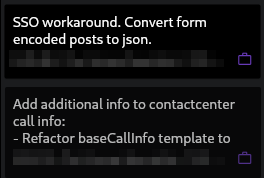


Perhaps the logic for determining that is broken? In this case, I haven't touched any of the gray ones, and they remain gray after I click the refresh button in the bottom toolbar.
You would need to drag a task for them to turn solid. Clicking refresh loads the state from the server but in this case the state needs to be sent to the server.
I'm sure this can be improved though...
Ah... that explains why they were showing gray from a specific task down! I had added a task above them to an invoice. So it disappeared from the list, causing the task order numbering to change.