

 internetarchive
Implement "see all" button for carousels on my books page
We would like to implement a "see all >" button on the right-hand side of each carousel on the my books page, as pictured here:
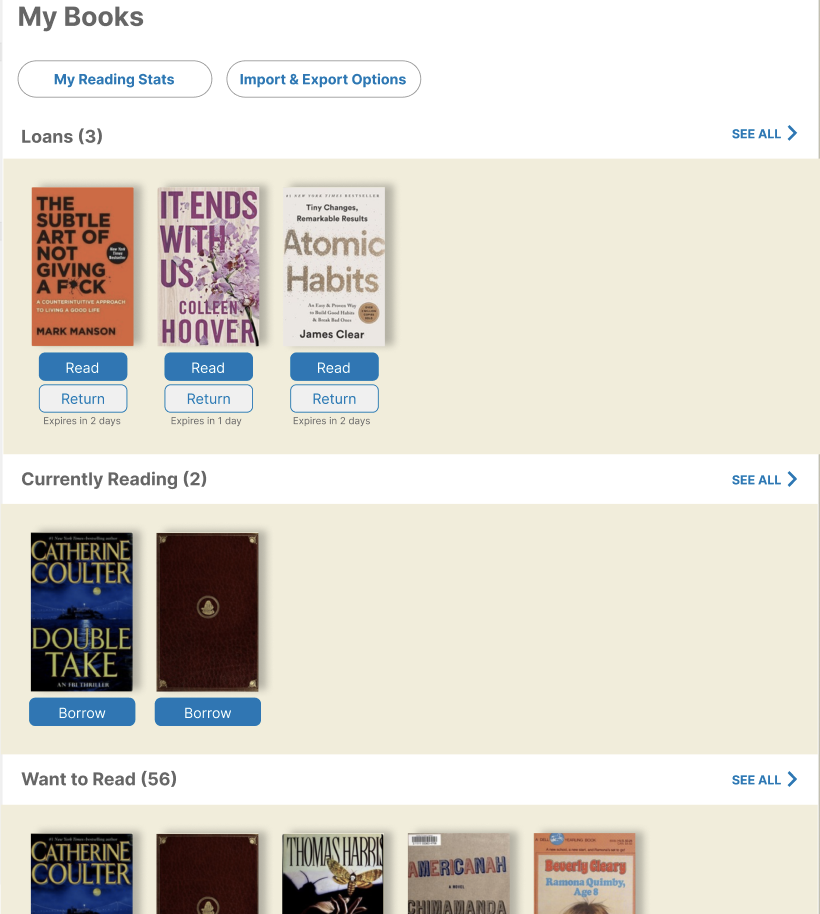
The specific changes from the current version are:
- Changing the color of the heading text for each section (loans, currently reading, want to read, and already read) to the same gray as the heading "My Books" text at the top
- Removing the underline from the heading text for each section
- Adding text that says "SEE ALL >" to the right of the heading for each section
- Making the entire header bar for each section clickable, so that if a user clicks anywhere between the heading title (e.g. currently reading) and the "see all" button, they still get redirected to the page for that section
For any clarifying questions about the changes to the design, please reach out to @danafein.
Stakeholders

Hello @danafein, could you please assign this issue to me? I am interested in working on it.


@Ari1009 had expressed interest in working on this issue. @Ari1009, are you still working on this issue? The two of you could also work together!
Ok, I have no issues working on this together if @Ari1009 allows it. But if the issue solved already that's fine.



what's the status of the merge? does @tushdemort have to resolve conflicts?


I would still like to be assigned this issue. @danafein there are other carousels that use this same custom_carousel template. would you like those to be updated as well? how about any updates to the mobile version?
I think now that each section is a link in desktop (and because we have other carousels elsewhere which we want to present consistently) I'm going to close this issue for now, sorry!