
intellij-dlanguage
 intellij-dlanguage copied to clipboard
 intellij-dlanguage
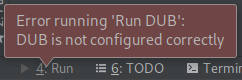
"Error running 'Run DUB': DUB is not configured correctly" on newly created project
I'm attempting to create a D project using intellij-dlanguage for the first time, so I am aware that this issue may be my own fault. I created a project using the built-in project creation tool, so it had run configurations automatically created. Upon trying to run the "Run DUB" configuration an error is given (screenshot) with virtually no details. Running dub run in the terminal seems to work and the program runs as usual. My project can be found here. Is there a configuration option that I messed up? Help would be appreciated.

I set up dub using the auto find button,
here's what it looks like for me. Am I missing something else?
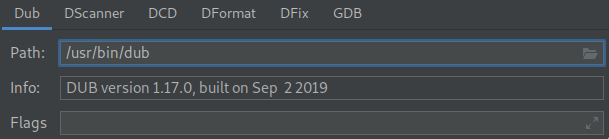
That seems fine. So after doing that does the plugin still consider dub not to be setup correctly?
Currently I do not have access to a pc but as far as I remember, the run configurations which are there by default didn't worked for me. I always had to delete all of them and create new ones.
In addition, in the project settings dialog you have to add a DMD SDK entry and set it also active for the project.

@adueppen This may be related to #514, could you pull the latest changes in develop and run it locally to see if it's still a problem. Use ./gradlew runIde
If there's still an issue please provide details of the errors in idea.log