
canvas-lms
 canvas-lms copied to clipboard
 instructure
Keyboard access to date picker on first click of date
Summary:
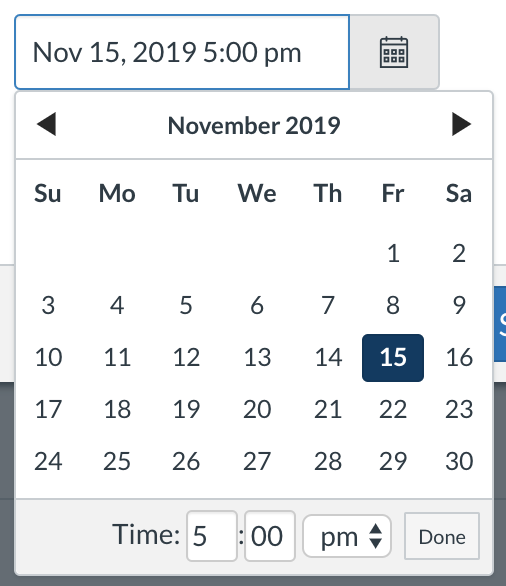
When working with due dates in Canvas it seems that keyboard control is lacking in the due date pop up. I would love to be able to click on the date and then tab to the time fields.
Steps to reproduce:
- Create or edit an assignment in Canvas
- Click the calendar icon next to a date field
- In the control that appears click on a date then try press tab.
Expected behavior:
I expect at this point to move from the date I clicked on to the time fields that follow. If I want to select different dates, I'd expect to use arrow keys to move between them. I'd then expect to get out by pressing escape (return to initial date field), pressing enter (confirms selection and returns to outer form, focused in date field) or tabbing to the "done" button and then pressing enter (same result as prior step).
Actual behavior:
On first click, pressing tab moves me out of the date picker altogether and on to the next field in the outer form. Once I click on time field I find I can then tab around including tabing back into the calendar and tab between all dates.
Additional notes:
Other users who favor keyboard access may be able to offer more conventional input on expected behavior. Suffice to say I'd expect keyboard access immediately after clicking on a due date. I see however, that the current setup may be favoring keeping keyboard focus in the main form. I can see pros and cons to either approach.
Thanks for considering, regardless!

Thanks for contributing to this issue. As it has been 2 years since the last activity, we are automatically closing the issue in 30 days. This is often because the request was already solved in some way and it just wasn't updated or it's no longer applicable. If that's not the case, please respond before the issue is closed, or post a message on the mailing list. We'll gladly take a look again!
![stale[bot] avatar](https://avatars.githubusercontent.com/in/1724?v=4 "Published by a pub.dev verified publisher")