

 insightsengineering
more formatting options to `export_as_pdf()` and `main_footer()`
I need to produce pdf's for the outputs I am producing for the upcoming SREP. Currently export_as_pdf() does not have the formatting we need. The footnotes seem to get cut off if there's more than one page and the margins are not maintained. The footnote goes right to the bottom of the page. ( see example below - I found some random sentences to illustrate the issue).
I am currently increasing the height of the page to avoid these issues but the page size is quite long and not standard for submission purposes.
Also for the main_footer() function, the footnotes tend to trail off far from the output and don't end nicely in line (see example below).
Thank you for your help!
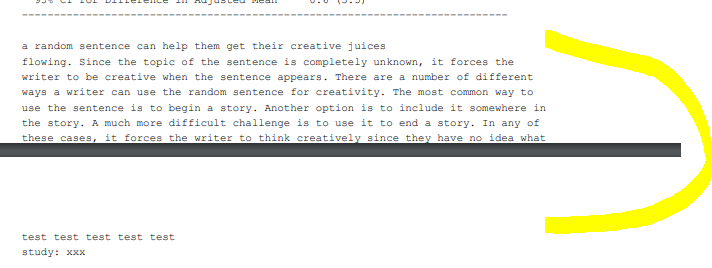
Here's the example code if it helps:
main_title(a2) <- "test test test test test"
subtitles(a2) <- "study: xxx"
main_footer(a2) <- "a random sentence can help them get their creative juices
flowing. Since the topic of the sentence is completely unknown, it forces the
writer to be creative when the sentence appears. There are a number of different
ways a writer can use the random sentence for creativity. The most common way to
use the sentence is to begin a story. Another option is to include it somewhere in
the story. A much more difficult challenge is to use it to end a story. In any of
these cases, it forces the writer to think creatively since they have no idea what
sentence will appear from the tool."

export_as_pdf(a2, file = "test.pdf", height = 10)

Hi @juliadedic1
Currently, rtables does not do any word wrapping automatically (anywhere, actually, but notably including in the titles as you point out here). Changing that is already on the roadmap.
It does support, however, 2 different ways of wordwrapping the content yourself: embedding \n characters in the string or, in most places (including main_footer) passing an already split vector, e.g., as output by strwrap provided by R.
So we can do
   lyt <- basic_table() %>%
        split_rows_by("ARM") %>%
        split_rows_by("STRATA1") %>%
        analyze("AGE")

a2 <- build_table(lyt, DM)

## this will just be propose_column_widths(a2) as of local changes that I will commit soon
cwidths <- propose_column_widths(matrix_form(a2, indent_rownames = TRUE))
totwidth <- sum(cwidths)
## I made your very long footer shorter just for space reasons here but its still long enough to illustrate the issue
main_footer(a2) <- strwrap("a random sentence can help them get their creative juices
flowing. Since the topic of the sentence is completely unknown, it forces the
writer to be creative when the sentence appears. There are a number of different
ways a writer can use the random sentence for creativity.", totwidth)
> a2
test test test
study xxx

————————————————————————
                 all obs
————————————————————————
A: Drug X
  A
    Mean          32.53
  B
    Mean          35.46
  C
    Mean          36.34
B: Placebo
  A
    Mean          32.30
  B
    Mean          32.42
  C
    Mean          34.45
C: Combination
  A
    Mean          35.76
  B
    Mean          34.39
  C
    Mean          33.54
————————————————————————

a random sentence
can help them get
their creative
juices flowing.
Since the topic of
the sentence is
completely unknown,
it forces the writer
to be creative when
the sentence
appears. There are a
number of different
ways a writer can
use the random
sentence for
creativity.
As for going up to the edge of the page, rtables has the concept of pages, but only when the pagination machinery is invoked, controlling the pdf's height does not do this, but if you specify a number of lines per page (lpp, which export_as_pdf accepts, and passes along to paginate_table when it's non-null), that will control how many lines, total, including titles, footers, divider lines, etc, are put on each page before a page break.
Keep in mind that certain elements are repeated for each page (title, subtitle, footers, and context providing rows) when pagination is done:
> paginate_table(a2, lpp = 35)
[[1]]
test test test
study xxx

————————————————————
             all obs
————————————————————
A: Drug X
  A
    Mean      32.53
  B
    Mean      35.46
  C
    Mean      36.34
B: Placebo
  A
    Mean      32.30
————————————————————

a random sentence
can help them get
their creative
juices flowing.
Since the topic of
the sentence is
completely unknown,
it forces the writer
to be creative when
the sentence
appears. There are a
number of different
ways a writer can
use the random
sentence for
creativity.

[[2]]
test test test
study xxx

————————————————————————
                 all obs
————————————————————————
B: Placebo
  B
    Mean          32.42
  C
    Mean          34.45
C: Combination
  A
    Mean          35.76
  B
    Mean          34.39
————————————————————————

a random sentence
can help them get
their creative
juices flowing.
Since the topic of
the sentence is
completely unknown,
it forces the writer
to be creative when
the sentence
appears. There are a
number of different
ways a writer can
use the random
sentence for
creativity.

[[3]]
test test test
study xxx

————————————————————————
                 all obs
————————————————————————
C: Combination
  C
    Mean          33.54
————————————————————————

a random sentence
can help them get
their creative
juices flowing.
Since the topic of
the sentence is
completely unknown,
it forces the writer
to be creative when
the sentence
appears. There are a
number of different
ways a writer can
use the random
sentence for
creativity.
As an aside, I actually think that the titles/footers being allowed to go out past the divider line (which delineates the width of the actual table body) is a feature, as it allows us to do something like this:
main_footer(a2) <- character()
prov_footer(a2) <- c("Super Awesome Trial - Data: ADSL - Snapshot: 12/12/2012 12:12:12",
"MD5 Hash: 0aee9b78301d7ec8998971363be87c03")
test test test
study xxx

————————————————————————
                 all obs
————————————————————————
A: Drug X
  A
    Mean          32.53
  B
    Mean          35.46
  C
    Mean          36.34
B: Placebo
  A
    Mean          32.30
  B
    Mean          32.42
  C
    Mean          34.45
C: Combination
  A
    Mean          35.76
  B
    Mean          34.39
  C
    Mean          33.54
————————————————————————

Super Awesome Trial - Data: ADSL - Snapshot: 12/12/2012 12:12:12
MD5 Hash: 0aee9b78301d7ec8998971363be87c03
Which personally I think looks pretty good :)

@juliadedic1 Have you had a chance to look at the pdf's that are created when rtables' pagination is used, and with the adding new lines workaround I mentioned? Are they sufficient for your use cases? If so I'd like to close this issue (please feel free to open another if more issues arise)
@gmbecker Hi Gabe, sorry I have been away on vacation. I think I was still having issues with the output getting chopped off but I need to go back and play around with it again. You can close the issue for now and I'll can let you know if anything comes up. Thanks for all your help!