

 innobi
Unable to read Hyper file with pantab
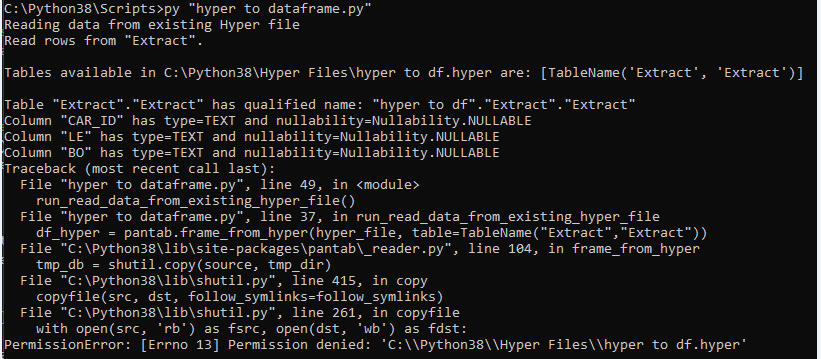
Describe the bug I am trying to convert a hyper file that I download from our tableau server to a dataframe and keep running into an error "PermissionError: [Errno 13] Permission denied:"
It is reading the columns and table available in the hyper file, but it does not run the line "pantab.frame_from_hyper..."
`from gettext import Catalog
import shutil
from pathlib import Path
import pantab
from tableauhyperapi import HyperProcess, Telemetry,
Connection, CreateMode,
NOT_NULLABLE, NULLABLE, SqlType, TableDefinition,
Inserter,
escape_name, escape_string_literal,
TableName,
HyperException
def run_read_data_from_existing_hyper_file(): print("Reading data from existing Hyper file") hyper_file = Path('C://Python38//Hyper Files') / 'hyper to df.hyper'
with HyperProcess(telemetry=Telemetry.DO_NOT_SEND_USAGE_DATA_TO_TABLEAU) as hyper:

    # Connect to existing Hyper file "C:\Python38\Scripts\hyper test.hyper"
    with Connection(endpoint=hyper.endpoint, database=hyper_file) as connection:

        print(f"Read rows from {escape_name('Extract')}.")

        # The table names in the "Extract" schema (the default schema).
        table_names = connection.catalog.get_table_names("Extract")
        print(f"\nTables available in {hyper_file} are: {table_names}")

        for table_name in table_names:
            # Get the table definition for the current name
            table_definition = connection.catalog.get_table_definition(name=table_name)
            print(f"\nTable {table_name} has qualified name: {table_definition.table_name}")
             # Iterate over columns in the table
            for column in table_definition.columns:
                print(f"Column {column.name} has type={column.type} and nullability={column.nullability}")

            df_hyper = pantab.frame_from_hyper(hyper_file, table=TableName("Extract","Extract"))

            print('*************************************************df_hyper*******************************************************')
            print(df_hyper)

    print("The connection to the Hyper file has been closed.")
print("The Hyper process has been shut down.")
return(df_hyper)
if name == 'main': try: run_read_data_from_existing_hyper_file()
except HyperException as ex:
    print(ex)
    exit(1)`
Expected behavior Expect it to read the data inside of the hyper file
Screenshots
Desktop (please complete the following information):
- OS: Windows 10
Additional context Here is the hyper file I am using hyper to df.zip

Thanks @lconklin for the issue. Just to confirm, what happens if you have the file in your user space instead of in the Python installation folder? Also does it make a difference if you run the shell as an admin?
The error is getting thrown from the Python standard lib around file permissions, so would be helpful to understand what is going on there

@WillAyd I receive the same error when running it outside of Python installation folder. Unfortunately, I do not have admin access on my machine to test that out. If there is anything else I can test let me know! Thanks
Is that other folder in your user space? Or is it still in an admin folder?
Very strange...so you are running the Python file from your Documents folder and trying to read a hyper file that exists in your Documents folder too right?
Yes that's correct. I have recreated the issue there and in other folder locations
If you completely remove pantab from the equation and just do open(the_file, 'rb') does Python throw the same error message?
(Excuse formatting - typing from phone)
The code below seems to work:
def run_read_data_from_existing_hyper_file(): print("Reading data from existing Hyper file") hyper_file = 'C://Users//USER_ID//Documents//hyper to df.hyper' print('Opening hyper file..') open(hyper_file, 'rb') print("The connection to the Hyper file has been closed.") return True
if name == 'main': run_read_data_from_existing_hyper_file()
Gotcha. Can you try to execute the script with the Python debugger? python -m pdb <the_script> should enter the debugger when the script fails and allow you to inspect the state of things
pantab 4.0 should make it possible to read any hyper file, regardless of the types included within. closing as resolved, but can reopen if the issue reappears