

 indilib
indi_pmc8_telescope with indi_skysafari
Describe the bug When using skysafari with explore scientifiv pmc 8 there is no connection possible. Using telescope simulator, connection is ok.
To Reproduce Exact steps to reproduce the behavior.
- Start EKOS, Configure profile with Explore Scientific Exos2 and skysafari
- Connect all
- Try to connect skysafari from mac or iphone using SkySafari LX200 driver to port 9624.
Expected behavior SkySafari connects to ekos, updates location
Screenshots no screenshots
Desktop (please complete the following information):
- OS: Astroberry 2.0.4
- Version 1.9.4
- KStars 3.5.7
Log Files EKOS Skysafari 2022-02-04T19:29:14: [ERROR] Internal client is not connected! Please make sure the mount name is set in the Options tab. Disconnect and reconnect to try again. 2022-02-04T19:29:14: [ERR2022-02-04T19:29:45: [INFO] No previous configuration found. To save driver configuration, click Save Configuration in Options tab. OR] Internal client is not connected! Please make sure the mount name is set in the Options tab. Disconnect and reconnect to try again. 2022-02-04T19:29:14: [ERROR] Internal client is not connected! Please make sure the mount name is set in the Options tab. Disconnect and reconnect to try again. 2022-02-04T19:29:11: [ERROR] Internal client is not connected! Please make sure the mount name is set in the Options tab. Disconnect and reconnect to try again. 2022-02-04T19:29:11: [ERROR] Internal client is not connected! Please make sure the mount name is set in the Options tab. Disconnect and reconnect to try again. 2022-02-04T19:29:07: [ERROR] Internal client is not connected! Please make sure the mount name is set in the Options tab. Disconnect and reconnect to try again. 2022-02-04T19:29:07: [ERROR] Internal client is not connected! Please make sure the mount name is set in the Options tab. Disconnect and reconnect to try again. 2022-02-04T19:29:07: [INFO] Connected to SkySafari. 2022-02-04T19:27:24: [INFO] No previous configuration found. To save driver configuration, click Save Configuration in Options tab. 2022-02-04T19:27:24: [INFO] SkySafari Server is running. Connect the App now to this machine using SkySafari LX200 driver.
PMC8 2022-02-04T19:27:25: [INFO] Observer location updated: Latitude 51:03:00.0 (51.05) Longitude 13:45:00.0 (13.75) 2022-02-04T19:27:25: [INFO] Site location updated to Lat 51:03:00 - Long 13:45:00 2022-02-04T19:27:25: [INFO] Device configuration saved. 2022-02-04T19:27:25: [INFO] Saving device configuration... 2022-02-04T19:27:25: [INFO] Device configuration applied. 2022-02-04T19:27:25: [INFO] Selected mount is EXOS2 2022-02-04T19:27:25: [INFO] Observer location updated: Latitude 51:03:00.0 (51.05) Longitude 13:45:00.0 (13.75) 2022-02-04T19:27:25: [INFO] Site location updated to Lat 51:03:00 - Long 13:45:00 2022-02-04T19:27:25: [INFO] Dome Policy set to: Dome ignored. Mount can park or unpark regardless of dome parking state. 2022-02-04T19:27:25: [INFO] Auto search is enabled. When connecting, the driver shall attempt to communicate with all available system ports until a connection is established. 2022-02-04T19:27:25: [INFO] Loading device configuration... 2022-02-04T19:27:24: [INFO] Be prepared to intervene if something unexpected occurs. 2022-02-04T19:27:24: [INFO] The PMC-Eight driver is in BETA development currently. 2022-02-04T19:27:24: [INFO] Detected mount type as iExos100. 2022-02-04T19:27:24: [INFO] firmware = 20A01.1 Release 2021.08.08: ES1A01CB20A01, ESP8266, DST4. 2022-02-04T19:27:24: [INFO] ES EXOS2-GT PMC-Eight is online. 2022-02-04T19:27:24: [INFO] Connecting to PMC8 via Serial. Autodecting cable type. This could take up to 30 seconds.

I am facing the same issue with the latest Version of Stellarmate.
I realized, that it works when you disable Tracking in the EKOS config. Still considered to be a bug
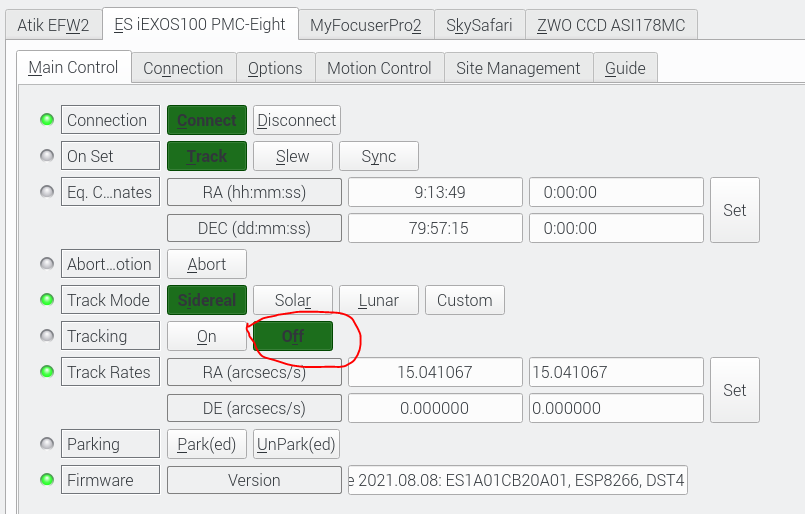


Yes, when I disable tracking I am able to connect with Sky Safari. However, as soon as I slew to an object it starts tracking again and the connection drops. When I want to connect again I have to disable Tracking again.
Ok I have to say this is incredibly odd. Why would tracking drop the connection?? Any messages you see from INDI when this happens?
You are actually right. The connection does not automatically drop. I think I have mixed it up last time, as I switched away from the app and when I went back the connection got dropped.
Still whenever I want to connect via Sky Safari, I always need to manually disable tracking, otherwise I will receive the Telescope is not responding error in Sky Safari.
I expect this has to be related to the iExos 100 Driver, because my HEQ5 with EQMod is working fine with the same Stellarmate device. Maybe something related to the Point and Track modes they use in the mount.
I tested with Sky Safari 6 and 7 on Android as well as with 7 on IPad. Always same behavior
Happy to do some debugging if you could give me a hint how to collect more logs
Starting with SS7, you can connect directly to INDI server. The INDI SkySafari Bridge driver is no longer required.
I just tested it and the problem only occurs on the direct Indi Connection. The Skyfi Bridge works. Thanks for the hint
This issue has been inactive for 60 days and is being marked as stale.
![github-actions[bot] avatar](https://avatars.githubusercontent.com/in/15368?v=4 "Published by a pub.dev verified publisher")