indiespirit
How to add tooltip?


you can use this method in the line chart. use onDataPointClick update the point data to your state and then show the tooltip based on indexData in renderDotContent
renderDotContent={({x, y, index, indexData}) => { if ( indexDataState === indexData) { // show tooltip return ( <CustomDot x={x} y={y} /> ); } return null; }}

you can use this method in the line chart. use onDataPointClick update the point data to your state and then show the tooltip based on indexData in renderDotContent
renderDotContent={({x, y, index, indexData}) => { if ( indexDataState === indexData) { // show tooltip return ( ); } return null; }}
@ShahoodHussain77 Thanks, this works! Should be in the docs.

import {LineChart} from 'react-native-chart-kit'; import {Rect, Text as TextSVG, Svg} from 'react-native-svg';
let [tooltipPos, setTooltipPos] = useState({ x: 0, y: 0, visible: false, value: 0, });
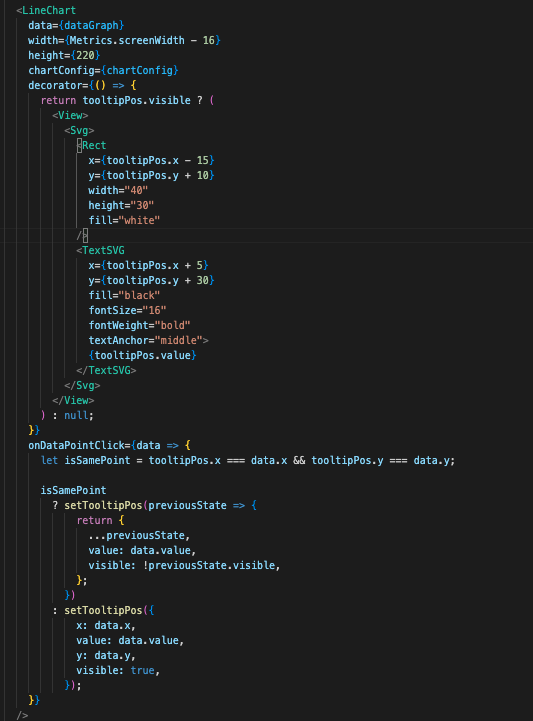
<LineChart ....... decorator={() => { return tooltipPos.visible ? ( <View> <Svg> <Rect x={tooltipPos.x - 15} y={tooltipPos.y + 10} width="40" height="30" fill="white" /> <TextSVG x={tooltipPos.x + 5} y={tooltipPos.y + 30} fill="black" fontSize="16" fontWeight="bold" textAnchor="middle"> {tooltipPos.value} </TextSVG> </Svg> </View> ) : null; }} onDataPointClick={data => { let isSamePoint = tooltipPos.x === data.x && tooltipPos.y === data.y; isSamePoint ? setTooltipPos(previousState => { return { ...previousState, value: data.value, visible: !previousState.visible, }; }) : setTooltipPos({ x: data.x, value: data.value, y: data.y, visible: true, }); }} />