

 wp-cli
mysql --no-defaults --execute="' is not recognized as an internal or external command
Hi, I have a problem. '"mysql --no-defaults --execute="' is not recognized as an internal or external command, operable program or batch file. OS: Win10 Lastest version wp-cli
CMD Window: `c:\wamp64\www\wordpress_cli>mysql -uroot Welcome to the MySQL monitor. Commands end with ; or \g. Your MySQL connection id is 13 Server version: 8.0.21 MySQL Community Server - GPL
Copyright (c) 2000, 2020, Oracle and/or its affiliates. All rights reserved.
Oracle is a registered trademark of Oracle Corporation and/or its affiliates. Other names may be trademarks of their respective owners.
Type 'help;' or '\h' for help. Type '\c' to clear the current input statement.
mysql> exit Bye
c:\wamp64\www\wordpress_cli>php .\wp-cli.phar config create --dbname=xx --dbuser=root '"mysql --no-defaults --execute="' is not recognized as an internal or external command, operable program or batch file.
c:\wamp64\www\wordpress_cli>`

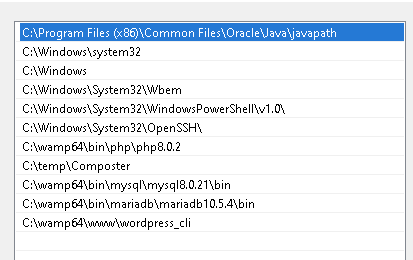

I'm seeing the same behavior, Using WP-CLI on XAMPP. Both php and mysql dirs are on PATH.

I'm also having the same issue.
none of the wp db * commands are working .
e.g. wp db check
'"mysqlcheck --no-defaults "wordpress" --check --host="localhost" --user="root" --default-character-set="utf8""' is not recognized as an internal or external command, operable program or batch file.
OS: windows 10 PHP: 8.0.3 MySql: 5.7.31

same issue on windows 10 with xampp. mysql is in the paths both the current user and globally any idea how to fix it?


I solved my problem by upgrading Windows to version Windows 10 Pro 21H1, build 19043.1237.
I am having this issue as well when I run the following command, I get the following output.
$ wp config create --dbname=myTestDb --dbuser=root --dbpass=rootbeer
'"mysql --no-defaults --execute="' is not recognized as an internal or external command,
operable program or batch file.
I have verfied that mysql is in my path with the following:
$ mysql --version
C:\Program Files\MySQL\MySQL Server 8.0\bin\mysql.exe  Ver 8.0.23 for Win64 on x86_64 (MySQL Community Server - GPL)
This is the output from command wp --info
$ wp --info
OS:     Windows NT 10.0 build 19043 (Windows 10) i586
Shell:  C:\Program Files\Git\usr\bin\bash.exe
PHP binary:     C:\PHP\php.exe
PHP version:    8.0.12
php.ini used:   C:\PHP\php.ini
MySQL binary:
MySQL version:
SQL modes:
WP-CLI root dir:        phar://wp-cli.phar/vendor/wp-cli/wp-cli
WP-CLI vendor dir:      phar://wp-cli.phar/vendor
WP_CLI phar path:       C:\Sites\markdurb.in\wordpress
WP-CLI packages dir:
WP-CLI global config:
WP-CLI project config:
WP-CLI version: 2.5.0
I have done this on (2) different machines running this same version of Windows, with the same result. I have tried multiple versions of MySQL 8.0.x and the two latest versions of PHP.
Any advice?

I am having this issue as well when I run the following command, I get the following output.
$ wp config create --dbname=myTestDb --dbuser=root --dbpass=rootbeer
'"mysql --no-defaults --execute="' is not recognized as an internal or external command,
operable program or batch file.
I have verfied that
mysqlis in my path with the following:$ mysql --version C:\Program Files\MySQL\MySQL Server 8.0\bin\mysql.exe Ver 8.0.23 for Win64 on x86_64 (MySQL Community Server - GPL)This is the output from command
wp --info$ wp --info OS: Windows NT 10.0 build 19043 (Windows 10) i586 Shell: C:\Program Files\Git\usr\bin\bash.exe PHP binary: C:\PHP\php.exe PHP version: 8.0.12 php.ini used: C:\PHP\php.ini MySQL binary: MySQL version: SQL modes: WP-CLI root dir: phar://wp-cli.phar/vendor/wp-cli/wp-cli WP-CLI vendor dir: phar://wp-cli.phar/vendor WP_CLI phar path: C:\Sites\markdurb.in\wordpress WP-CLI packages dir: WP-CLI global config: WP-CLI project config: WP-CLI version: 2.5.0I have done this on (2) different machines running this same version of Windows, with the same result. I have tried multiple versions of MySQL 8.0.x and the two latest versions of PHP.
Any advice?
Downgraded to PHP 7.4.25 and error is no longer happening. Prior to downgrade, I commented out the following line in proc_open_compat in utils.php
$cmd = _proc_open_compat_win_env( $cmd, $env );
This also resolved the issue.
Hope this is helpful.
I am also facing same issue with my wp-cli. Anyone got solution on this?

Same issue with Xampp + PHP v8.1.1. Both PHP and MySQL is in the PATH.

Same with me but below PHP 8x working fine but PHP 8x+ showing "'"mysql --no-defaults --execute="' is not recognized as an internal or external command, operable program or batch file." error

PHP 8.0.15 is also not compatible, switching to 7.4.x worked.
Would be nice if we didn't have to switch back for WP-CLI.

Looks like PHP 8+ has a Windows compat bug fix, which causes our workaround to break...


We do a lot of CLI stuff with WordPress, and right now our only workaround on Windows is to manually specify the PHP version when running WP-CLI commands that need the database.
So for instance we might run this through GitBash (your paths will vary):
/c/DevTools/php/7.4/php /c/DevTools/wordpress/wp --version
Actually, we more often than not use Symfony's CLI to proxy commands because you can specify a PHP version in a specially named file, so our command is slightly shorter:
symfony php /c/DevTools/wordpress/wp --version
These commands could be aliased pretty easily, too.
This is all just workarounds, we haven't found a fix, but at least we can keep working.

Thanks for your input @cjhaas I will try this with PHP 8.x, with PHP 7.4 wp-cli still works.
Looks like PHP 8+ has a Windows compat bug fix, which causes our workaround to break...
Is there any chance to get this fixed @schlessera or what is required to move this issue forward? WP CLI defines support for PHP ^8.0 but it seems not really to work - at least on Windows. 🤔


We have the same issue for other operations, e.g. remove of plugin:
C:\Users\Administrator>c:\php-8.0\php.exe -dsafe_mode=off -ddisplay_errors=on -dopen_basedir=  -d max_execution_time=60 "C:\wp-cli.phar" "--path=C:\Inetpub\vhosts\abc.tld\httpdocs" --debug  --no-color plugin uninstall akismet "--skip-plugins=akismet,hello,thanks_for_read"
...
Debug (hooks): On hook "before_run_command": WP_CLI\Bootstrap\RegisterDeferredCommands->add_deferred_commands() (9.385s)
Debug (bootstrap): Running command: plugin uninstall (9.387s)

C:\Users\Administrator>echo %errorlevel%
1
Plugin files are not removed!
Environment: Windows, PHP 8.0, for example:
C:\Users\Administrator>c:\php-8.0\php.exe -dsafe_mode=off -ddisplay_errors=on -dopen_basedir=  -d max_execution_time=60 "C:\wp-cli.phar" --info
OS:     Windows NT 10.0 build 14393 (Windows Server 2016) AMD64
Shell:  C:\Windows\system32\cmd.exe
PHP binary:     c:\php-8.0\php.exe
PHP version:    8.0.21
php.ini used:   C:\Program Files (x86)\Plesk\Additional\PleskPHP80\php.ini
MySQL binary:
MySQL version:
SQL modes:
WP-CLI root dir:        phar://wp-cli.phar/vendor/wp-cli/wp-cli
WP-CLI vendor dir:      phar://wp-cli.phar/vendor
WP_CLI phar path:       C:\Users\Administrator
WP-CLI packages dir:
WP-CLI global config:
WP-CLI project config:
WP-CLI version: 2.6.0
Once I comment out
	// Need to encompass the whole command in double quotes - PHP bug https://bugs.php.net/bug.php?id=49139
	cmd = '"' . _proc_open_compat_win_env( $cmd, $env ) . '"';
at utils.php, plugin remove works perfectly.
Also, switch to PHP 7.4 helps.
Could you please fix compatibility of WP-CLI with PHP 8.0 and later on Windows?


I submitted pull requests to resolve this issue:
- https://github.com/wp-cli/db-command/pull/231
- https://github.com/wp-cli/wp-cli/pull/5689

this is still an issue, using Windows Server 2019, PHP 8.1.12 and latest wp-cli 2.7.1 and getting:
'"mysql --no-defaults --execute="' is not recognized as an internal or external command, operable program or batch file.'
Can anyone point what would be the workaround besides to downgrade PHP to 7.x?

We've got discussions started in the pull requests working on a resolution. In the meantime you may use the Windows fork which has the pull requests pre-merged. https://github.com/lipemat/wp-cli-bundle/releases/tag/2.7.1-windows
Thanks for your work on those pull requests, @lipemat
I chatted with @schlessera yesterday. We're fine to land them, let them soak in the nightly build, and see if there's any fallout.
I also created https://github.com/wp-cli/wp-cli-tests/issues/155 so we can try to prevent this in the future. However, given we probably can't recreate every Windows environment, we might want to create a @wp-cli/windows-users GitHub group for volunteers who might be willing to run the test suite in their local environment before each release.

The nightly build now has the two pull requests, if anyone would like to test things out: wp cli update --nightly
I've tested the nightly build on Windows 10 against:
- PHP 7.4
- PHP 8.0
- PHP 8.1
Everything appears to be working.
I also ran the test suite as mentioned here.
