

 withfig
shell integration not configured in dotfiles
Description:
Please include a detailed description of the issue (and an image or screen recording, if applicable)
✘ Figterm socket: No file at path /tmp/figterm-9CE26527-4B4D-4D4C-98E0-B99B77EC7857.socket
Details:
| OS | Fig | Shell |
|---|---|---|
| macOS 12.2.1 (21D62) | 1.0.56 | -zsh |
fig diagnostic
Fig Diagnostics
Fig details:
- Fig version: Version 1.0.56 (B401) [U.S.]
- Bundle path: /Applications/Fig.app
- Autocomplete: true
- Settings.json: true
- Accessibility: true
- Number of specs: 0
- Symlinked dotfiles: false
- Only insert on tab: false
- Keybindings path:
- Installation Script: false
- PseudoTerminal Path: /Users/marcstein/.fig/bin:/opt/homebrew/Caskroom/miniconda/base/bin:/opt/homebrew/Caskroom/miniconda/base/condabin:/Users/marcstein/google-cloud-sdk/bin:/opt/homebrew/bin:/opt/homebrew/sbin:/usr/local/bin:/usr/bin:/bin:/usr/sbin:/sbin:/usr/local/Cellar/open-babel/3.1.1_1/bin:/Library/Apple/usr/bin:/Users/marcstein/go/bin
- SecureKeyboardInput: false
- SecureKeyboardProcess:
Hardware Info:
- Model Name: MacBook Pro
- Model Identifier: MacBookPro18,2
- Chip: Apple M1 Max
- Cores: 10 (8 performance and 2 efficiency)
- Memory: 64 GB
OS Info:
- macOS 12.2.1 (21D62)
Environment:
- User Shell: /bin/zsh
- Current Directory: /Users/marcstein
- CLI Installed: true
- Executable Location: /Users/marcstein/.fig/bin/fig
- Current Window ID: 2115/% (com.apple.Terminal)
- Active Process: ??? (???) - ???
- Environment Variables:
- TERM=xterm-256color
- TERM_SESSION_ID=9CE26527-4B4D-4D4C-98E0-B99B77EC7857
- PATH=/Users/marcstein/.fig/bin:/opt/homebrew/Caskroom/miniconda/base/bin:/opt/homebrew/Caskroom/miniconda/base/condabin:/Users/marcstein/google-cloud-sdk/bin:/opt/homebrew/bin:/opt/homebrew/sbin:/usr/local/bin:/usr/bin:/bin:/usr/sbin:/sbin:/usr/local/Cellar/open-babel/3.1.1_1/bin:/Library/Apple/usr/bin:/Users/marcstein/go/bin
Integrations:
- SSH: false
- TMUX: false
- iTerm: installed!
- Hyper: application is not present.
- Visual Studio Code: installed!
- Docker: false

~/.fig/tools/install_and_upgrade.sh returns zsh: no such file or directory: /Users/marcstein/.fig/tools/install_and_upgrade.sh
Hey @marcstein! It looks Fig isn't being sourced correctly in your dotfles.
We've deprecated install_and_upgrade.sh. You can run fig install instead.
However, before you run this, can you please share your ~/.zshrc and the output of running fig doctor --verbose --no-early-exit?

Hi Matt,
The last line is
PATH=~/.fig/bin:$PATH
Do you want the whole config?
Marc Stein CEO underwrite.ai P. (617) 545-7171 M. (857) 222-3291 E. @.*** W. https://www.underwrite.ai https://www.linkedin.com/in/marc-stein-b83b765
On Thu, Mar 10, 2022 at 5:48 PM Matt Schrage @.***> wrote:
Hey @marcstein https://github.com/marcstein! We've deprecated install_and_upgrade.sh. You can run fig install instead.
However, before you run this, can you please share your `~/.zshrc?
— Reply to this email directly, view it on GitHub https://github.com/withfig/fig/issues/1088#issuecomment-1064586160, or unsubscribe https://github.com/notifications/unsubscribe-auth/AAGEJZMRP4RDFCU7G4BZARLU7J323ANCNFSM5QN7A7OQ . Triage notifications on the go with GitHub Mobile for iOS https://apps.apple.com/app/apple-store/id1477376905?ct=notification-email&mt=8&pt=524675 or Android https://play.google.com/store/apps/details?id=com.github.android&referrer=utm_campaign%3Dnotification-email%26utm_medium%3Demail%26utm_source%3Dgithub.
You are receiving this because you were mentioned.Message ID: @.***>
Here you go!
If you come from bash you might have to change your $PATH.
export PATH=$HOME/bin:/usr/local/bin:$PATH
Path to your oh-my-zsh installation.
export ZSH="/Users/marcstein/.oh-my-zsh"
Set name of the theme to load --- if set to "random", it will
load a random theme each time oh-my-zsh is loaded, in which case,
to know which specific one was loaded, run: echo $RANDOM_THEME
See https://github.com/ohmyzsh/ohmyzsh/wiki/Themes
ZSH_THEME="robbyrussell"
#ZSH_THEME="agnoster"
Set list of themes to pick from when loading at random
Setting this variable when ZSH_THEME=random will cause zsh to load
a theme from this variable instead of looking in $ZSH/themes/
If set to an empty array, this variable will have no effect.
ZSH_THEME_RANDOM_CANDIDATES=( "robbyrussell" "agnoster" )
Uncomment the following line to use case-sensitive completion.
CASE_SENSITIVE="true"
Uncomment the following line to use hyphen-insensitive completion.
Case-sensitive completion must be off. _ and - will be interchangeable.
HYPHEN_INSENSITIVE="true"
Uncomment the following line to disable bi-weekly auto-update checks.
DISABLE_AUTO_UPDATE="true"
Uncomment the following line to automatically update without prompting.
DISABLE_UPDATE_PROMPT="true"
Uncomment the following line to change how often to auto-update (in days).
export UPDATE_ZSH_DAYS=13
Uncomment the following line if pasting URLs and other text is messed up.
DISABLE_MAGIC_FUNCTIONS="true"
Uncomment the following line to disable colors in ls.
DISABLE_LS_COLORS="true"
Uncomment the following line to disable auto-setting terminal title.
DISABLE_AUTO_TITLE="true"
Uncomment the following line to enable command auto-correction.
ENABLE_CORRECTION="true"
Uncomment the following line to display red dots whilst waiting for
completion.
Caution: this setting can cause issues with multiline prompts (zsh 5.7.1
and newer seem to work)
See https://github.com/ohmyzsh/ohmyzsh/issues/5765
COMPLETION_WAITING_DOTS="true"
Uncomment the following line if you want to disable marking untracked
files
under VCS as dirty. This makes repository status check for large
repositories
much, much faster.
DISABLE_UNTRACKED_FILES_DIRTY="true"
Uncomment the following line if you want to change the command execution
time
stamp shown in the history command output.
You can set one of the optional three formats:
"mm/dd/yyyy"|"dd.mm.yyyy"|"yyyy-mm-dd"
or set a custom format using the strftime function format specifications,
see 'man strftime' for details.
HIST_STAMPS="mm/dd/yyyy"
Would you like to use another custom folder than $ZSH/custom?
ZSH_CUSTOM=/path/to/new-custom-folder
Which plugins would you like to load?
Standard plugins can be found in $ZSH/plugins/
Custom plugins may be added to $ZSH_CUSTOM/plugins/
Example format: plugins=(rails git textmate ruby lighthouse)
Add wisely, as too many plugins slow down shell startup.
plugins=(git zsh_codex zsh-autosuggestions)
bindkey '^X' create_completion
source $ZSH/oh-my-zsh.sh
User configuration
export MANPATH="/usr/local/man:$MANPATH"
You may need to manually set your language environment
export LANG=en_US.UTF-8
Preferred editor for local and remote sessions
if [[ -n $SSH_CONNECTION ]]; then
export EDITOR='vim'
else
export EDITOR='mvim'
fi
Compilation flags
export ARCHFLAGS="-arch x86_64"
Set personal aliases, overriding those provided by oh-my-zsh libs,
plugins, and themes. Aliases can be placed here, though oh-my-zsh
users are encouraged to define aliases within the ZSH_CUSTOM folder.
For a full list of active aliases, run alias.
Example aliases
alias zshconfig="mate ~/.zshrc"
alias ohmyzsh="mate ~/.oh-my-zsh"
brew hack for x86
alias ibrew='arch -x86_64 /usr/local/bin/brew'
JINA_CLI_BEGIN
autocomplete
if [[ ! -o interactive ]]; then
return
fi
compctl -K _jina jina
_jina() {
local words completions
read -cA words
if [ "${#words}" -eq 2 ]; then
completions="$(jina commands)"
else
completions="$(jina completions ${words[2,-2]})"
fi
reply=(${(ps:\n:)completions})
}
session-wise fix
ulimit -n 4096
export OBJC_DISABLE_INITIALIZE_FORK_SAFETY=YES
JINA_CLI_END
The next line updates PATH for the Google Cloud SDK.
if [ -f '/Users/marcstein/google-cloud-sdk/path.zsh.inc' ]; then . '/Users/marcstein/google-cloud-sdk/path.zsh.inc'; fi
The next line enables shell command completion for gcloud.
if [ -f '/Users/marcstein/google-cloud-sdk/completion.zsh.inc' ]; then . '/Users/marcstein/google-cloud-sdk/completion.zsh.inc'; fi
export GOPATH=$HOME/go
export PATH=$PATH:$GOPATH/bin
#source /usr/local/opt/powerlevel9k/powerlevel9k.zsh-theme
#source /opt/homebrew/opt/powerlevel9k/powerlevel9k.zsh-theme
>>> conda initialize >>>
!! Contents within this block are managed by 'conda init' !!
__conda_setup="$('/opt/homebrew/Caskroom/miniconda/base/bin/conda' 'shell.zsh' 'hook' 2> /dev/null)"
if [ $? -eq 0 ]; then
eval "$__conda_setup"
else
if [ -f "/opt/homebrew/Caskroom/miniconda/base/etc/profile.d/conda.sh"
]; then
    . "/opt/homebrew/Caskroom/miniconda/base/etc/profile.d/conda.sh"

else

    export PATH="/opt/homebrew/Caskroom/miniconda/base/bin:$PATH"

fi
fi
unset __conda_setup
<<< conda initialize <<<
[ -s ~/.fig/fig.sh ] && source ~/.fig/fig.sh
PATH=~/.fig/bin:$PATH Marc Stein CEO underwrite.ai P. (617) 545-7171 M. (857) 222-3291 E. @.*** W. https://www.underwrite.ai https://www.linkedin.com/in/marc-stein-b83b765
On Thu, Mar 10, 2022 at 6:04 PM Matt Schrage @.***> wrote:
Hey @marcstein https://github.com/marcstein! The whole config would be ideal. :)
— Reply to this email directly, view it on GitHub https://github.com/withfig/fig/issues/1088#issuecomment-1064596667, or unsubscribe https://github.com/notifications/unsubscribe-auth/AAGEJZNE6YNVK5E65SMLBLDU7J5YBANCNFSM5QN7A7OQ . Triage notifications on the go with GitHub Mobile for iOS https://apps.apple.com/app/apple-store/id1477376905?ct=notification-email&mt=8&pt=524675 or Android https://play.google.com/store/apps/details?id=com.github.android&referrer=utm_campaign%3Dnotification-email%26utm_medium%3Demail%26utm_source%3Dgithub.
You are receiving this because you were mentioned.Message ID: @.***>
Yeah, it looks like you are missing the fig shell integrations!
Run fig install --dotfiles and then open a new terminal. This should resolve the problem.
fig doctor
✘ Figterm socket: No file at path /tmp/figterm-C4833672-50F2-4D34-88C8-BD1C02698DCF.socket Marc Stein CEO underwrite.ai P. (617) 545-7171 M. (857) 222-3291 E. @.*** W. https://www.underwrite.ai https://www.linkedin.com/in/marc-stein-b83b765
On Thu, Mar 10, 2022 at 7:01 PM Matt Schrage @.***> wrote:
Yeah, it looks like you are missing the fig shell integrations.
Run fig install --dotfiles and then open a new terminal. This should resolve the problem.
— Reply to this email directly, view it on GitHub https://github.com/withfig/fig/issues/1088#issuecomment-1064636475, or unsubscribe https://github.com/notifications/unsubscribe-auth/AAGEJZK2SWFMJJCPGBPMPHTU7KEOXANCNFSM5QN7A7OQ . Triage notifications on the go with GitHub Mobile for iOS https://apps.apple.com/app/apple-store/id1477376905?ct=notification-email&mt=8&pt=524675 or Android https://play.google.com/store/apps/details?id=com.github.android&referrer=utm_campaign%3Dnotification-email%26utm_medium%3Demail%26utm_source%3Dgithub.
You are receiving this because you were mentioned.Message ID: @.***>
Having the same issue only with InteliJ IDEA Ultimate 2022.2.2. Fig works in Iterm2 and in the terminal started in Vscode, but doesn't work in the terminal of InteliJ. Fig Integrations seems to be green, but Debugger shows '(???)'.
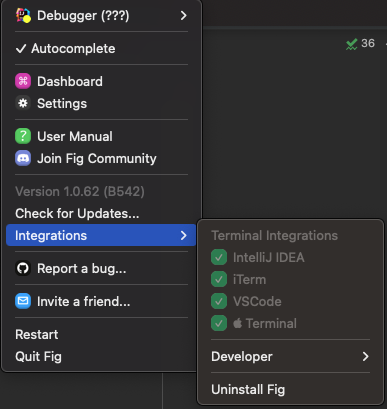
When I run fig doctor --verbose, I get the following output:
`Let's check if you're logged in... ✔ Logged into Fig
Let's check your dotfiles... ✔ ~/.bashrc contains valid fig hooks ✔ ~/.profile contains valid fig hooks ✔ ~/.zshrc contains valid fig hooks ✔ ~/.zprofile contains valid fig hooks
Let's make sure Fig is setup correctly... ✔ Fig bin exists ✔ PATH contains ~/.local/bin ✔ PATH contains ~/.fig/bin ✔ Fig Integration
Let's make sure Fig is running... ✔ Fig is running ✔ Fig socket exists ✔ Daemon ✔ Daemon diagnostics
Let's see if Fig is in a working state...
✘ Figterm: Tried to find the socket file, but it wasn't there.
Fig uses the /tmp directory for sockets.
Did you delete files in /tmp? The OS will clear it automatically.
Try making a new tab or window in your terminal, then run fig doctor again.
No file at path: "/var/tmp/fig/iazimnia/figterm/a446b1dc-5297-493a-ba45-bcddd3f30732.socket"
0: No file at path /var/tmp/fig/iazimnia/figterm/a446b1dc-5297-493a-ba45-bcddd3f30732.socket
Location: fig_cli/src/cli/doctor.rs:216
Backtrace omitted. Run with RUST_BACKTRACE=1 environment variable to display it. Run with RUST_BACKTRACE=full to include source snippets. ✔ Insertion lock does not exist ✔ PATH and PseudoTerminal PATH match ✔ Autocomplete dev mode ✔ Plugin dev mode ✔ Mission Control is loading from the correct URL
Let's check if your system is compatible... ✔ OS is supported
Let's check fig diagnostic... ✔ Installation script ✔ Compatible shell ✔ Fig app installed in the right place ✔ Autocomplete is enabled ✔ Fig CLI path ✔ Accessibility enabled ✔ Secure keyboard input disabled ● It looks like your dotfiles are symlinked. If you need to make modifications, make sure they're made in the right place.
Let's check your terminal integrations... ✔ iTerm integration is enabled ✔ VSCode integration is enabled
Fig still not working? Run fig issue to let us know! Or, email us at [email protected]! ` Anyone got this working with InteliJ?

Try quitting JetBrains and restarting it @imanAzi. I’m going to close this issue, but if you’re still having trouble please open a new one!