

 vasturiano
I can't get force-ar to work: Error: Component attempted to register before AFRAME was available.
Describe the bug
Loading the graph in 3d or VR works fine switch to AR and get Error: Component attempted to register before AFRAME was available.
To Reproduce Steps to reproduce the behavior:
- Load code
import ForceGraphAR from 'react-force-graph-ar';


class Graph extends Component {

    constructor(props) {
      super(props);
      this.state = {
        cyRef : null
      };
    }


    render = () => {
      if (this.props.elements.nodes.length > 0) {
        return(
          <div className='GraphContainer'>
            <ForceGraphAR
        graphData={this.props.elements}
        // nodeAutoColorBy="group"
        linkCurvature="curvature"
        linkCurveRotation="rotation"
        nodeColor="nodeColor"
        nodeRelSize={6}
        nodeVal="nodeVal"
        nodeLabel="displayText"
        linkColor="linkColor"
        linkWidth={2}
        linkDirectionalParticleWidth={2}
        linkDirectionalParticles="hits"
        onEngineStop={console.log("Ready")}
      />
          </div>
        );
      } else {
        return (
          <div style={{'color': 'red', 'height': '100%', 'alignContent': 'center'}}>
            <div className="lds-dual-ring"></div>
          </div>
        );
      }

    }
}
export default Graph;
-
use with
<Graph elements={gData} />(gData is pulled from Basic Example ) -
Yarn Start, Recieve Error (alternativly build and host to test on phone)
Expected behavior Expect it to ask for camera permissions.
Desktop (please complete the following information): Tried with Chrome: Mac OSX Catalina
Smartphone (please complete the following information): Both and safari/chrome on iOS 13 (iPhone 11PM)
Additional context Both 3D and VR works with this just not AR. Demo's on AR site work fine.

@DavidBates thanks for reaching out. To use the AR mode, you have to make sure you load two libraries prior to using: aframe and ar.js.
Just like in this example: https://github.com/vasturiano/react-force-graph/blob/master/example/ar-graph/index.html#L8

Thanks. I assumed it was a difference in using components. I can get aframe to import but havn't been able to find a way to import ar.js. Do I just need to inject it as a script using something like:
componentDidMount () {
    const script = document.createElement("script");

    script.src = "//unpkg.com/ar.js/aframe/build/aframe-ar.min.j";
    script.async = true;

    document.body.appendChild(script);
}
Or is there a more elegant way to import these? Also would it better to have these dependencies in react-force-graph-ar? to simplify implementation? once figured out I could work towards a pull request for that.
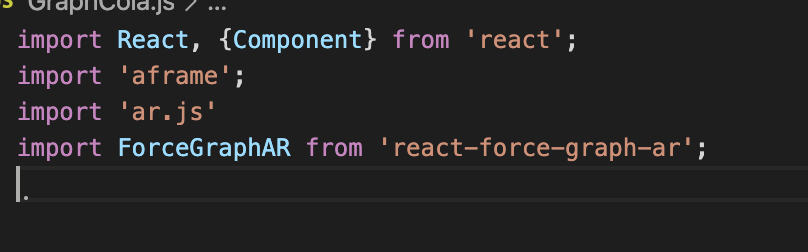
@DavidBates for the sake of modularity I've decided not to include these libraries in the module. Think of it as peer dependencies, the same way that React is a peer dependency and is not included in.
The difference with both aframe and ar.js is that all the consuming modules expect to find those libraries registered as app globals. So far I've only used ar.js as a script tag import. Perhaps they can be imported as a regular ES module too, as long as the import registers a window global.
I just ran into this as well (using Next.js). The solution seems to be to manually require ar.js and wait till it is loaded (see the wrapper component):
const [arJS, setArJS] = useState();

  useEffect(() => {
    typeof window !== "undefined" && setArJS(require("ar.js"));
  }, []);

  return arJS ? <ForceGraphAR {...otherProps} ref={forwardRef} /> : null;
Demo here: https://webnetesctl.vercel.app/ar?local=true
