

 timmhirsens
Should @spec syntax highlighting be more muted/subtle?
I personally find the @spec syntax highlighting to add too much visual noise to my code.
I find it harder to scan for specific functions I'm looking for, and it fights for attention with function definitions.
Does anybody else feel this way at all?
How hard would it be to make something similar-looking to (shudders) PHP docblock which doesn't fight as much for attention but still easy to pick out relevant info?


I can recommend the highlighting the Elixir Plugin for IntelliJ IDEA @KronicDeth uses:
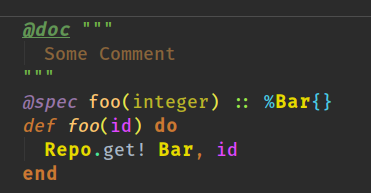

I think, what I'm trying to say is that I think @spec should look closer in appearance to documentation than code.
Does anybody else think so?
I tend to agree, but I'm not sure it should be the same coloring as documentation - as it is a different thing.
But not having the same highlighting as 'actual' code would be nice.


@fr1zle I feel for you: people fighting about the default color schemes, when anyone can create and publish their own themes, has generated a lot of issues for me.
For any users that want to generate their own themes, I explain why I decided to make certain colors close or contrasting in https://github.com/KronicDeth/intellij-elixir/blob/master/COLOR_SCHEME_DESIGN.md.
