

 themeum
Customize Color Picker Palette
Issue description:
What is the correct way to change the default color palette for all the color pickers in every field that supports a color picker (e.g., color, multicolor, typography, etc.)?
There's #863 which I believe she was asking the same as I am and there's #1248 which might be on the same path...
Any help would be greatly appreciated!

The correct way was in the the link started by me. You can use the #1248 answer to his own post too, but that will set for all colors even if you have defined (unless you write more js).
What is a better idea is to make some arrays for different cases, such as this pastel one and you can make others and then use those as a fallback when you haven't defined. So I have a text one for dark text on light backgrounds, a pastel one, or vivid one and then pop it in the choices:
     //* fallback pastel palette
	function theme_prefix_pastel_colors() {
		return array(
			'palettes' => array(
				'#ffffff',
				'#f4e98a',
				'#e5f48a',
				'#bbfbe8',
				'#e3efbd',
				'#e9e9fb',
				'#f2dce4'
			)
		);
	}//end fallback


	//* A Field
	Theme_Class_Kirki::add_field( 'theme_prefix', array(
        'type'        => 'color',
        'settings'    => 'my_setting',
        'label'       => __( 'My Label', 'textdomain' ),
        'section'     => 'my_section',
        'default'     => '#f4e98a',
        'choices'     => theme_prefix_pastel_colors(),
        'priority'    => 5,
        'transport'   => 'postMessage',

    	'output'      => ( '#f4e98a' != get_theme_mod( 'my_setting' ) && ! empty( get_theme_mod( 'my_setting' ) ) ) ? array(
        	array(
                'element'  => '.something',
                'property' => 'background-color'
        	),
    	) : array(),

        'js_vars' => array(
            array(
                'element'  => '.something',
                'property' => 'background-color',
                'function' => 'style'
            )
        ),
     ) );

Thanks @carasmo I came across your past issue and kinda knew what you were trying to do. While using the palettes is what I've been doing, it's not supported across most of the Kirki controls that utilize a color picker (color, typography, multicolor, etc.). I was even having trouble getting #1248 working.
The problem with the color palette is that it doesn't dynamically change, which is useless 99% of the time (for me). Instead of silently complaining about it, I'm attempting to fix it. :)
Best case scenario, I'd like the color palette to populate colors I've already used which would speed things up a bit and actually make it useful.
I don't know if anyone has came across the same challenge or if a solution is hanging out there somewhere...
The 1248 works, but I couldn't figure out how to not set the palette if there was one defined already.
function foo_palette() {
?>
    <script>
        jQuery(document).ready(function($){

	$( '.kirki-color-control' ).iris( {
    	palettes: ['#125', '#459', '#78b'],
	} );


        });
    </script>
<?php
}
add_action('customize_controls_print_footer_scripts', 'foo_palette' );
This works for me too. But it seems to break some other JS responsible for setting the width of color controls, when alpha channel is activated. Tested with Multicolor control on latest Kirki and WordPress.
This ...
add_action( 'customize_controls_print_footer_scripts', function() {
  $default = self::$kirki['fields']['color_palette']['default'];
  $mod     = Theme::mod( 'color_palette' ); // returns false if empty.
  $palette = '';

  if ( ! $mod ) {
    $mod = $default;
  }

  foreach ( $mod as $color ) {
    $palette .= '\'' . $color . '\',';
  }
  ?>

  <script>
    jQuery( document ).ready( function( $ ) {
      $( '.kirki-color-control' ).iris( {
        palettes: [ <?php echo $palette; ?> ],
      } );
    } );
  </script>

  <?php
} );
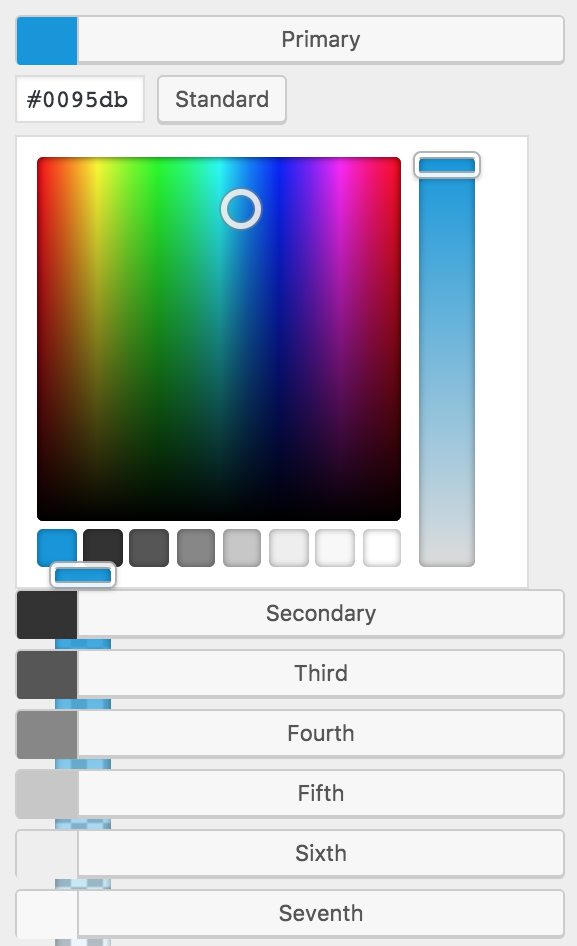
... changes the palette, but breaks color picker layout:

@carasmo the PHP function works great with single color fields! Any idea how to get the same function working on the multi color field?
