

 tgorgdotcom
locast2plex Docker on QNAP
I create the container and it shows the right information but Plex doesn't see the "Live DVR". When I look at the console, it shows that it's up and the following;
Validating User Info...
User Info obtained.
User didDonate: True
User donationExpire: 1600378947
Getting user location...
User location obtained as 39.9038/-104.9419
Getting user's media market (DMA)...
DMA found as 751
Getting list of stations based on DMA...
Loading FCC Stations list...
Starting device server on 0.0.0.0:6077
Starting SSDP server...
192.168.1.125 - - [18/Aug/2020 16:27:00] "GET /device.xml HTTP/1.1" 200 -
192.168.1.125 - - [18/Aug/2020 16:27:22] "GET /device.xml HTTP/1.1" 200 -
eventually times out and stops the service...


For my related issue on Unraid (just started following this thread), mine shows this:
<root xmlns="urn:schemas-upnp-org:device-1-0">
<specVersion>
<major>1</major>
<minor>0</minor>
</specVersion>
<device>
<deviceType>urn:schemas-upnp-org:device:MediaServer:1</deviceType>
<friendlyName>Locast2Plex</friendlyName>
<manufacturer>Silicondust</manufacturer>
<modelName>HDHR3-US</modelName>
<modelNumber>HDHR3-US</modelNumber>
<serialNumber/>
<UDN>uuid:hmwhuwux</UDN>
</device>
<URLBase>http://myexternalip:6077</URLBase>
</root>
I've tried both running the command directly, as well as added the -e to extra parameters on the main image. When I run the command directly it creates a secondary docker with a randomly generated name that runs the server connection.
Plex errors is that the "Device not found. Ensure your device is powered on and connected to your network."
I'm very new to Docker/Unraid, sorry.

Whoops! Figured out my issue. I had my actual external ISP provided IP in the external_addy. I needed the internal IP listed, 192.168.0.3.
I can't believe I mixed that up.
Ok, I did fix my issue. I gave it a static IP while in Bridge mode for the QNAP which passed it to the Virtual Switch. So, locast2plex in Docker is up and running. However, when I put it in Plex, it doesn't connect.
@simgate So, I'm not sure how QNAP works compared to Unraid, but it may be similar. I'll walk you through what I did for a full setup.
So, I installed locast2plex from DockerHub. In my extra parameters in the docker, I set it up with the commands he recommends on the run part of the setup.
-e [email protected] -e password=mypassword -e external_addy=IPaddressformyUnraidbox -p 6077:6077 -p 1900:1900/udp
It's set to bridge for the network. Nothing else manually configured. It runs fine from there.
Then in Plex, follow his steps, go to the Live TV & DVR section of the Settings, then Add Device, select to add it manually, add the address:port for it: ex. 192.168.1.200:6077, then Connect (it will stay blank, but Continue will light up), then Continue, then follow the process.
It should fully connect through after this.
If your Plex Server/Docker is running on the same device as the docker for locast2plex (mine is), you can also use 127.0.0.1:6077 to add it.
Thanks for the help! I had it setup but what was apparently making it now work, was the current SiliconDust device as the Live TV/DVR device. I unplugged the ethernet and it was able to pull it in.
Make sure you're subscription is up to date but it looks like it's not finding your location.
On Sat, Aug 29, 2020, 20:15 KBoz [email protected] wrote:
I'm having creating the docker on my QNAP TVS-672XT running QTS 4.4.3. I'm running docker (not compose) since it seemed esier than compose and keep getting the following errors:
docker run -v /share/CACHEDEV1_DATA/homes/xxxxxxxx/app/config.ini -p 6077:6077 tgorg/locast2plex Locast2Plex v0.5.2 Tuner count set to 3 No UUID found. Generating one now... Traceback (most recent call last): File "/app/main.py", line 331, in config_handler.set('main', 'uuid', DEVICE_UUID) File "/usr/lib/python2.7/ConfigParser.py", line 396, in set raise NoSectionError(section) ConfigParser.NoSectionError: No section: 'main'
The config.ini file contains:
[main] [email protected] locast_password=Etype1974@ plex_accessible_ip=192.168.1.128
#plex_accessible_port=6077 #bytes_per_read=1152000 #tuner_count=3 #uuid=<note: automaticially created if nonexistant> #reporting_model=HDHR3-US #reporting_firmware_name=hdhomerun3_atsc #reporting_firmware_ver=20150826 #concurrent_listeners=10
Any suggestions?
— You are receiving this because you were mentioned. Reply to this email directly, view it on GitHub https://github.com/tgorgdotcom/locast2plex/issues/30#issuecomment-683366877, or unsubscribe https://github.com/notifications/unsubscribe-auth/ADSKGOA7XPNACAWHPX7KBR3SDGY3LANCNFSM4QDXTS6A .
Anyone tried doign this from Qnap Container Station and DockerHub? It does find the docker data there but doesn't see to properly build it.

I'm having creating the docker on my QNAP TVS-672XT running QTS 4.4.3. I'm running docker (not compose) since it seemed esier than compose and keep getting the following errors:
docker run -v /share/CACHEDEV1_DATA/homes/xxxxxxxx/app/config.ini -p 6077:6077 tgorg/locast2plex Locast2Plex v0.5.2 Tuner count set to 3 No UUID found. Generating one now... Traceback (most recent call last): File "/app/main.py", line 331, in config_handler.set('main', 'uuid', DEVICE_UUID) File "/usr/lib/python2.7/ConfigParser.py", line 396, in set raise NoSectionError(section) ConfigParser.NoSectionError: No section: 'main'
The config.ini file contains:
[main] [email protected] locast_password=yyyyyyy plex_accessible_ip=1.1.1.1
#plex_accessible_port=6077 #bytes_per_read=1152000 #tuner_count=3 #uuid=<note: automaticially created if nonexistant> #reporting_model=HDHR3-US #reporting_firmware_name=hdhomerun3_atsc #reporting_firmware_ver=20150826 #concurrent_listeners=10
Any suggestions?
Make sure you're subscription is up to date but it looks like it's not finding your location. … On Sat, Aug 29, 2020, 20:15 KBoz @.> wrote: I'm having creating the docker on my QNAP TVS-672XT running QTS 4.4.3. I'm running docker (not compose) since it seemed esier than compose and keep getting the following errors: docker run -v /share/CACHEDEV1_DATA/homes/xxxxxxxx/app/config.ini -p 6077:6077 tgorg/locast2plex Locast2Plex v0.5.2 Tuner count set to 3 No UUID found. Generating one now... Traceback (most recent call last): File "/app/main.py", line 331, in config_handler.set('main', 'uuid', DEVICE_UUID) File "/usr/lib/python2.7/ConfigParser.py", line 396, in set raise NoSectionError(section) ConfigParser.NoSectionError: No section: 'main' The config.ini file contains: [main] @. locast_password=Etype1974@ plex_accessible_ip=192.168.1.128 #plex_accessible_port=6077 #bytes_per_read=1152000 #tuner_count=3 #uuid=<note: automaticially created if nonexistant> #reporting_model=HDHR3-US #reporting_firmware_name=hdhomerun3_atsc #reporting_firmware_ver=20150826 #concurrent_listeners=10 Any suggestions? — You are receiving this because you were mentioned. Reply to this email directly, view it on GitHub <#30 (comment)>, or unsubscribe https://github.com/notifications/unsubscribe-auth/ADSKGOA7XPNACAWHPX7KBR3SDGY3LANCNFSM4QDXTS6A .
You mean it's not finding my volume location? This seemed to work. When I tried specifying the location differently I got other errors. Qnap doesn't provide location information very well.
Locast works fine on my phone or via a browser. It recognizes my location that I'd set up. I haven't done the $5 yet but I didn't think I needed to do that prior to building dockers
So based on your error, locast is not finding your location. Then I can only assume your network for your container is not right. How's the container getting it's address?
No idea. I'm just runnign the docker and expecting it to set things up. I did provide the local IP address for my NAS which runs my Plex server. I did not set up any port forwarding in teh cinfig.ini that I use for the Plex server.
When I logged into Locast it correctly showed my location they have for their system. If they match IP location (separate discussion on VPN for Locast2Plex) then I can't guarantee why tht woudl be an issue. I did subscribe for $5 adn tried running Docker again this monring and it failed the same way so it's not a subscription issue.
Also, are you bridging your network when creating the docker container and are you giving it a static IP or DHCP?
I don't beleive I'm doing link aggregation. It's nothing I set up just basic set up. I am not bridging my network nor giving it a static IP. It shoudl be DCHP.
So, your using Nat and it's not getting an internet connection. I would reconfigure in bridge mode and give it a static address outside your DHCP pool. That way you know the IP address and make sure it's pingable from your PC.
I'm having creating the docker on my QNAP TVS-672XT running QTS 4.4.3. I'm running docker (not compose) since it seemed esier than compose and keep getting the following errors:
docker run -v /share/CACHEDEV1_DATA/homes/xxxxxxxx/app/config.ini -p 6077:6077 tgorg/locast2plex
Your volume command is incomplete, so the file can't be found within the container. You'll also need to specify where in the container you want that mounted. For example:
docker run -v /share/CACHEDEV1_DATA/homes/xxxxxxxx/app/config.ini:/app/config.ini -p 6077:6077 tgorg/locast2plex

I'm having creating the docker on my QNAP TVS-672XT running QTS 4.4.3. I'm running docker (not compose) since it seemed esier than compose and keep getting the following errors: docker run -v /share/CACHEDEV1_DATA/homes/xxxxxxxx/app/config.ini -p 6077:6077 tgorg/locast2plex
Your volume command is incomplete, so the file can't be found within the container. You'll also need to specify where in the container you want that mounted. For example:
docker run -v /share/CACHEDEV1_DATA/homes/xxxxxxxx/app/config.ini:/app/config.ini -p 6077:6077 tgorg/locast2plex
I tried this with the same result.
I tried logging in directly to locast via a web browser on my NAS server. I was able to log in. It asked me if it could use location services (not sure there are any not provided by my ISP on a QNAP). I said yes and it set me up properly for my location and provided me with a EPG. When I seelcted a program It woudl not show the video.
Does the docker handle the location serrvices request? Why doesn't it display a video via direct web browser?
any further advice? This still isn't working. Is there a way to do debug on Docker and woudl that help?
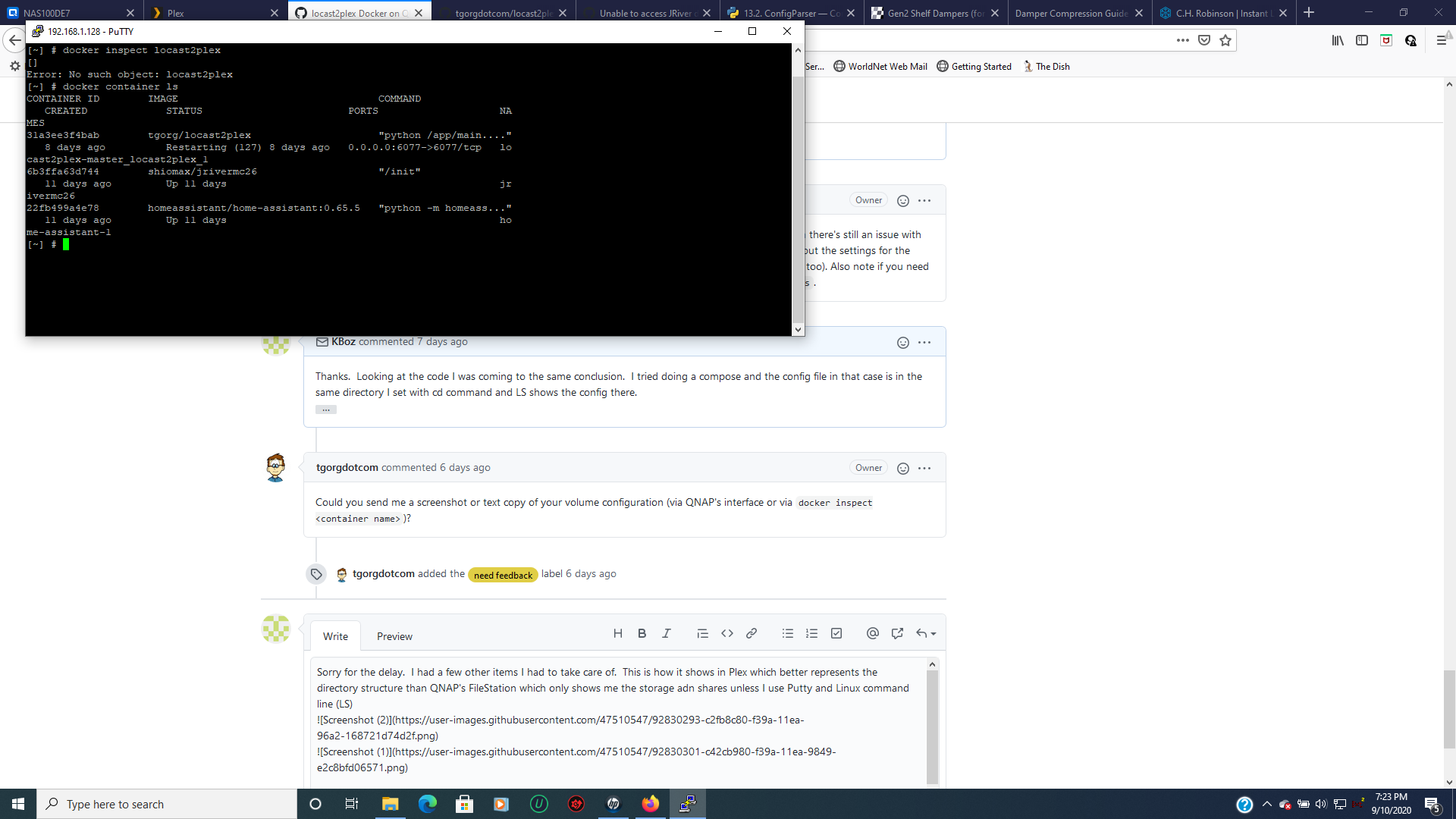
Hmmm. If you're getting the same error in the log, "ConfigParser.NoSectionError: No section: 'main'", then there's still an issue with grabbing the config file from the host. I think the command docker inspect <container name> will list out the settings for the container for me to verify (or if there's a way to get that info from a QNAP web interface that would work too). Also note if you need to find the name of the container you're running from a command line, you can use docker container ls.
Thanks. Looking at the code I was coming to the same conclusion. I tried doing a compose and the config file in that case is in the same directory I set with cd command and LS shows the config there.
Sent from my iPhone
On Sep 2, 2020, at 8:51 PM, Thomas Gorgolione [email protected] wrote:
Hmmm. If you're getting the same error in the log, "ConfigParser.NoSectionError: No section: 'main'", then there's still an issue with grabbing the config file from the host. I think the command docker inspect
will list out the settings for the container for me to verify (or if there's a way to get that info from a QNAP web interface that would work too). Also note if you need to find the name of the container you're running from a command line, you can use docker container ls. — You are receiving this because you commented. Reply to this email directly, view it on GitHub, or unsubscribe.
Could you send me a screenshot or text copy of your volume configuration (via QNAP's interface or via docker inspect <container name>)?
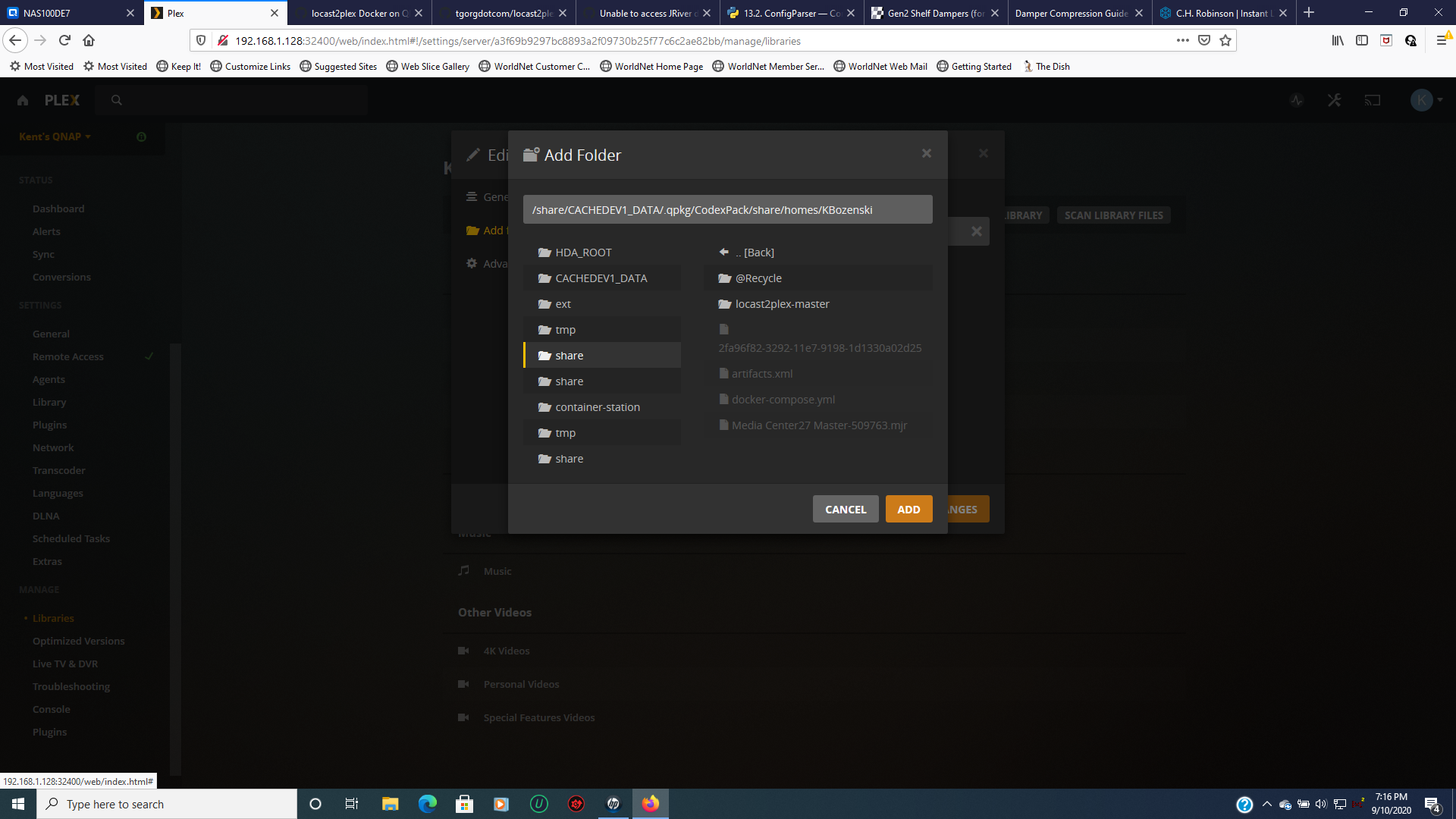
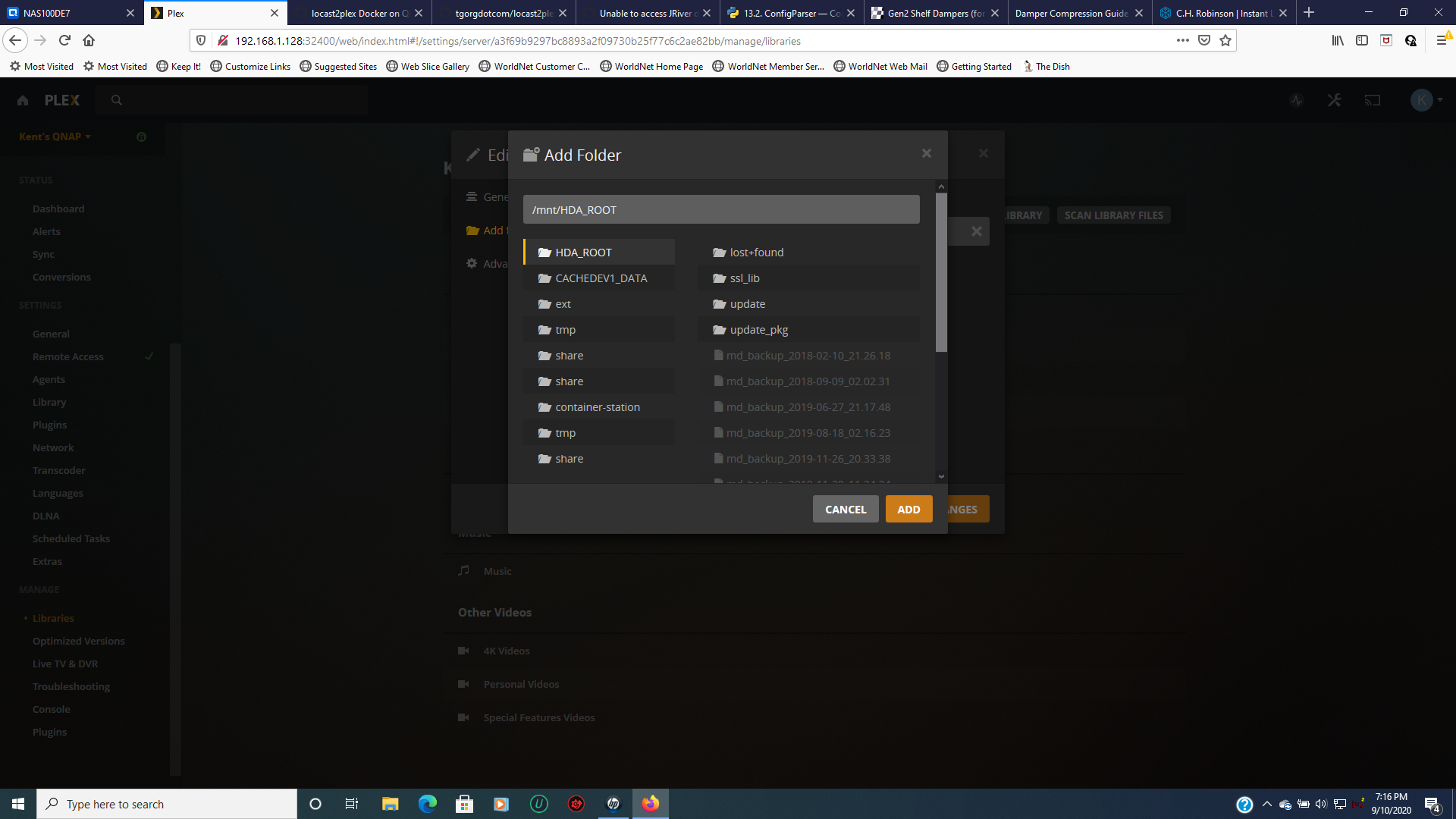
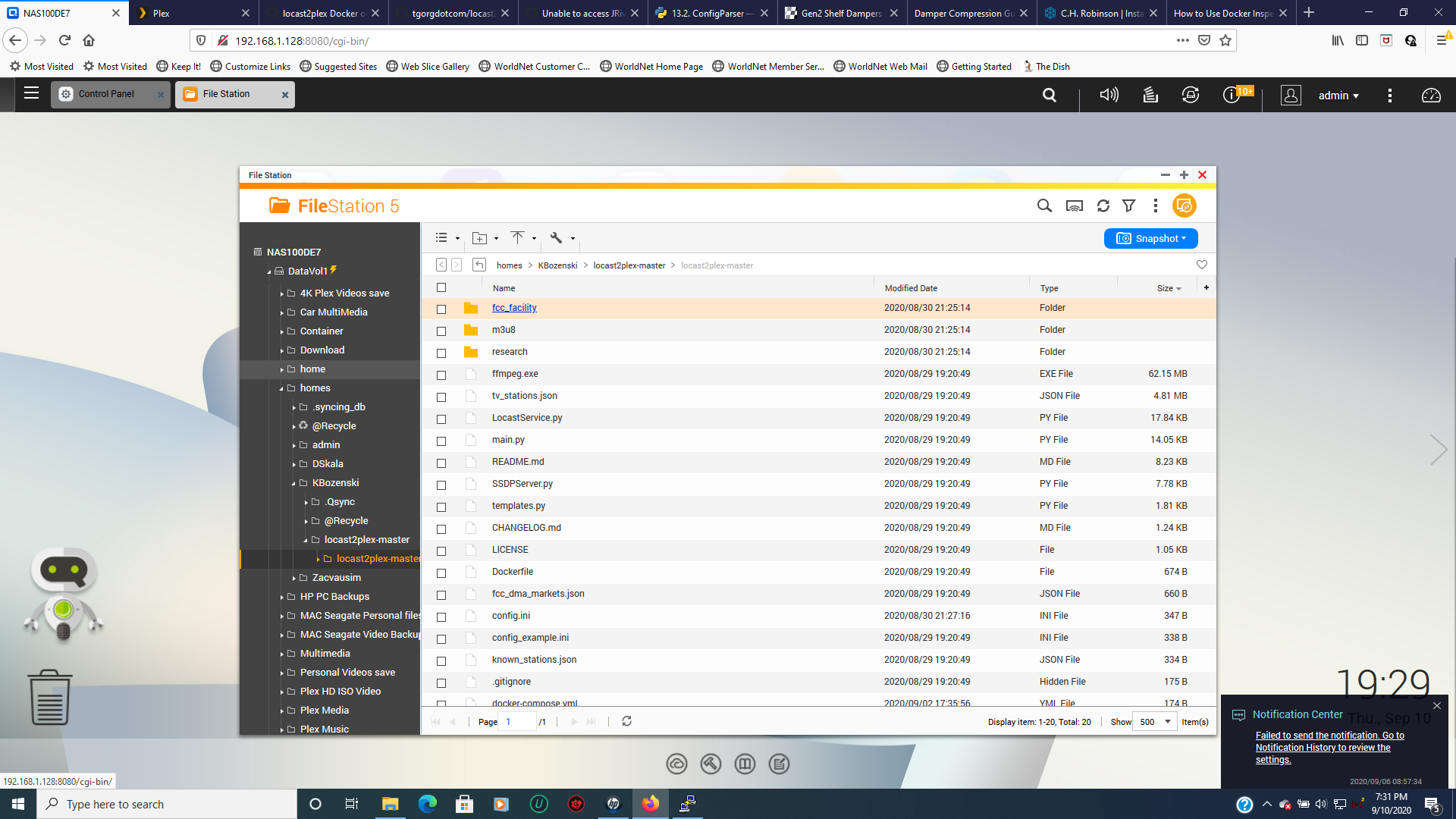
Sorry for the delay. I had a few other items I had to take care of. This is how it shows in Plex which better represents the directory structure than QNAP's FileStation which only shows me the storage adn shares unless I use Putty and Linux command line (LS)
[~] # docker inspect tgorg/locast2plex [ { "Id": "sha256:af6609c3f1acfaf6cf642d2054531992125cbe8575300d2811f31c15710c80b5", "RepoTags": [ "tgorg/locast2plex:latest" ], "RepoDigests": [ "tgorg/locast2plex@sha256:18506f3c43c75237dd3ff8086da54b52f1bd5dd9982b8607da4fc148e126ec87" ], "Parent": "", "Comment": "", "Created": "2020-08-30T00:23:35.867843918Z", "Container": "c655e6cd9e0d0fdbb6aa160127dda7f8ea5edf905e7cf53c1f2fc5c53b120510", "ContainerConfig": { "Hostname": "c655e6cd9e0d", "Domainname": "", "User": "", "AttachStdin": false, "AttachStdout": false, "AttachStderr": false, "Tty": false, "OpenStdin": false, "StdinOnce": false, "Env": [ "PATH=/usr/local/sbin:/usr/local/bin:/usr/sbin:/usr/bin:/sbin:/bin", "LD_LIBRARY_PATH=/usr/local/lib:/usr/local/lib64", "username=username", "password=password", "external_addy=0.0.0.0", "external_port=6077", "debug=false" ], "Cmd": [ "/bin/sh", "-c", "#(nop) ", "ENTRYPOINT ["python" "/app/main.py" "2>&1"]" ], "Image": "sha256:990ee8d7c2d159b37530c7b8e3c25775597180a01efbbe17c78651396da96095", "Volumes": null, "WorkingDir": "", "Entrypoint": [ "python", "/app/main.py", "2>&1" ], "OnBuild": null, "Labels": { "maintainer": "Thomas Gorgolione [email protected]" } }, "DockerVersion": "19.03.8", "Author": "", "Config": { "Hostname": "", "Domainname": "", "User": "", "AttachStdin": false, "AttachStdout": false, "AttachStderr": false, "Tty": false, "OpenStdin": false, "StdinOnce": false, "Env": [ "PATH=/usr/local/sbin:/usr/local/bin:/usr/sbin:/usr/bin:/sbin:/bin", "LD_LIBRARY_PATH=/usr/local/lib:/usr/local/lib64", "username=username", "password=password", "external_addy=0.0.0.0", "external_port=6077", "debug=false" ], "Cmd": null, "Image": "sha256:990ee8d7c2d159b37530c7b8e3c25775597180a01efbbe17c78651396da96095", "Volumes": null, "WorkingDir": "", "Entrypoint": [ "python", "/app/main.py", "2>&1" ], "OnBuild": null, "Labels": { "maintainer": "Thomas Gorgolione [email protected]" } }, "Architecture": "amd64", "Os": "linux", "Size": 173962439, "VirtualSize": 173962439, "GraphDriver": { "Data": { "LowerDir": "/share/CACHEDEV1_DATA/Container/container-station-data/lib/docker/overlay2/ced7f4e9b331ccf7b90300d86a339a05c18be22bd02d002c43147ce82883730d/diff:/share/CACHEDEV1_DATA/Container/container-station-data/lib/docker/overlay2/9f5e271695d616701336bdb6186534bed8b927b8598dbd17ae3cca53eea171f6/diff:/share/CACHEDEV1_DATA/Container/container-station-data/lib/docker/overlay2/ffbfad925a7f8fad76dce3bce96a2327afcd913a7b5ec69d4b3dff1f054ab224/diff:/share/CACHEDEV1_DATA/Container/container-station-data/lib/docker/overlay2/9f3c98829710c9b88a89b15f4f073c18e48f80236c364cb09101b4f52be1aeba/diff:/share/CACHEDEV1_DATA/Container/container-station-data/lib/docker/overlay2/78dc08274a0f6f5604dc745024c0a6be5c325b61352f99cfb830dbc5075eed03/diff:/share/CACHEDEV1_DATA/Container/container-station-data/lib/docker/overlay2/6864d01deac464f5c6411bb4cb61ac0ba1b6663914faa704264fa8efaf992171/diff:/share/CACHEDEV1_DATA/Container/container-station-data/lib/docker/overlay2/35d30c0c39a57ffa3f3a0d3b7bf6f73510bf2dca8806e2031eaf38fa8cf24f4d/diff:/share/CACHEDEV1_DATA/Container/container-station-data/lib/docker/overlay2/a3e584f30dc4a07321e2c1baac55632922c001f58764769fd24f90fc4ecb61ab/diff:/share/CACHEDEV1_DATA/Container/container-station-data/lib/docker/overlay2/b18f23090d4764a714894552e5dfa758e0caf100504dfcddfee0ce231352d88d/diff:/share/CACHEDEV1_DATA/Container/container-station-data/lib/docker/overlay2/6851a4fffcd5de8d986a76a2b713f5ecac1674115c2ca42bfa0ca0d39df917c1/diff:/share/CACHEDEV1_DATA/Container/container-station-data/lib/docker/overlay2/a35f38def23ccd6b571b4795324ebf970514c87aff57f41bc54a24eca94c350d/diff:/share/CACHEDEV1_DATA/Container/container-station-data/lib/docker/overlay2/374736a9b99ccf7ef6cdac8bcc7b919b43edc44ff5c11560899a06b5e4752f64/diff", "MergedDir": "/share/CACHEDEV1_DATA/Container/container-station-data/lib/docker/overlay2/1fbf3dc9985181817e2ca03b008b298385af26ed6e365101491c5990de6f482f/merged", "UpperDir": "/share/CACHEDEV1_DATA/Container/container-station-data/lib/docker/overlay2/1fbf3dc9985181817e2ca03b008b298385af26ed6e365101491c5990de6f482f/diff", "WorkDir": "/share/CACHEDEV1_DATA/Container/container-station-data/lib/docker/overlay2/1fbf3dc9985181817e2ca03b008b298385af26ed6e365101491c5990de6f482f/work" }, "Name": "overlay2" }, "RootFS": { "Type": "layers", "Layers": [ "sha256:3e207b409db364b595ba862cdc12be96dcdad8e36c59a03b7b3b61c946a5741a", "sha256:cb0cdee81ded49a4fec20425138f6081d6c08b8d5931acd1fcaff76d049f8160", "sha256:24df57e0236cd4c7e3a95b32e57d2a2f67aca745c994e02b3541a81f40f5cefd", "sha256:1f525272dc7d466b9a702c0b588c75519a2dadd69b3dbcd87dd745276a9c92fd", "sha256:76796ad9aa54b8666499fccb8e69a3f528b48b3840319073b8dafa9b526228f8", "sha256:ab5fabe8db2e88297842d6b7f4f066280f1ee664a8407e8c7a6f9006d7dade8b", "sha256:be5ce5993b3296e2c781fb167860eec5e4ef56379e48170e1c3232defa1f4b6d", "sha256:3d56e60f62f2770ed76fdcc7a05185b25669998711b326f83c6c2fb32e49b4d0", "sha256:5ead83fbc0083d31cb704dbf6b534399ec0787317b21f55c70c60bb84bfe34f5", "sha256:9e97d79d71f8910d62f1355606d95f9fe1c5d4931ca83aa917422ddabc5d56bf", "sha256:332bb90f552d17e6302ddf75a1279ea78774651fedbb2710d3a4b48d491704ed", "sha256:fa3f309f3b6635e0b1d11b465b8d76f6f16c954b0aba11e61c29d3984cc050a5", "sha256:b4c2f1092bc34f76904bf42413099baa9daa1c727c8370218f20445b9b401031" ] }, "Metadata": { "LastTagTime": "0001-01-01T00:00:00Z" } } ]