

 rxhanson
Improvement recommendation: Snap layout/Snap panel
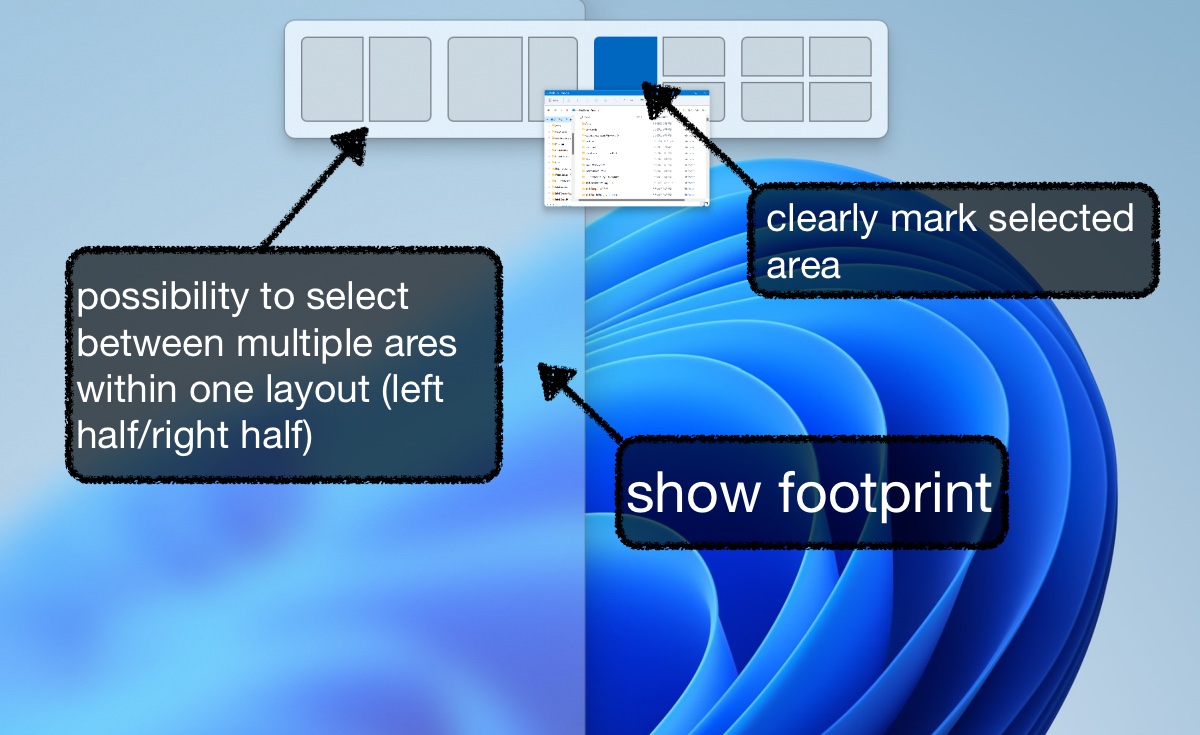
1) Show footprint When a window is dragged over a snap layout of the snap panel, no footprint is currently displayed. In contrast, when a window is moved to one side, a footprint is displayed.
Suggestion: Previewing the selected snap layout on the screen can improve self-descriptiveness. An option to display this footprint here would be desirable.
2) Selection of the snap layout
When a window is moved to a side and the footprint is displayed, it is colored gray transparent. However, the snap layouts in the snap panel mark a window adjustment action white transparent. The area of the screen that is not covered by the window is grayed out in the snap layouts in the snap panel. With the knowledge of footprints when dragging windows, I had assumed that the grayed out portion represented the preview of how the window would be adjusted. However, the opposite was true and caused confusion (conformity with user expectation violated). When the cursor is moved over a snap layout, the selected snap layout is highlighted in blue in the snap panel. This not only colors the white transparent area that represents the preview, but also a frame around that snap layout. This reinforces the assumption that the blue area is not the preview, but rather the background.
Suggestion:
In the snap layouts in the snap panel, highlight only the part that represents the preview (like the window is snapped when it is released). Do not highlight the frame around the snap layout. Also allow multiple actions in one snap layout, e.g.: 2x2 layout. The cursor can be moved over the different areas (top left, top right, bottom left, bottom right). The selected area is highlighted in blue, all other areas remain grey. The window will adjust accordingly, depending on the selected area in the snap layout of the snap panel. This is a similar behaviour that Windows 11 implemented in the 22H2 update:
3) Customize the size of the snap panel
The size of the snap panel should be customizable. Especially if 2) is implemented, the snap layouts should be displayed larger.

Thanks for the detailed feedback. I'll see what I can do next time I'm working on adding new Snap Panel functionality.
I'll certainly add the footprint, but the other parts of this are nontrivial. To get something like this, you'd be sacrificing some ease of customization or configuration any way that this is implemented.

With pleasure! What do you mean by sacrificing some ease of customization or configuration? 😄 I would rather argue that the ease of use increases 😄
What do you mean by sacrificing some ease of customization or configuration? 😄
Discussing this in detail would be pretty lengthy, so I'll try to keep it short. The other big factor at stake here is the amount of time it would take to make something like this (copying Windows and allowing you to select any action you want). Right now, it's customizable in that you can pick the window sizes you want. Adding the Windows functionality for every window size is a serious time investment, so rather I could just copy what Windows is doing and create a small subset that behaves that way. Even this route takes time, and I have to be sure that this is the right path for the app.
I would rather argue that the ease of use increases 😄
I have no argument against that, rather balancing time on the "right" features is the main issue.
That sounds understandable. Then maybe I would suggest to show only the footprint and make small changes to the snap lay-out thumbnails in the snap panel. Would resizing the snap panel be complicated to implement? Sorry for the question, I'm coming more from the usability and UX side. PS: my comments are also just suggestions I noticed while using it. I really like using rectangle pro and would like to help you improve it even more :)
I definitely appreciate the feedback, and it helps with how I internalize/prioritize things.
Then maybe I would suggest to show only the footprint and make small changes to the snap lay-out thumbnails in the snap panel.
Footprint is the first step, then figuring out the way to better portray the thumbnails would be next. I tend to cycle through the feature sets in Pro since there is a lot, and focus on one feature set at a time, so it's a matter of when I get back to this part.
Would resizing the snap panel be complicated to implement?
The limiting factor here is the icons. There's like 70 icons, and when I first created Rectangle I made all the icons really small. For the snap panel, I had to redraw them to be larger since scaling them up didn't look good, and I would have to redraw them again to account for larger snap panel sizes. I scripted most of it to use Pixelmator Pro to automatically scale it up, and you'll probably notice some artifacts from that in a number of the icons. Ideally, I would programmatically generate most of those images on the fly, but that would take some time, too. I'd have to dig through and see how much effort this would actually be.