

 ricklupton
Is it Possible end a flow in a waypoint instead of a target?
I want to model the following situation:
- I have a certain source, 100 elements.
- I have several waypoints between the source and the target.
- The elements reaching are much less than the ones entering from the source.
In the real world example provided (fruits and farms) this was handle with the Compost part, but is it possible to limit the flow and end it in a certain waypoint instead of a target?
I believe this flexibility will be much useful since there are lots of situations where some of the input is lost or even with datasets with missing data (specially in the target label).
I didn't find a proper example of this behavior anywhere in the docs.

Hi @ELC, sorry for the slow reply! I missed your comment somehow.
That's an interesting question; I think I see what you mean. Do you have some example data easily available -- might be easier to discuss with that?

Yes, I've prepared an example based on the System boundaries tutorial (this is the most related tutorial).
Imagine we have a local production that can be consumed locally or exported, but in the same Sankey it is desired to map all the track for the locally cosumed food while still being able to see how much went to exportation, but no information about the destination of the exportation is known.
The data use is the following (modified version of the tutorial dataset):
source,target,type,value,distribuitor farm1,Mary,apples,5,local farm1,James,apples,3,local farm2,Fred,apples,10,local farm3,Fred,bananas,10,local farm2,Susan,bananas,5,local farm3,,apples,10,exported farm4,Susan,bananas,1,local farm5,Susan,bananas,1,local farm6,Susan,bananas,1,local
Here we have a missing value for the 6th row in the 2nd columns since it was exported we have no information about who will be the consumer.
Modiying the code of the tutorial like so:
from floweaver import *

size = dict(width=570, height=300)

farms_with_other = Partition.Simple('source',
                                    [ 'farm1',
                                      'farm2',
                                      'farm3',
                                      ('other', ['farm4', 'farm5', 'farm6']),
                                    ])

customers_by_name = Partition.Simple('target', flows.target.unique().tolist())
distribuitor_by_type = Partition.Simple('distribuitor', flows.distribuitor.unique().tolist())
fruit_by_type = Partition.Simple('type', flows.type.unique().tolist())

nodes = {
    'farms': ProcessGroup(flows.source.unique().tolist(), partition=farms_with_other),
    'customers': ProcessGroup(flows.target.unique().tolist(), partition=customers_by_name),
    'distribuitor': Waypoint(partition=distribuitor_by_type),
    'type': Waypoint(partition=fruit_by_type),
}

ordering = [
    ['farms'],
    ['type'],
    ['distribuitor'],
    ['customers'],
]

bundles = [
    Bundle('farms', 'customers', waypoints=['type', 'distribuitor']),
]

sdd = SankeyDefinition(nodes, bundles, ordering)
weave(sdd, flows).to_widget(**size)
We end up with this:
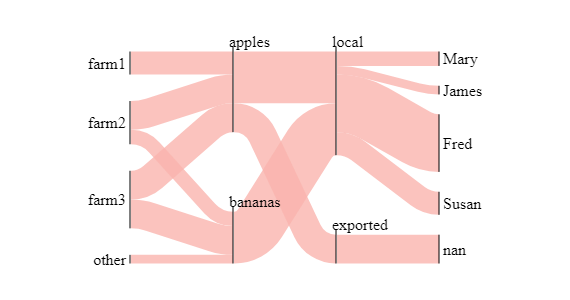
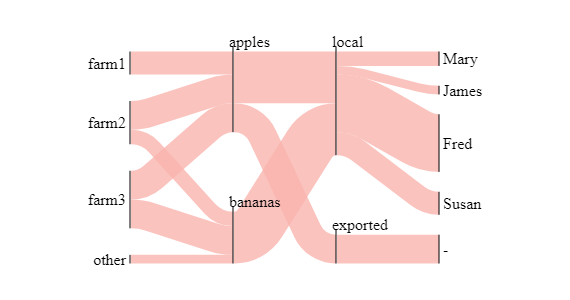
This could be improve to hide the nan with something like a - like this:
My temporary solution was to "repeat" the last known value like this:
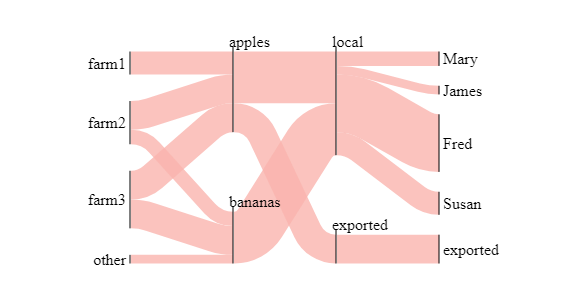
This occured to me when dealing with 10 waypoints so if the "lost" occur in the first waypoint, I repeated that value to all the following waypoints and that generates lots of repetition, noisy and ruin the whole visualization. To solve this I just cut the representation at that point and work with subsets of the original data.
What I would like to have is something like this:
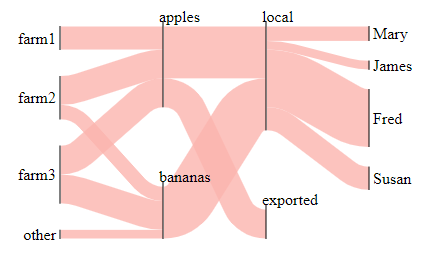
Is this possible in a way that I'm not aware of?
Providing a solution to this could help in the following scenarios:
- Several flows with one having more steps than another
- Unknown data for some flows but not for others (this case)
Thanks for the concrete example. I think I'd work with this slightly differently -- it's not doing what you want in your first diagram because you've included the "exported" target within the "customers" ProcessGroup. If you don't want it to appear there, just don't include it:
nodes = {
    'farms': ProcessGroup(['farm%d' % (i + 1) for i in range(6)], partition=farms_with_other),
    'customers': ProcessGroup(['Mary', 'James', 'Fred', 'Susan'], partition=customers_by_name),
    'distribuitor': Waypoint(partition=distribuitor_by_type),
    'type': Waypoint(partition=fruit_by_type),
}
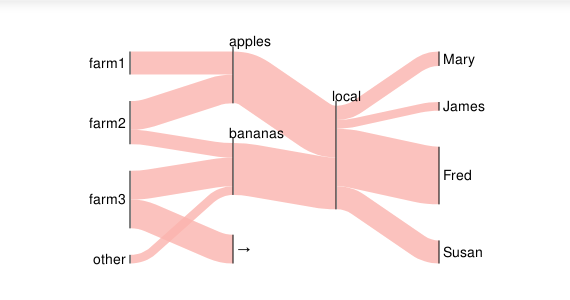
Because you've only specified one Bundle, from "farms" to "customers", the exported flow is shown without any detail. But if you want you can make it go through the Waypoints, as shown later on in the tutorial in the /Controlling Elsewhere flows/ section:
bundles = [
    Bundle('farms', 'customers', waypoints=['type', 'distribuitor']),
    Bundle('farms', Elsewhere, waypoints=['type', 'distribuitor'])    # new bundle
]
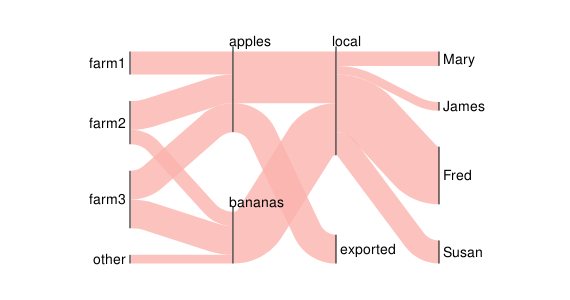
Which looks like what you wanted?
This occured to me when dealing with 10 waypoints so if the "lost" occur in the first waypoint, I repeated that value to all the following waypoints and that generates lots of repetition, noisy and ruin the whole visualization. To solve this I just cut the representation at that point and work with subsets of the original data.
Sorry I still don't quite see what you mean by this. In the example above, the "lost" value is the target. What does the sequence of waypoints represent in your case?
Excelent! Even after reading the tutorial it wasn't clear to me that this was possible by adding another bundle, I would suggest to add an example like this where the other bundles ends before the main bundle so no one would be mislead as I was.
Sorry I still don't quite see what you mean by this. In the example above, the "lost" value is the target. What does the sequence of waypoints represent in your case?
I can't provide much details but I was working with an flow that involves time so not all the products reach the end yet so to reflect that in the Sankey we have to assume that the flow ended in a waypoint instead of the target.