
workrave
 workrave copied to clipboard
 rcaelers
Break warning window grabs keyboard focus on Wayland
This bug was originally reported by Matijs van Zuijlen on the Debian bug tracker: https://bugs.debian.org/cgi-bin/bugreport.cgi?bug=980873
"I recently switched from X to Wayland and have noticed that the windows that pop up to warn the user to take a break now grab the keyboard focus. This is quite annoying since they of course tend to pop up while I am typing, which means a random number of key strokes are sent into nothingness.
This generally means I have to switch back to the previous application, finish whatever I was typing, switch back to Workrave, wait for the break to finish, and then again switch back to the previous application."
Expected behavior
"The warning window should instead leave the focus where it was, allowing the user to finish any ongoing typing before taking a break."
Linux:
- Distribution: Debian
- Distribution Version: unstable
- Desktop Environment: Gnome
- Workrave Version 1.10.44

Indeed. I can easily reproduce this problem. Workrave should open a top level window that does not take the focus when it is shown on the screen. This appears to work fine when X11 is used; but fails when Wayland is used.
As far as I can tell from examining the source code of Mutter (Gnome's window manager), it is not possible to open a top level window that does not take the focus when Wayland is used. So I am now investigating a number of workarounds (e.g. using a popup window instead of a top level window, and using a Gnome Shell extension to show the break warning window).
As a workaround you could force Workrave to use the X11 backend of Gdk: GDK_BACKEND=x11 workrave

Thanks for looking into this @rcaelers. I am now succesfully using GDK_BACKEND=x11 workrave as a workaround.

If Wayland truly can't open a stay-on-top window without making it the active window, that would mess with a basic functionality of various programs including the stay-on-top window setting in KDE and so on. If that really isn't feasible, it seems a ticket should be opened to get Wayland to fix this limitation.
Anyway, can anyone link to or explain instructions for how to use the GDK_BACKEND=x11 workrave workaround, especially while still having autostart for WorkRave?
It seems to me that workrave-gnome should somehow be set to do this workaround automatically until a Wayland solution is found. It wouldn't cause any problem for anyone already on x11 in general, right?

@wolftune I think I just edited ~/.config/autostart/workrave.desktop and added the environment variable to the Exec line.
Well, only partial success, still need help with this.
running GDK_BACKEND=x11 workrave right from terminal while workrave is not working, that works perfectly. Behavior is correct. However, I have not succeeded at getting this into auto-starting. I'm on Ubuntu 22.04, and no longer is gnome-tweaks and autostart the right set up. Instead, the setup is to install gnome-shell-extensions and workrave-gnome and turn on the extension. See https://github.com/rcaelers/workrave/issues/333#issuecomment-1319077180
So, the extension automatically runs workrave, it's not using a file in ~/.config/autostart/
I tried env GDK_BACKEND=x11 workrave and just GDK_BACKEND=x11 workrave both within /usr/share/applications/workrave.desktop and neither of those worked. I'm guessing that the workrave-gnome extension is run from some other place. Any help anyone?
I did notice an important detail about the wayland failing:
On Wayland, the prompt window does not stay on top
So, it's not just that it captures the input, it also is not a stay-on-top window. Pushing alt-Tab goes to another window and the prompt is hidden in the background. I imagine this means the setup for Wayland in Workrave is wrong. Surely Wayland has stay-on-top functionality, right? I don't know, but I imagine that if the prompt window isn't set for stay-on-top it also makes sense that it is just a normal window which grabs input when it opens. It doesn't appear to be using the proper window settings for Wayland. So, just maybe there is a proper Wayland setting for stay-on-top window that does not grab activity?
Update: I got the workaround working enough. I had to turn off the workrave-gnome extension. I added back the workrave autostart in gnome tweaks. Then, I edited ~/.config/autostart/workrave.desktop and put in env GDK_BACKEND=x11 workrave
That succeeds in getting a usable workrave. The window is successfully a stay-on-top without grabbing the input. The two quirks to this approach: 1. Accessing the menu to adjust settings and such is a right-click on the status-bar icon, and the menu shows up in strange random places on the screen, far from the icon. 2. There's no way to get a status-bar view of the timers.
The workrave-gnome extension works great for the status-bar but badly for the prompt window. I can get everything perfect for now (though still as workarounds). After logging in with the adjusted autostart with custom env, then I can turn on the extension and get the better applet visible. So, everything functioning! BUT… after logging out and back in, I get a warning:
Workrave failed to start Is Workrave already running?
So, I can't get the extension and the env-adjusted autostart both set to work at once. Unless I want to turn off and on the extension each time I log in or out, I have to accept not having the nicer applet with timers in the status bar for now. I'm sticking with the autostart to have the better window that doesn't grab input.
Workrave 1.11 beta 2 has an option in the preferences "Force the use of X11 on Wayland (requires restart of Workrave)"
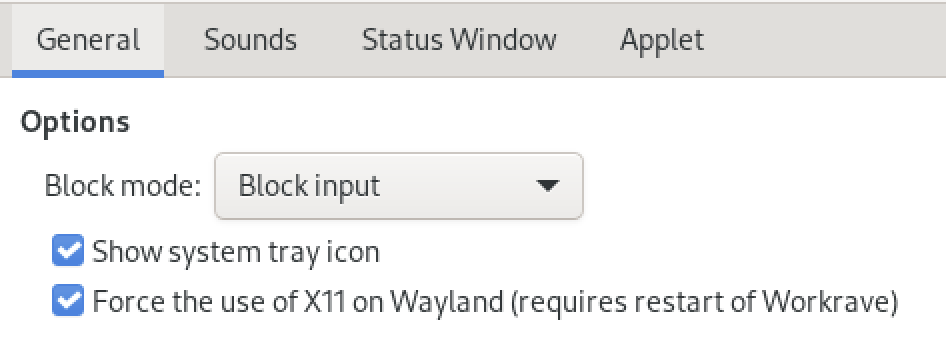
Gnome's Wayland compositor 'Mutter' does not support always-on-top windows. Gtk4 even removed the API function gtk_window_set_keep_above() because it is not supported by Wayland (source: https://docs.gtk.org/gtk4/migrating-3to4.html). Wayland also doesn't support absolute window positioning (use for Break windows) and Pointer/Mouse grabs (used by Workrave to lock screen). So Workrave on Wayland is somewhat crippled. I recommend this 'Force X11' for now.
Any idea about whether Mutter has issues for supporting always-on-top? I'd use this as a reason to push for support there. And it's at the Mutter level? So, other Wayland compositors might work better?
@wolftune Could you please post your complete workrave.desktop here?
I'm thinking of adding your GDK_BACKEND=x11 workrave work-around to the Debian package to make sure that it works okay on wayland in the upcoming stable release (in case 1.11 comes out after the freeze).
@fmarier
It's on a computer I don't have as easy access to. If it really really helps to get the full thing, I can do it. But here is the exact key line in complete:
Exec=env GDK_BACKEND=x11 workrave
Nothing else was changed.