

 prisma
`__dirname is not defined` when generating PrismaClient to custom location, w/ SvelteKit
Bug description
Prisma seems to have issues running with SvelteKit when generating the client to some other location other than the default.
When running a production build for the app, the following error will show:
ReferenceError: __dirname is not defined in ES module scope
This file is being treated as an ES module because it has a '.js' file extension and '/<sveltekit-project-dir>/package.json' contains "type": "module". To treat it as a CommonJS script, rename it to use the '.cjs' file extension.
    at file:///<sveltekit-project-dir>/build/server/chunks/2-6f7b7120.js:19960:27
    at file:///<sveltekit-project-dir>/build/server/chunks/2-6f7b7120.js:31969:3
    at ModuleJob.run (node:internal/modules/esm/module_job:198:25)
    at async Promise.all (index 0)
    at async ESMLoader.import (node:internal/modules/esm/loader:385:24)
    at async Promise.all (index 1)
    at async render_page (file:///<sveltekit-project-dir>/build/server/index.js:2382:19)
    at async resolve (file:///<sveltekit-project-dir>/build/server/index.js:2872:22)
    at async respond (file:///<sveltekit-project-dir>/build/server/index.js:2910:22)
    at async Array.ssr (file:///<sveltekit-project-dir>/build/handler.js:19060:3)
Notes:
- This issue does not happen when running
vite devorvite previewfor some reason. Prisma works as expected under those conditions. The error only happens when running the build output directly with node. - If you remove the
outputoption from the generator, then import the prisma client from '@prisma/client', Prisma will run as expected - but unfortunately that doesn't meet my needs. - Reason for this use case: I need to connect to multiple schemas, and I want the benefit of prisma's generated types for both. As far as I know, the only way to connect to multiple schemas is to generate multiple prisma clients - which in turn means I can't use '@prisma/client' because that package will only point to one client at a time. (When generating multiple clients to the default location, they will just overwrite each other)
How to reproduce
See my test repo where I've reproduced the error: https://github.com/McGaelen/prisma-sveltekit
Expected behavior
No error and Prisma runs as expected.
Prisma information
generator client {
  provider = "prisma-client-js"
  output = "../node_modules/custom-client-location"
}
...(the rest is an exact copy of https://www.prisma.io/docs/getting-started/quickstart)
import {PrismaClient} from 'custom-client-location' // <- importing from custom location specified in prisma.schema
const prisma = new PrismaClient()
Environment & setup
- OS: macOS, CentOS
- Database: PostgreSQL, SQLite, but probably all of them
- Node.js version: v16.15.1
Prisma Version
prisma                  : 4.4.0
@prisma/client          : 4.4.0
Current platform        : darwin-arm64
Query Engine (Node-API) : libquery-engine f352a33b70356f46311da8b00d83386dd9f145d6 (at node_modules/@prisma/engines/libquery_engine-darwin-arm64.dylib.node)
Migration Engine        : migration-engine-cli f352a33b70356f46311da8b00d83386dd9f145d6 (at node_modules/@prisma/engines/migration-engine-darwin-arm64)
Introspection Engine    : introspection-core f352a33b70356f46311da8b00d83386dd9f145d6 (at node_modules/@prisma/engines/introspection-engine-darwin-arm64)
Format Binary           : prisma-fmt f352a33b70356f46311da8b00d83386dd9f145d6 (at node_modules/@prisma/engines/prisma-fmt-darwin-arm64)
Format Wasm             : @prisma/prisma-fmt-wasm 4.4.0-66.f352a33b70356f46311da8b00d83386dd9f145d6
Default Engines Hash    : f352a33b70356f46311da8b00d83386dd9f145d6
Studio                  : 0.474.0

I have the error ReferenceError: __dirname is not defined in ES module scope as well in SvelteKit but not with a custom location.
ReferenceError: __dirname is not defined in ES module scope
This file is being treated as an ES module because it has a '.js' file extension and '/home/dsp/git/package.json' contains "type": "module". To treat it as a CommonJS script, rename it to use the '.cjs' file extension.
    at file:///home/dsp/git/build/server/chunks/db-46c26d2c.js:19959:27
    at file:///home/dsp/git/build/server/chunks/db-46c26d2c.js:31968:3
    at ModuleJob.run (node:internal/modules/esm/module_job:193:25)
    at async Promise.all (index 0)
    at async ESMLoader.import (node:internal/modules/esm/loader:533:24)
    at async Promise.all (index 0)
    at async render_page (file:///home/dsp/git/build/server/index.js:1475:19)
    at async resolve (file:///home/dsp/git/build/server/index.js:1965:22)
    at async Object.handle (file:///home/dsp/git/build/server/chunks/hooks.server-62fe1b4e.js:3:20)
    at async respond (file:///home/dsp/git/build/server/index.js:2003:22)

I'm getting this error too, but with solid-start.
file:///<path_to_project>/dist/server.js:36641
        import_path2.default.join(__dirname, "../query-engine-darwin");
                                  ^

ReferenceError: __dirname is not defined in ES module scope
This file is being treated as an ES module because it has a '.js' file extension and '<path_to_project>/package.json' contains "type": "module". To treat it as a CommonJS script, rename it to use the '.cjs' file extension.
    at file:///<path_to_project>/dist/server.js:36641:28
    at file:///<path_to_project>/dist/server.js:52455:3
    at ModuleJob.run (node:internal/modules/esm/module_job:193:25)
    at async Promise.all (index 0)
    at async ESMLoader.import (node:internal/modules/esm/loader:530:24)
Would be awesome if this would be fixed!

Can confirm this is an issue we are affected with (Sveltekit + Prisma fails on node-adapter). Probably related to https://github.com/prisma/prisma/issues/5030#issuecomment-1347116391?

I also have the same error, using Sveltekit + Prisma on node-adapter.
Packages
"@sveltejs/adapter-node": "^1.2.3",
"@prisma/client": "^4.12.0",
"prisma": "^4.12.0"
Steps
- Using Sveltekit-Node Adapter
- pnpm run build
- Copy .env, prisma configure, package.json, pnpm-lock.yaml
- Go to build folder and run pnpm i && pnpx prisma generate
- Run node -r dotenv/config .
ReferenceError: __dirname is not defined in ES module scope
This file is being treated as an ES module because it has a '.js' file extension and '/Users/alienhack/Desktop/works/NageInfo/build/package.json' contains "type": "module". To treat it as a CommonJS script, rename it to use the '.cjs' file extension.
    at requireLibrary (file:///Users/alienhack/Desktop/works/NageInfo/build/server/chunks/db-880d6739.js:184:2590)
    at file:///Users/alienhack/Desktop/works/NageInfo/build/server/chunks/db-880d6739.js:405:7
    at requireClient$1 (file:///Users/alienhack/Desktop/works/NageInfo/build/server/chunks/db-880d6739.js:1400:3)
    at requireClient (file:///Users/alienhack/Desktop/works/NageInfo/build/server/chunks/db-880d6739.js:1411:7)
    at file:///Users/alienhack/Desktop/works/NageInfo/build/server/chunks/db-880d6739.js:1416:21
    at ModuleJob.run (node:internal/modules/esm/module_job:193:25)
    at async Promise.all (index 0)
    at async ESMLoader.import (node:internal/modules/esm/loader:530:24)
    at async file:///Users/alienhack/Desktop/works/NageInfo/build/server/index.js:2311:42
    at async Promise.all (index 1)
prisma.schema
generator client {
  provider = "prisma-client-js"
}

datasource db {
  provider = "sqlserver"
  url      = env("DATABASE_URL")
}
.
.
.
db.ts
import { PrismaClient } from '@prisma/client';

const db = new PrismaClient();
export default db;
Environment & setup
OS: MacOS 13.2.1 (22D68)
Database: MSSql
Node.js version: 18.15.0
Prisma Version
4.12.0

FWIW we have since migrated off of SvelteKit + Prisma as being locked in to Vercel for deployments did not meet our requirements.
FWIW we have since migrated off of SvelteKit + Prisma as being locked in to Vercel for deployments did not meet our requirements.
@feynmanliang I got a hacky solution from other thread that works
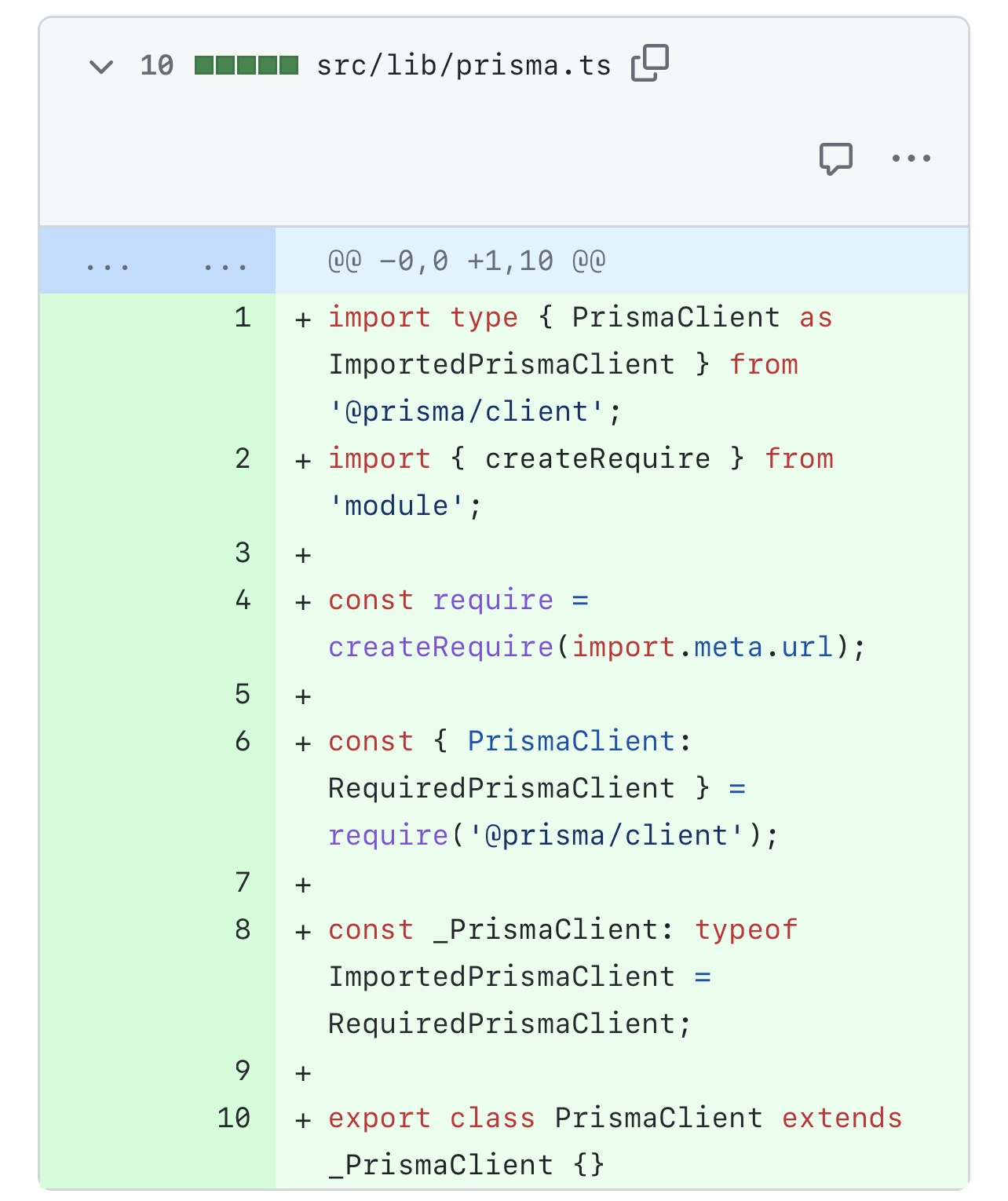
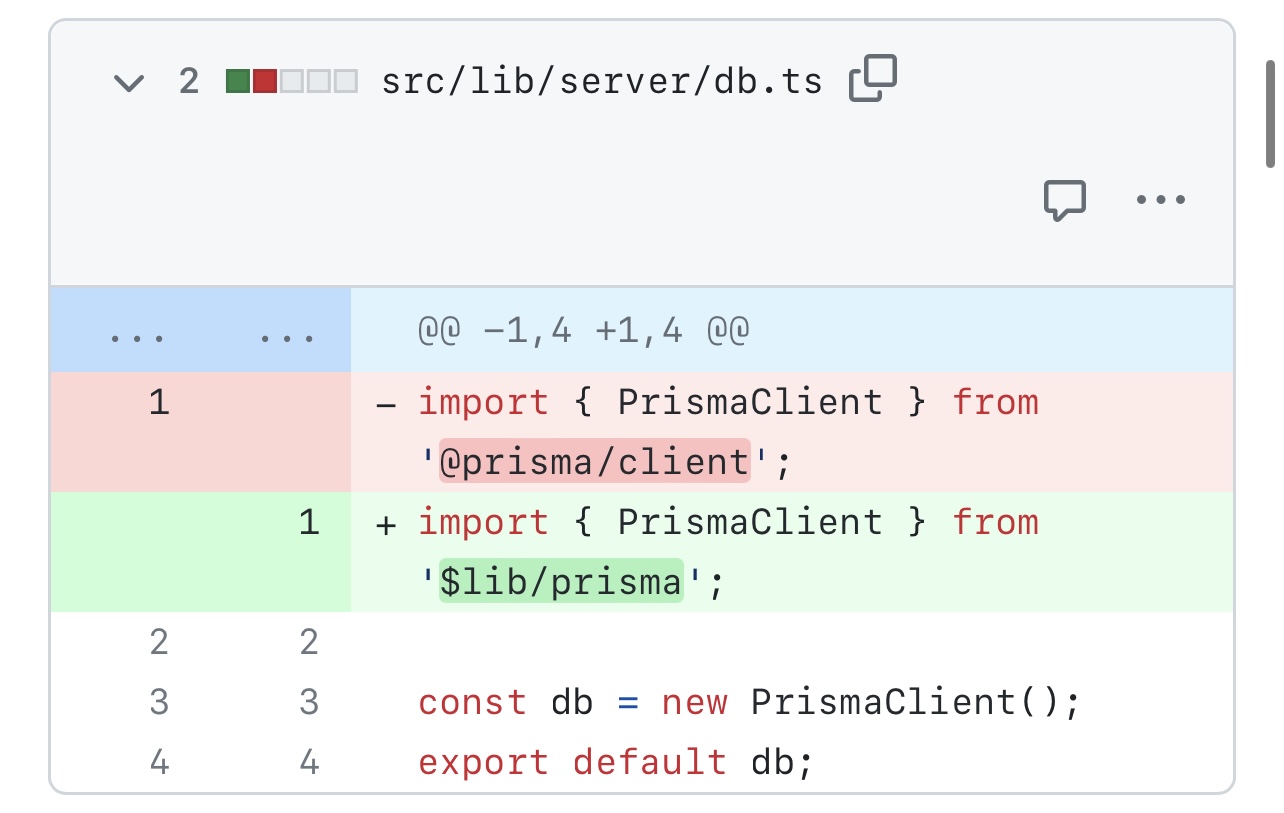
Linking the solution that @AlienHack mentioned: https://github.com/prisma/prisma/issues/5030#issuecomment-1398076317
It's ugly - but it works. Would love to see some movement on this issues!

Can confirm this is an issue we are affected with (Sveltekit + Prisma fails on node-adapter). Probably related to #5030 (comment)?
THANK YOU. Finally after days of researching to find the root cause of my problem, I finally find someone else who has the same problem!
It's specifically the use of Prisma Client with the node adapter for environment required to host the the app. SvelteKit just happens to be what I'm using to build my app. I don't think it's septically tied to the SSR/Server Side Rendering. That's just the mode.
As you are likely aware, the root cause seems to be that we're using ES2022 but the Prisma client is using an old __dirname() function that isn't support/available in ES2022, which I believe is the default used in SvelteKit. The reason for the continued use of this __dirname() function for the detection of the environment specifically for Vercel hosted websites.
Are you by chance deploying to CapRover PaaS?
I'm still working to find a solution as of this writing.

Hi! This problems came up on Azure Web Service, too This hack works fine and is brilliant!! ↓ https://github.com/prisma/prisma/issues/5030#issuecomment-1398076317

As you are likely aware, the root cause seems to be that we're using ES2022 but the Prisma client is using an old __dirname() function that isn't support/available in ES2022, which I believe is the default used in SvelteKit. The reason for the continued use of this __dirname() function for the detection of the environment specifically for Vercel hosted websites.
Is there no way to detect if __dirname exists and if not, shim/manage it with import.meta.url?
SvelteKit allows to build and ship the build folder "as is", without needing to install any dependencies after the build.
https://github.com/prisma/prisma/issues/5030#issuecomment-1398076317 solution is not very clean, but it also forces to reinstall @prisma/client where the build is shipped, which is really not convenient!
It seems very strange to keep this __dirname "just for Vercel"

@gtim mentioned in https://github.com/prisma/prisma/discussions/19564 that our prototype version with ESM support worked.
@feynmanliang @ryoppippi @dievardump @wvhulle @AlienHack @maietta @McGaelen @MilyMilo @apollo79 It would really help if you could try that prototype version, see instructions at https://pris.ly/esm
The more feedback we get in https://github.com/prisma/prisma/discussions/19564, the more confident we will be to bring this into the latest version of Prisma 🙌🏼

I am no longer having any issues with Prisma and not sure what changed. I don't think I will have to run the prototype version-- but just out of curiosity I'll try to make that happen in the next few days and report back any issues I run into.
@gtim mentioned in #19564 that our prototype version with ESM support worked.
@feynmanliang @ryoppippi @dievardump @wvhulle @AlienHack @maietta @McGaelen @MilyMilo @apollo79 It would really help if you could try that prototype version, see instructions at https://pris.ly/esm
The more feedback we get in #19564, the more confident we will be to bring this into the latest version of Prisma 🙌🏼
I also no longer have this issue. Using standard prisma setup, and viola no error appeared.
I'm getting this error now specifically when importing prisma into hooks.server.ts, seems to be working everywhere else!

I'm getting this error now specifically when importing prisma into
hooks.server.ts, seems to be working everywhere else!
Is this only in deployments and if so, are you by chance using the Node adapter? This is where I was having this issue, but no longer am I having the issue.
@maietta Yup! Only when running the Node build!
Working in +page.server.ts though, how did you fix?
@maietta Yup! Only when running the Node build!
Working in
+page.server.tsthough, how did you fix?
I honestly don't know. Just one day it started working. I was able to deploy to Vercel without issues, but not using Node adapter until one day it just started working.
Frustrating not knowing the exact reason.
But, you say have specific version nailed down from working to non-working, so that means we can review what changed between versions.
simillar problem with running binary executable produced by bun build --compile
start error info
prisma:error Can't find variable: __dirname
1 | __dirname
   ^
ReferenceError: Can't find variable: __dirname
      at compiled://root/test-elysia:4097:69
      at processTicksAndRejections (:1:2602)

Can you open a new issue for this @lost22git? WIth bun that is a different problem for us. Thank you. (Please fill the full issue template so we can hopefully reproduce this.)

We are using webpack in our backend, as we have a mix of JS, ES6 ant TS, and this resolved the issue:
webpack.config.ts
...
  node: {
    __dirname: true,
  },
...

I'm getting this error now specifically when importing prisma into
hooks.server.ts, seems to be working everywhere else!
@Torbet Did you find a solution? Get the same, only in hooks.server.ts, with node build

I have created a shell script that updates the build/handler.js and adds the missing globals.
fix_dirname_error.sh:
#!/usr/bin/bash

sed -i '/await server.init/i \
globalThis.__filename = fileURLToPath(import.meta.url); \
globalThis.__dirname = path.dirname(__filename);' build/handler.js
then in the package.json update the build command:
"build": "vite build && ./fix_dirname_error.sh",
The above works with the current (2.5.10) version of sveltekit and on linux. I assume would work on Mac too.

I am experiencing the same issue on vercel with nuxt 3.
/api/login ReferenceError: __dirname is not defined in ES module scope at file:///var/task/chunks/_/db.mjs:825:16 ... 4 lines matching cause stack trace ... at async Server.<anonymous> (/opt/rust/nodejs.js:16:5739) { cause: ReferenceError: __dirname is not defined in ES module scope at file:///var/task/chunks/_/db.mjs:825:16 at ModuleJob.run (node:internal/modules/esm/module_job:271:25) at async onImport.tracePromise.__proto__ (node:internal/modules/esm/loader:578:26) at async Object.handler (file:///var/task/chunks/nitro/nitro.mjs:2633:19) at async toNodeHandle (file:///var/task/chunks/nitro/nitro.mjs:2904:7) at async Server.<anonymous> (/opt/rust/nodejs.js:16:5739), statusCode: 500, fatal: false, unhandled: true, statusMessage: undefined, data:

Ok, I've found a solution for the "__dirname is not defined in ES module scope" error.
The issue arises when using ES modules (ESM) in the generated Prisma Client. The __dirname variable is not automatically available in ESM.
Solution:
Explicitly set moduleFormat = "esm" in the generator block of your schema.prisma file. This ensures that the Prisma Client is generated with the correct module format and uses import.meta.url instead of __dirname for resolving file paths.
generator client {
  provider = "prisma-client"
  output   = "../src/generated/prisma"
  moduleFormat = "esm" // Explicitly set module format to ESM
}
ref : https://www.prisma.io/docs/orm/prisma-schema/overview/generators#field-reference-1

ReferenceError: __dirname is not defined in ES module scope at file:///var/task/chunks/nitro/nitro.mjs:10417:16 at ModuleJob.run (node:internal/modules/esm/module_job:234:25) at async ModuleLoader.import (node:internal/modules/esm/loader:473:24) at async d (/opt/rust/nodejs.js:16:18341) Node.js process exited with exit status: 1. The logs above can help with debugging the issue. ReferenceError: __dirname is not defined in ES module scope at file:///var/task/chunks/nitro/nitro.mjs:10417:16 at ModuleJob.run (node:internal/modules/esm/module_job:234:25) at async ModuleLoader.import (node:internal/modules/esm/loader:473:24) at async d (/opt/rust/nodejs.js:16:18341) Node.js process exited with exit status: 1. The logs above can help with debugging the issue.
Same with nuxt 3 / vercel

I actually managed to solve that issue... simply by moving away from nodejs entirely (no hate & no rant).
Thank you @gozilla-paradise the wonderful workaround you posted above. It works just great 😊 As a matter of convenience for others I am reposting it here as plain code:
import type { PrismaClient as ImportedPrismaClient } from "@prisma/client";
import { createRequire } from "module";

const require = createRequire(import.meta.url);
const { PrismaClient: RequiredPrismaClient } = require("@prisma/client");

const _PrismaClient: typeof ImportedPrismaClient = RequiredPrismaClient;

export class PrismaClient extends _PrismaClient {}
Now importing the just created PrismaClient instead of the one from @prisma/client fixed the issue for me.

I managed to fix this issue with one of my projects by replacing all occurrences of __dirname with import.meta.url from all files in the build directory. I made a short script to automatically do this after each build too so it's faster. Maybe you could try doing that?

Getting this with Netlify, Nuxt3 and Prisma. It's frustrating.
I've tried all solutions and can't seem to find what the issue is. The site builds, but as soon as you start calling the endpoints, it fails.
Netlify logs show the following:
Apr 21, 08:33:55 AM: b7d5b9d4 ERROR  [request error] [unhandled] [POST] https://scriptednotes.netlify.app/api/user
 ReferenceError: __dirname is not defined in ES module scope
    at file:///var/task/chunks/_/db.mjs:825:16
    ... 7 lines matching cause stack trace ...
    at async Runtime.handleOnceStreaming (file:///var/runtime/index.mjs:1206:26) {
  cause: ReferenceError: __dirname is not defined in ES module scope
      at file:///var/task/chunks/_/db.mjs:825:16
      at ModuleJob.run (node:internal/modules/esm/module_job:271:25)
      at async onImport.tracePromise.__proto__ (node:internal/modules/esm/loader:578:26)
      at async Object.handler (file:///var/task/chunks/nitro/nitro.mjs:2433:19)
      at async toNodeHandle (file:///var/task/chunks/nitro/nitro.mjs:2704:7)
      at async b (file:///var/task/chunks/nitro/nitro.mjs:1176:6914)
      at async Module.handler (file:///var/task/chunks/nitro/nitro.mjs:6107:13)
      at async Runtime.handler (file:///var/task/___netlify-bootstrap.mjs:2:34361)
      at async Runtime.handleOnceStreaming (file:///var/runtime/index.mjs:1206:26),
  statusCode: 500,
  fatal: false,
  unhandled: true,
  statusMessage: undefined,
  data: undefined
}
I've the following in the in my schema.prisma:
generator client {
  provider      = "prisma-client-js"
  output        = "../generated/prisma"
  moduleFormat  = "esm"
}
My db.ts has the following:
import { PrismaClient } from '@/generated/prisma'

const prismaClientSingleton = () => {
  return new PrismaClient()
}

type PrismaClientSingleton = ReturnType<typeof prismaClientSingleton>

const globalForPrisma = globalThis as unknown as {
  prisma: PrismaClientSingleton | undefined
}

export const prisma = globalForPrisma.prisma ?? prismaClientSingleton()

if (process.env.NODE_ENV !== 'production') globalForPrisma.prisma = prisma
I think I'm ready to just give up with all of this 🤦🏽♂️
