

 pnp
pnp
Getting "The object id site:GUID:web:GUID" when provisioning site collection with PnP Tenant Templates
Category
[x] Bug [ ] Enhancement
Environment
[x] Office 365 / SharePoint Online [ ] SharePoint 2016 [ ] SharePoint 2013
Expected or Desired Behavior
When creating a Site Collection using a PnPTenantTemplate, I should be able to apply a template right after the completion of the site collection.
Observed Behavior
Steps to Reproduce
I'm using a very simple PnP Template file with a single Site Collection and a Single Template (just adding a simple custom action). I would say that in 90% of the cases, I get the following error :
Message          : The object id "site:67a4f0c0-2d39-48ee-b30d-d57754025f54:web:b0a83137-82e8-4257-9653-5e8e891749a3" is invalid.
Stacktrace       :    at Microsoft.SharePoint.Client.ClientRequest.ProcessResponseStream(Stream
                   responseStream)
                      at Microsoft.SharePoint.Client.ClientRequest.ProcessResponse()
                      at
                   Microsoft.SharePoint.Client.ClientRequest.<ExecuteQueryToServerAsync>d__6.MoveNext()
                   --- End of stack trace from previous location where exception was thrown ---
                      at System.Runtime.ExceptionServices.ExceptionDispatchInfo.Throw()
                      at System.Runtime.CompilerServices.TaskAwaiter.HandleNonSuccessAndDebuggerNotificatio
                   n(Task task)
                      at Microsoft.SharePoint.Client.ClientRequest.<ExecuteQueryAsync>d__0.MoveNext()
                   --- End of stack trace from previous location where exception was thrown ---
                      at System.Runtime.ExceptionServices.ExceptionDispatchInfo.Throw()
                      at System.Runtime.CompilerServices.TaskAwaiter.HandleNonSuccessAndDebuggerNotificatio
                   n(Task task)
                      at
                   Microsoft.SharePoint.Client.ClientRuntimeContext.<ExecuteQueryAsync>d__0.MoveNext()
                   --- End of stack trace from previous location where exception was thrown ---
                      at System.Runtime.ExceptionServices.ExceptionDispatchInfo.Throw()
                      at System.Runtime.CompilerServices.TaskAwaiter.HandleNonSuccessAndDebuggerNotificatio
                   n(Task task)
                      at Microsoft.SharePoint.Client.ClientContext.<ExecuteQueryAsync>d__4.MoveNext()
                   --- End of stack trace from previous location where exception was thrown ---
                      at System.Runtime.ExceptionServices.ExceptionDispatchInfo.Throw()
                      at System.Runtime.CompilerServices.TaskAwaiter.HandleNonSuccessAndDebuggerNotificatio
                   n(Task task)
                      at Microsoft.SharePoint.Client.ClientContextExtensions.<ExecuteQueryImplementation>d_
                   _7.MoveNext()
                   --- End of stack trace from previous location where exception was thrown ---
                      at System.Runtime.ExceptionServices.ExceptionDispatchInfo.Throw()
                      at System.Runtime.CompilerServices.TaskAwaiter.HandleNonSuccessAndDebuggerNotificatio
                   n(Task task)
                      at Microsoft.SharePoint.Client.ClientContextExtensions.ExecuteQueryRetry(ClientRuntim
                   eContext clientContext, Int32 retryCount, Int32 delay, String userAgent)
                      at
                   OfficeDevPnP.Core.Framework.Provisioning.ObjectHandlers.TokenParser.AddListTokens(Web
                   web)
                      at OfficeDevPnP.Core.Framework.Provisioning.ObjectHandlers.TokenParser..ctor(Web
                   web, ProvisioningTemplate template, ProvisioningTemplateApplyingInformation
                   applyingInformation)
                      at OfficeDevPnP.Core.Framework.Provisioning.ObjectHandlers.ObjectHierarchySequenceSit
                   es.ProvisionObjects(Tenant tenant, ProvisioningHierarchy hierarchy, String sequenceId,
                   TokenParser tokenParser, ProvisioningTemplateApplyingInformation applyingInformation)
                      at OfficeDevPnP.Core.Framework.Provisioning.ObjectHandlers.SiteToTemplateConversion.A
                   pplyProvisioningHierarchy(Tenant tenant, ProvisioningHierarchy hierarchy, String
                   sequenceId, ProvisioningTemplateApplyingInformation provisioningInfo)
                      at SharePointPnP.PowerShell.Commands.Provisioning.Tenant.ApplyTenantTemplate.ExecuteC
                   mdlet()
                      at SharePointPnP.PowerShell.Commands.PnPCmdlet.ProcessRecord()
Looking through the latest commit, I see that @erwinvanhunen did some optimization on the polling aspect of "knowing" that a site seems to be ready to be used. I guess the testing platform is the SP Starter Kit... Knowing that this template has 3 different site collections, this might be why the error was not found earlier.

On the same topic (even tried to simply add more sleep in there) I get the following errors when running using PowerShell.

Or this one
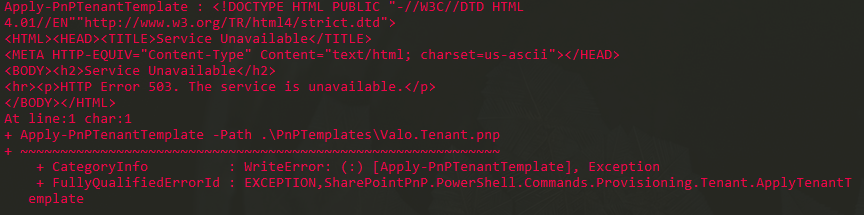
If I run the command over and over (usually 3 times) it starts working as the site seems to be in "good shape" after a minute or so.
Running into the same problem... I've been adding arbitrary sleeps in my code which IMO is a bad practice.
Have you had any chance in resolving this issue implementing a different solution ?

We have this error occasionally during last year. It occurs more often on env when you recreate sites (delete and create it again with the same url) and apply PnP template - i.e. on automatic deployments environments.

I am facing the same issue when deleting and creating the site collection using New-PnPSite (with Wait=$True). The PnP trace shows the following. This issue does not occur for new site collection Url. There is not fixed time to wait after deletion of site collection. I have seen this issue even after waiting for one day after deletion.
[OfficeDevPnP.Core] [0] [Debug] Starting to wait for site collection to be created 0ms Information: 0 : 2020-07-28 09:34:51.8746 [OfficeDevPnP.Core] [0] [Debug] Elapsed: 00:00.000 | Attempt 1/80 0ms [OfficeDevPnP.Core] [0] [Error] ExecuteQuery threw following exception: Microsoft.SharePoint.Client.ServerException: The object id "site:260d96cb-9253-4360-88f8-c6d8eb93471f:web:8db9a85b-34ad-425b-bbaa-dea9a0073246" is invalid. at Microsoft.SharePoint.Client.ClientRequest.ProcessResponseStream(Stream responseStream)

I get this occasionally, too. It only seems to happen when I've had a problem, deleted the existing site, and recreated it. I even delete the existing site from the recycle bin with Clear-PnPTenantRecycleBinItem and delete the underlying Group from AAD.
Apply-PnPProvisioningTemplate : The object id "site:1120b0db-4b15-412e-8999-1c96d2d29019:web:eacde6a6-2157-4313-9f69-a5729e5a4f69" is invalid.
At line:1 char:1
As far as I can tell, there's no real pattern to it. Sometimes after I delete and then run Apply-PnPProvisioningTemplate on the new site, it woks fine - right away. Other times, I have to wait hours or more before I get past the error.

This may help somebody, when a site collection is deleted 'permanently', it may not be completely deleted because of redirect references. Recreating the same site relative url may fail with different errors. Use following SPO cmdlets to delete all the redirects:
https://docs.microsoft.com/en-us/sharepoint/manage-site-redirects