

 pgf-tikz
Add bleed margin to patterns' bounding boxes
Brief outline of the bug
For patterns that are expected to make up larger continuous drawings, thin white lines are spot at pattern boundaries in some PDF viewers with huge zoom level. It seems adding some bleed margin so that a pattern's bounding box is a bit larger than its x-/y-step(s) and adapt the pattern drawing code do the trick.
Minimal working example (MWE)
The thin white lines are easier to be spot with slant lines.
Full example
\documentclass[margin=5pt]{standalone}
\usepackage{tikz}
\usetikzlibrary{patterns, patterns.meta}

\makeatletter
% LinesB = Lines + bleeds
\pgfdeclarepattern{
  name=LinesB,
  parameters={
      \pgfkeysvalueof{/pgf/pattern keys/distance},
      \pgfkeysvalueof{/pgf/pattern keys/bleed},
      \pgfkeysvalueof{/pgf/pattern keys/angle},
      \pgfkeysvalueof{/pgf/pattern keys/xshift},
      \pgfkeysvalueof{/pgf/pattern keys/yshift},
      \pgfkeysvalueof{/pgf/pattern keys/line width},
  },
  % half bbox size = half tile size + bleed
  bottom left={% corner of bbox
    \pgfpoint
      {-.5*(\pgfkeysvalueof{/pgf/pattern keys/distance}+\pgfkeysvalueof{/pgf/pattern keys/bleed})}%
      {-.5*(\pgfkeysvalueof{/pgf/pattern keys/distance}+\pgfkeysvalueof{/pgf/pattern keys/bleed})}},
  top right={% corner of bbox
    \pgfpoint
      {.5*(\pgfkeysvalueof{/pgf/pattern keys/distance}+\pgfkeysvalueof{/pgf/pattern keys/bleed})}%
      {.5*(\pgfkeysvalueof{/pgf/pattern keys/distance}+\pgfkeysvalueof{/pgf/pattern keys/bleed})}},
  tile size={%
    \pgfpoint
      {\pgfkeysvalueof{/pgf/pattern keys/distance}}%
      {\pgfkeysvalueof{/pgf/pattern keys/distance}}},
  tile transformation={%
    \pgftransformshift{%
      \pgfpoint
        {\pgfkeysvalueof{/pgf/pattern keys/xshift}}%
        {\pgfkeysvalueof{/pgf/pattern keys/yshift}}}%
    \pgftransformrotate{\pgfkeysvalueof{/pgf/pattern keys/angle}}},
  defaults={
    distance/.initial=3pt,
    bleed/.initial=1pt,
    angle/.initial=0,
    xshift/.initial=0pt,
    yshift/.initial=0pt,
    line width/.initial=\the\pgflinewidth,
  },
  code={%
    \pgfsetlinewidth{\pgfkeysvalueof{/pgf/pattern keys/line width}}%
    % bleed by .5\pgflinewidth
    \pgfpathmoveto{\pgfpoint{-.5*(\pgfkeysvalueof{/pgf/pattern keys/distance}-\pgflinewidth)}{0pt}}%
    \pgfpathlineto{\pgfpoint{.5*(\pgfkeysvalueof{/pgf/pattern keys/distance}+\pgflinewidth)}{0pt}}%
    \pgfusepath{stroke}%
  },
}
\makeatother

\begin{document}
\begin{tikzpicture}[baseline=0pt, pattern color=blue]
  \draw[pattern={Lines[angle=45]}]  (0,0) rectangle (10pt,10pt);
  \draw[pattern={LinesB[angle=45]}] (1*12pt,0) rectangle +(10pt,10pt);
  \draw[pattern=north east lines]   (2*12pt,0) rectangle +(10pt,10pt);
\end{tikzpicture}
\end{document}
Opened in Adobe Acrobat Reader v2022.003.20314, 1600% zoom level
- left:
Lines[angle=45], thin white lines, step = bbox = 3pt, drawing code no bleed - middle:
LinesB[angle=45], no white lines, step = 3pt, bbox = 5pt, drawing code bleeds by .2pt (half ofline width) - right:
north east lines, step = 3pt, bbox = 5pt, drawing code bleeds by .1pt (on each side)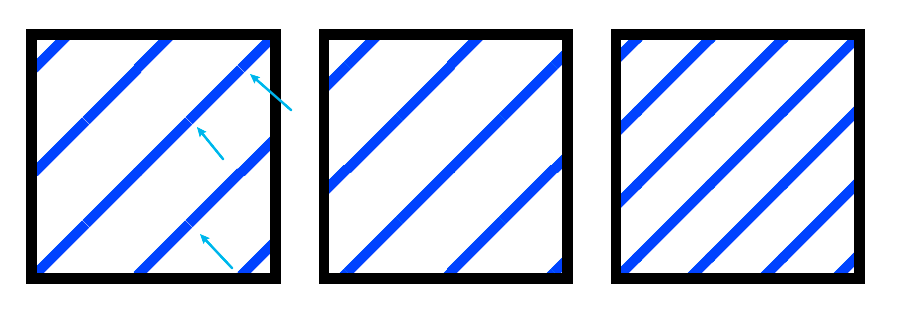
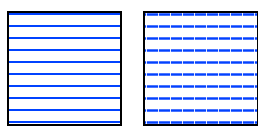
Another output generated by the pattern LinesX provided in https://github.com/pgf-tikz/pgf/issues/1180#issuecomment-1425165881
- left:
LinesX, no white lines, step = bbox = 3pt, drawing code no bleed - right:
LinesX[distance=3bp], thin white lines, step = bbox = 3bp, drawing code no bleed
Output pdf is opened in TeXstudio's (v4.5.1) internal poppler-based PDF viewer, zoom level 400%
Discussion
This trick is already used in some patterns in patterns library, for example north east lines and in the pattern hatch defined in the first example in sec. 62.3 User-Defined Patterns. However pattern Lines from patterns.meta library doesn't.
Source code snippets
https://github.com/pgf-tikz/pgf/blob/dceb378b263061856b9a21082e5dc6fffdcdf494/tex/generic/pgf/libraries/pgflibrarypatterns.code.tex#L31-L37 https://github.com/pgf-tikz/pgf/blob/dceb378b263061856b9a21082e5dc6fffdcdf494/doc/generic/pgf/pgfmanual-en-library-patterns.tex#L173-L189 https://github.com/pgf-tikz/pgf/blob/dceb378b263061856b9a21082e5dc6fffdcdf494/tex/generic/pgf/libraries/pgflibrarypatterns.meta.code.tex#L279-L319
