

 overleaf
XeLaTeX not available on Clean Install
Steps to Reproduce
- Install with overleaf toolkit (it installs v2.5.0)
- Create a sample minimal document or open the example.
- Change the compiler to xelatex
- Compile and the error message will appear (without details or any logs in the log div)
-

Expected Behaviour
The file should compile in XeLaTeX.
Observed Behaviour
The file does not compile in XeLaTeX. It does compile in pdfLaTeX
Context
No output :(
Technical Info
N/A
- URL:
- Browser Name and version: Firefox 85
- Operating System and version (desktop or mobile): Arch Linux Desktop
- Signed in as: Admin
- Project and/or file: Example File
Thanks in advance for your help! Btw, how can I compile the sharelatex/sharelatex docker container myself? I can't find the source for it. The dockerfile in this repo shows sharelatex/sharelatex as base (from the Docker hub, but no source definition file)

Same issue with PDFLaTeX. Any fix?
 It just hangs like that for 2 minutes and then becomes:


So it just worked. Turns out the sqlite database was set to readonly. Running sudo chown www-data:www-data -R <data-dir> worked.
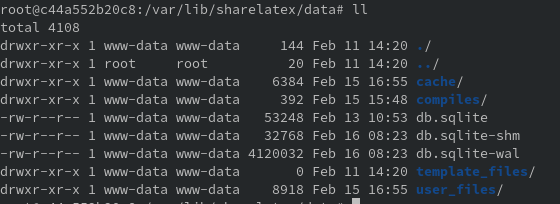 On my container the folder is already owned by www-data. I also tried to chown again and the data folder itself in order to own files, that do not belong to www-data, but no change.
Did you try something else, that fixed the issue but became effective only after a restart?
On my container the folder is already owned by www-data. I also tried to chown again and the data folder itself in order to own files, that do not belong to www-data, but no change.
Did you try something else, that fixed the issue but became effective only after a restart?
I looked a bit deeper into the issue..
- sudo docker exec -it sharelatex bash
- ll /usr/local/texlive/2020/bin/x86_64-linux/
You will see there is latexmk, lualatex but no xelatex.
Also compiling from the cli with /usr/local/texlive/2020/bin/x86_64-linux/latexmk -xelatex main.tex from your compile folder root@c44a552b20c8:/var/lib/sharelatex/data/compiles/<hashhere># will result in the output:
Latexmk: This is Latexmk, John Collins, 29 September 2020, version: 4.70b.
Latexmk: applying rule 'xelatex'...
Rule 'xelatex': The following rules & subrules became out-of-date:
      'xelatex'
------------
Run number 1 of rule 'xelatex'
------------
------------
Running 'xelatex -no-pdf -recorder  "main.tex"'
------------
sh: 1: xelatex: not found
Latexmk: fls file doesn't appear to have been made.
Latexmk: Examining 'main.log'
=== TeX engine is 'LuaHBTeX'
Latexmk: Index file 'main.idx' was written
Latexmk: Errors, so I did not complete making targets
Collected error summary (may duplicate other messages):
  xelatex: Command for 'xelatex' gave return code 127
      Refer to 'main.log' for details
----------------------
This message may duplicate earlier message.
Latexmk: Failure in processing file 'main.tex':
   *LaTeX didn't generate the expected log file 'main.log'
Obviously the binary is not bundle in this release of texlive 2020 :cry: Interesting is also the "became out of date" for xelatex.
EDIT: Sometimes it is hard to identify an issue and there is a very easy fix.. The same way you install packages to your latex environment you can also provide the xelatex (xetex) package:
sudo docker exec sharelatex tlmgr install xetex
sudo bin/stop && sudo bin/up -d
Worked for me :)
@devs As xelatex is a compile option from the UI list, I would suggest, to include the package into the base installation of the container.
Thank you for investigation. I am using XeLaTeX, too and wonderd why it doesn't work on a clean install

It is the same for me
When I'm using latexmk, latexmk -xelatex is not available at all
I had to use the apt command to install it and its dependencies
apt-get update
apt-get install texlive-xetex texlive-latex-extra texlive-science
Error log
# latexmk -pvc -xelatex -gg -silent csuthesis_main                                                            Rc files read:
  NONE
======= Need to update make_preview_continuous for target files
Viewing pdf
Latexmk: Run number 1 of rule 'xelatex'
sh: 1: xelatex: not found
Latexmk: fls file doesn't appear to have been made.
Latexmk: Getting log file 'csuthesis_main.log'
Latexmk: Couldn't read log file 'csuthesis_main.log':
  No such file or directory
Latexmk: *LaTeX didn't generate the expected log file 'csuthesis_main.log'
    ==> You will need to change a source file before I do another run <==
Collected error summary (may duplicate other messages):
  xelatex: Run of rule 'xelatex' gave a non-zero error code

=== Watching for updated files. Use ctrl/C to stop ...

Thanks for the ping. I've created an internal ticket for this. Unfortunately, I cannot give any estimate if or when this gets included in a release.

Hello,
In case you missed this in the release notes. Overleaf Community Edition and Server Pro version 4.2 onwards includes XeLaTeX in the minimal TeXLive installation.
Greetings, Jakob