
react-native-vector-icons
 react-native-vector-icons copied to clipboard
 oblador
Unrecognized font family 'Ionicons'
- [ ] Review the documentation: https://github.com/oblador/react-native-vector-icons
- [ ] Search for existing issues (including closed ones): https://github.com/oblador/react-native-vector-icons/issues
Environment
macOS Catalina 10.15.6 IOS "react-native-vector-icons": "^7.0.0"
Description
Describe your issue in detail. Include screenshots if needed. I am trying to add a simple Icon button to open navigation.openDrawer
import Icon from 'react-native-vector-icons/Ionicons';
const HomeStackScreen = ({navigation}) => ( <HomeStack.Navigator> <HomeStack.Screen name="Home" component={HomeScreen} options={{ title: 'Feed', headerLeft: () =>( <Icon.Button name="menu" size={25} backgroundColor="#61dafb" onPress={() => navigation.openDrawer()}></Icon.Button> )
}} />
</HomeStack.Navigator>
);
Demo
You can use https://snack.expo.io/ to create a demo that can help users to better understand your problem.


For IOS
Edit Info.plist and add a property called Fonts provided by application (or UIAppFonts if Xcode won't autocomplete/not using Xcode) and type in the files you just added. It will look something like this: XCode screenshot https://cloud.githubusercontent.com/assets/378279/12421498/2db1f93a-be88-11e5-89c8-2e563ba6251a.png
Just step 4 from the following link:
https://medium.com/@vimniky/how-to-use-vector-icons-in-your-react-native-project-8212ac6a8f06
The new version of react-native does the library automatically
- Add Fonts provided by application as a new key
Hi @Edydh I have the same problem where im passing Ionicon as a setting pram for react-native-paper
export default function Main() {
	return (
		<PaperProvider
			theme={theme}
			settings={{
				icon: props => <Ionicons {...props} />,
			}}>
			<App />
		</PaperProvider>
	);
}
so from the react native 0.60 update, manual linking, for eg:
react-native link react-native-vector-icons
will cause failure in ios as the auto link will twice link causing failure in build, so even the manual linking from
https://github.com/oblador/react-native-vector-icons#option-manually will cause error.
now its working after adding the .ttf file on the info.plist now :)
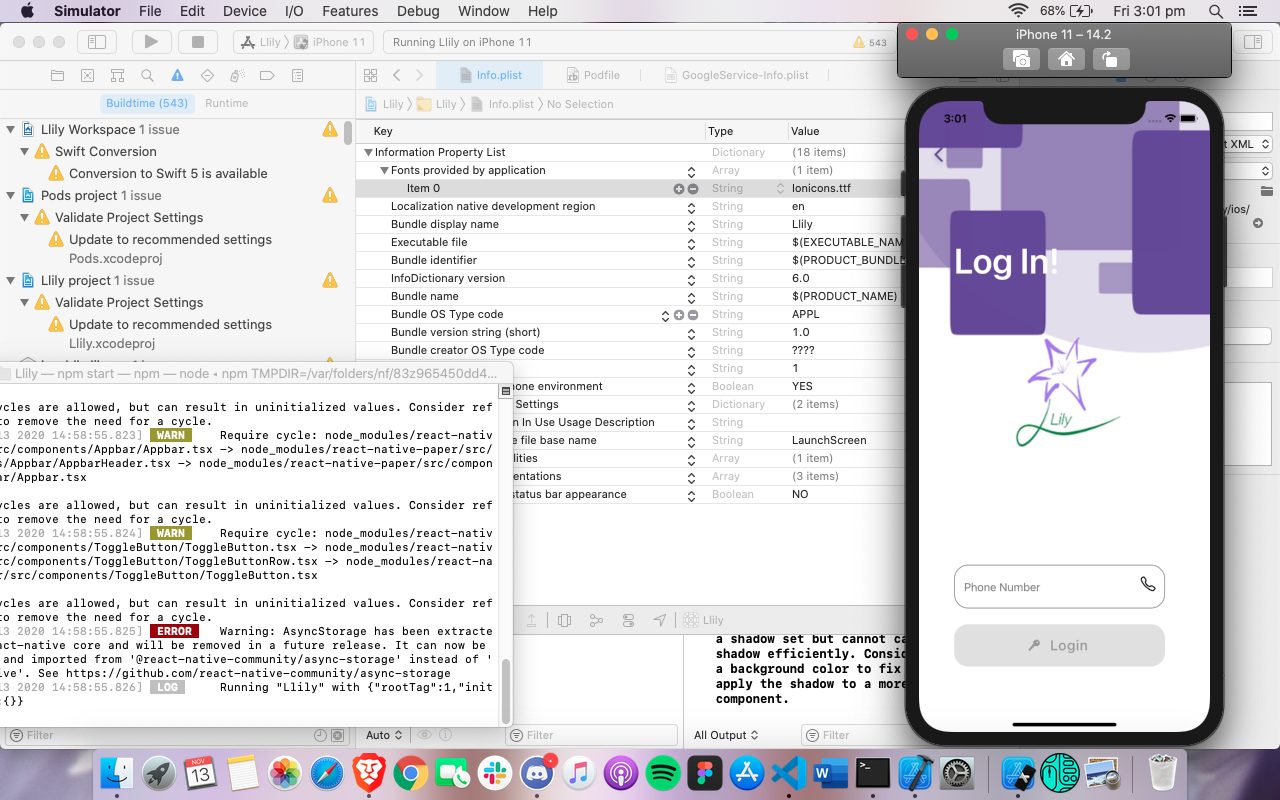


This is the solution https://github.com/oblador/react-native-vector-icons/issues/1238#issuecomment-691278273
Just the step 4 of the following link:
https://medium.com/@vimniky/how-to-use-vector-icons-in-your-react-native-project-8212ac6a8f06
for react-native versions > 0.60
It worked for me

Is there a reason that we have to manually add them? Not any way to automate this process? A lot of people are going to run into this issue.

Try to import and load the font
import Ionicons from 'react-native-vector-icons/Ionicons'
Ionicons.loadFont()

This seems like a conspiracy theory. I'm also having this problem and tried everything. It works on Android but not on IOS. For more than 3 days trying everything with a dam Mac air that takes more than 40 minutes to refresh the cache. Is just pure hell.

Try to import and load the font
import Ionicons from 'react-native-vector-icons/Ionicons'
Ionicons.loadFont()
it work for me! thank!

import Ionicons from 'react-native-vector-icons/Ionicons' Ionicons.loadFont()
Thanks, it works for me! Do you know why this is needed?

import Ionicons from 'react-native-vector-icons/Ionicons' Ionicons.loadFont()
Thanks, it works for me! Do you know why this is needed?
In the end, it makes sense because in this case you only load the needed font when you mount the app the first time. Imagine importing or loading all the fonts... that's huge and not needed.
follow the below link for solution https://www.devhubspot.net/post/detail/react-native-unrecognised-font-family-error-solution

Can I just say that this should not be considered as fixed. This should not be closed. Just copying the fonts manually by had in a new directory and then try this... and if it does not work try that... and if it does not work try the otter thing. is just not a fix. This is a workaround. It works on android out of the box when you add a specific font module. It should work also on ios.