

 nushell
Ctrl-Z in some programs renders nushell inoperable
Describe the bug
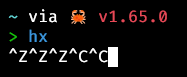
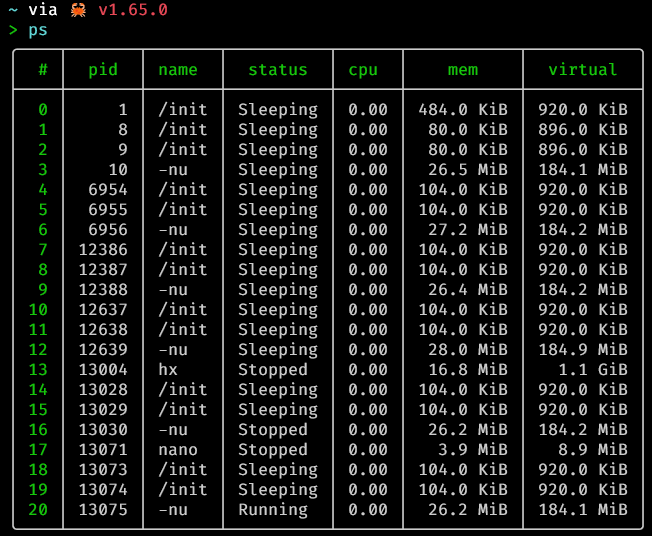
Today I accidentally pressed Ctrl-Z in hx in nushell and was unable to use the shell as a result. I needed to kill -9 the suspended process from another shell.
asciinema recording
I'm not sure if this issue is unique to interactive editors in nushell in wsl, but I only reproduce the issue in similar circumstances:
hx on nu on wsl via windows terminal (resolved with kill -9)
nano on nu on wsl via windows terminal (could not resolve with kill -9, resolved by closing terminal)
Other tests that did not reproduce issue:
ed on nu on wsl via windows terminal (ignored ^Z)
cat on nu on wsl via windows terminal (ignored ^Z)
ping on nu on wsl via windows terminal (ignored ^Z)
vi on nu on wsl via windows terminal (ignored ^Z)
hx on nu on conemu (ignored ^Z)
hx on bash in wsl via windows terminal (suspended correctly)
nano on bash in wsl via windows terminal (suspended correctly)
hx on bash on conemu (ignored ^Z)
How to reproduce
- open a terminal running
nushell - open
hxornanofrom nu - press Ctrl-Z
- invoke
fgto foreground the application
Expected behavior
- startup
- open the app
- suspend the app
- foreground the suspended app
Screenshots

Configuration
| key | value |
|---|---|
| version | 0.67.0 |
| branch | |
| commit_hash | 62d3497bbbb31896581b5c67ce82883dd4fafe54 |
| build_os | linux-x86_64 |
| build_target | x86_64-unknown-linux-gnu |
| rust_version | rustc 1.61.0 (fe5b13d68 2022-05-18) |
| rust_channel | 1.61.0-x86_64-unknown-linux-gnu |
| cargo_version | cargo 1.61.0 (a028ae4 2022-04-29) |
| pkg_version | 0.67.0 |
| build_time | 2022-08-18 11:25:08 +08:00 |
| build_rust_channel | release |
| features | database, dataframe, default, trash, which, zip |
| installed_plugins |
Additional context
OS: Windows (WSL: ubuntu) Windows Terminal Version: 1.15.2874.0

I'm guessing this is because nushell doesn't support job management yet like ctrl-z, fg, etc. Also, 0.67.0 is quite old now. We're currently on 0.72.0 and many things have changed, but not job mgmt.

Updated nu. The issue no longer happens with hx but a similar issue still happens with nano.
I have the same issue with nu 0.72 and nvim v0.9 (build from source, on master, yesterday) on macos Catalina.

For nvim you can send it SIGCONT e.g. kill -SIGCONT <pid of nvim>, probably works for other programs too. Useful when you don't want to lose work

Should this issue be turned into a feature request?
From the book, background processes are supported with alternative solutions like pueue or tmux.
However, this is a different use case. We are not trying to have processes running in the background. This is really about pausing a process for a while, not allowing it to run, do side commands before resuming the process.

Given that it does completely break some workflows, I wouldn’t say that it’s a feature request, but a bug resolution. As always the nushell project may decide that they don’t want to do the work (I’m not doing it after all 😄), but personally it’s a major blocker that prevent me to try nushell.
Given that it does completely break some workflows, I wouldn’t say that it’s a feature request, but a bug resolution. As always the nushell project may decide that they don’t want to do the work (I’m not doing it after all smile), but personally it’s a major blocker that prevent me to try nushell.
same probleme I realy like the nushell's functional approach but it's the last think that block me for switching to it.

Just to add fuel to this feature request flame, I'm getting the same issues. I'll probably switch once it's up
Nushell is...fresh

Yeah, this just bit me with top (and nushell 0.80).
If nushell isn't going to takeover and let us type more commands when a process is suspended, it would be very nice if it at least handled the situation and didn't leave us stuck in a frozen terminal. (i.e. it could immediately send SIGCONT to unsuspend the application, if it can't prevent the application being suspended in the first place) I consider that part a bug; actually supporting background processes would be a feature request.

@cumber We'd accept a PR to make it better. Sounds like you have a good idea.
@fdncred Nushell is definitely valuable enough to me that I intend to contribute. :) I need to start learning Rust to do so though, so it might be a while.
I use nushell as a scripting language a lot, but migration to it as a shell is blocked by this limitation, unfortunately. Would love to see it fixed.

@blueberrycarrot have you tried this lately? I was affected previously, but I just checked: when I ctrl+z from vim, nushell returns control to vim immediately. I don't actually know what's changed so perhaps it might still be a problem in your use-case. Unless you just mean job control, in which case I guess that's not fixed, or perhaps simply not planned.

@partiallyordered this fails on the latest - 0.89.0
| key | value |
|---|---|
| version | 0.89.0 |
| branch | |
| commit_hash | |
| build_os | linux-x86_64 |
| build_target | x86_64-unknown-linux-gnu |
| rust_version | rustc 1.75.0 (82e1608df 2023-12-21) |
| rust_channel | stable-x86_64-unknown-linux-gnu |
| cargo_version | cargo 1.75.0 (1d8b05cdd 2023-11-20) |
| build_time | 2024-02-01 13:42:12 +01:00 |
| build_rust_channel | release |
| allocator | mimalloc |
| features | default, sqlite, trash, which, zip |
| installed_plugins |
- Run
nu - Run
vi - Press Ctrl-Z
- Observe dead terminal where nothing happens no matter what you press or type
I keep toying with switching from my long-time stack of bash + tmux + neovim to a rust-based stack of nu + zellij + helix, but my muscle memory keeps leaving me with a hung pane; helix + ctrl-z in nu seems to require a kill -9 (even SIGCONT doesn't seem to bring it back).
+1 for some kind of option to at least disable ctrl-z in nu!
