

 microsoft
Add indication of currently selected environment
With the update to 1.17.4 we have UNIVERSAL auth profiles, which allow us to use the same credentials to connect to select a dataverse environment with pac org select --environment https://myfavenv.crmX.dynamics.com. This makes life much easier no having to enter credentials for each environment. Thanks!
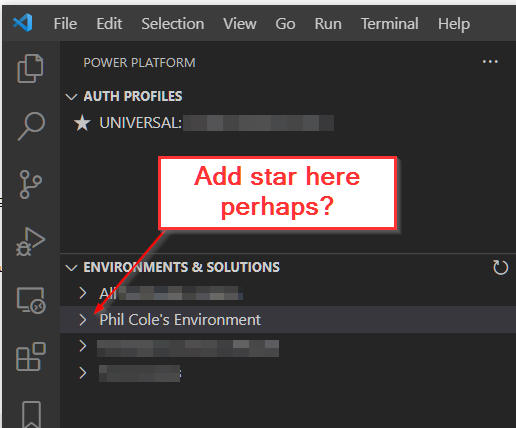
However, in the VSCode extension, we are no longer easily able to see which environment is currently selected. This used to be possible because the Auth Profiles were a one-to-one match to an environment.
Would it be possible to show which env is currently selected? Perhaps a star at the beginning of the environment name in the 'Environments & Solutions' pane?

This is partially handled by #278, as the Auth Profile will now have the environment listed in its tooltip.
(Not that tooltips are all that discoverable, but it along with the Azure Cloud info wasn't present before.)
Tracking the work for adding a select mechanic like we use in the auth profile panel (★ for selected, and possibly a ☆ button on the row or context menu option to select the environment) via AB#2905948
