

 microsoft
Starting WSL 2 distribution hangs forever
Environment
Windows build number: Microsoft Windows NT 10.0.20201.0
Your Distribution version: Ubuntu 18.04
Whether the issue is on WSL 2 and/or WSL 1: WSL 2
Steps to reproduce
Open wsl.exe, wt.exe, or ubuntu.exe
Possible duplicate of #5836
wsl.exe
Running wsl hangs forever, or at least the 10 minutes I waited.
Running wsl --help works properly.
Running wsl -l hangs for several minutes but then seems to properly output.
wt.exe Windows Terminal
Opening Windows Terminal displays the error since my default profile of Ubuntu isn't working:
Could not find your default profile in your list of profiles - using the first profile. Check to make sure the "defaultProfile" matches the GUID of one of your profiles.
WSL logs: Feedback app hangs, can't collect anything.
Expected behavior
WSL opens.
Actual behavior
WSL doesn't open. See 'Steps to reproduce'.

Had my PC BSoD and restart a bunch, same issue occurs. Hyper-V is still off
Are you windows running on physical machine or Windows itself is a virtual machine? I hit the very slow response yesterday because I only allocated 1G memory and limited disk space to Windows.
Try disable swap file to see if it improve the time in your case. https://github.com/microsoft/WSL/issues/5836#issuecomment-685809778

The same behavior on
Platform ServicePack Version      VersionString
-------- ----------- -------      -------------
 Win32NT             10.0.20201.0 Microsoft Windows NT 10.0.20201.0
Also constant BSoDs on system shutdown.

Someone knows how to fix this issue? Neither disabling HyperV nor write swap=0 fixed it for me. I have the BSoD on shutdown too. The last Insider's update seems to create this issue.

Someone knows how to fix this issue? Neither disabling HyperV nor write
swap=0fixed it for me. I have the BSoD on shutdown too. The last Insider's update seems to create this issue.
Ok after about 10 minutes, Windows terminal says these:
There are no more endpoints available from the endpoint mapper.

[process exited with code 4294967295]
Running wsl -l -v takes min 4 minutes to respond, but it responds.
Still the PC takes forever to turn off, and fails with BSoD.
Please, if you need more information please ask. I will keep investigating / learning to solve it.
Updating to Microsoft Windows NT 10.0.20206.0 seems to have fixed the issue.
I am having the exact same issue. At every windows update, WSL starts working again, but after the first reboot the problem is back.

When the problem happens, can you check the disk usage? @isaporto reported that the disk is very busy.
If possible, could you please collect wsl log?
Uninstalling VirtualBox fixed the problem of wsl2 archlinux distro hanging on start and wsl --shutdown taking >10mins to execute, reinstalling VirtualBox brought the problem back.
Build 20206.rs_prerelease.200828-1431


I forgot I even had VirtualBox installed. I uninstalled/updated and WSL works. What.
There are no more endpoints available from the endpoint mapper.
Having the same issue with Build 20206.rs_prerelease.200829-1431

Wow, uninstalling VirtualBox and rebooting finally fixed it! I had also forgotten that I'd installed it.
Thanks so much @mercurytoxic !!!

If you are dual-booting Linux and Windows, like I do - a VirtualBox installation on the Linux partition will influence WSL. Uninstalling VirtualBox on Linux fixed WSL on Windows.

Windows 10 20H2 19042.630 kernel 4.19.128-microsoft-standard Ubuntu 20.04.1 LTS Just encountered this today. Not sure how to capture useful logs but it happens consistently for me. I dont have VirtualBox installed or Hyper-V enabled. And each time I tried to use VSCode remote container dev features from a WSL2 folder, my mouse cursor started to lagging, and several seconds later, I cannot open wsl shells and they hang forever. Restarting my computer can fix it but I still can't use remote container dev. :(

I was getting the error
WslRegisterDistribution failed with error: 0x800706d9
Error: 0x800706d9 There are no more endpoints available from the endpoint mapper.
For me, the issue was the Host Network Service was not running. I changed it to start automatically and started it up once manually. I was then able to launch Ubuntu and set it as the default in WSL 2.

I was getting the error
WslRegisterDistribution failed with error: 0x800706d9
Error: 0x800706d9 There are no more endpoints available from the endpoint mapper.
For me, the issue was the Host Network Service was not running. I changed it to start automatically and started it up once manually. I was then able to launch Ubuntu and set it as the default in WSL 2.
This fixed the problem for me today. Killing vmmem, starting the service and then using WSL2 worked normally, without a restart.

@dude0001 @henry701 how can I check if the host network service is not running? And, how can I make it start automatically?

@dude0001 @henry701 how can I check if the host network service is not running? And, how can I make it start automatically?
@alecive 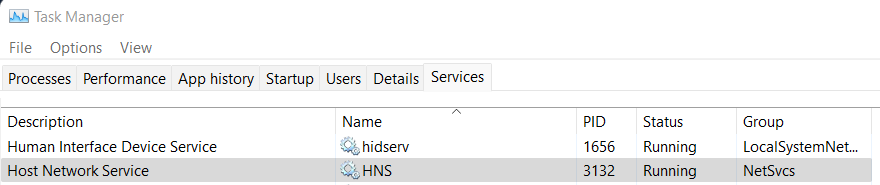
About starting it automatically, I think it is the default. But for some reason, shit happens sometimes and it stops or doesn't start I think? Good luck.
Ok great I've changed the startup type from "Manual" to "Automatic (Trigger Start)". I am (was) primarily a Linux user, so I'm not super comfortable dealing with the internal workings of Windows. I'll keep an eye out to see if this changes anything!
Second time I've seen this and the second time that a reboot fixed it. This time it happened with Windows Build 19044.1526. I didn't get a chance to try many of the other suggestions here, though I can say that every wsl command that I tried hung.

I was getting the error
WslRegisterDistribution failed with error: 0x800706d9
Error: 0x800706d9 There are no more endpoints available from the endpoint mapper.
For me, the issue was the Host Network Service was not running. I changed it to start automatically and started it up once manually. I was then able to launch Ubuntu and set it as the default in WSL 2.
Thanks, this worked for me, mine is disabled damn.

Hm, I followed the advice of starting the hns service, and it appeared to fix the problem, allowing the installation process to continue, however, it got stuck due to an unrelated error (causing me to attempt to reinstall later). After I rebooted the machine to apply Windows updates, however, the service doesn't start anymore, so I can't install the needed WSL distribution. I can't figure why. I'm not even sure where to report this abnormality, so I resorted to writing here.

For anyone who's still having this issue occasionally like myself, I find this solution without rebooting your PC or tweaking services. I've used it twice and it worked perfectly.
In these cases, the LxssManager is somehow preventing the WSL2 from rebooting. Maybe this is worthwhile for MS to look into?

For me, the HNS service is the issue. Though I cannot start the service for some reason (error 1075).

I opened my WSL distro as admin from the start menu It prompted me to it wanted to change something I accepted and now it is working again.

Thank you all for the hints. Uninstalling minikube app was the trick for me (Win10).
