
BotFramework-Emulator

BotFramework-Emulator copied to clipboard
 microsoft
Improve UX / Semantics of Ngrok Options in App Settings
The following options in the application settings for Ngrok behave in a way that isn't very clear to the user upon reading the descriptions:
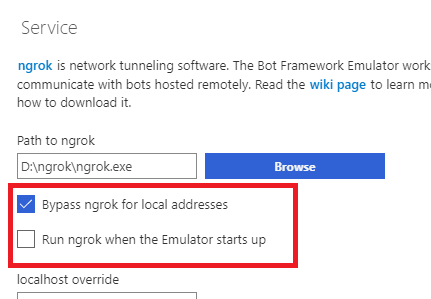
- "Run ngrok when the Emulator starts up" will always use Ngrok regardless of whether the "Bypass" option is enabled or disabled.
- This is not very clear to the user; one would expect the Emulator to still honor the "Bypass" option
- Since the "Bypass" option is basically rendered useless when the "Run ngrok on startup" is enabled, the UI doesn't accurately reflect that to the user
Solution:
There are two suitable solutions:
- We rework the underlying logic so that the "Run ngrok on startup" option doesn't cause the Emulator to ignore the "Bypass" option and instead just does what is described and starts Ngrok on startup to be used with remote bots
OR
- We change the wording of the "Run ngrok on startup" option to be something like "Always use ngrok to communicate with bots" and enabling the option disables the "Bypass" option
Personally, I'm in favor of the former.
