

 mermaid-js
mermaid missing text in svg
Describe the bug i created a simple mmdc file. and when generated to an svg it is missing text.
To Reproduce i made a file called test.mmdc wit this code:
graph TD
id1[This is the text in the box]
then I converted it with this command: mmdc -i test.mmdc
it then generated this: https://imgur.com/a/FmDRxV3
Expected behavior I expected that the text "This is the text in the box" would appear in the box
Screenshots https://imgur.com/a/FmDRxV3
Desktop (please complete the following information):
- OS: windows 10
- Browser chrome
- Version89.0.4389.90

@dolfijn3000 : please, check with Mermaid live editor: https://mermaid-js.github.io/mermaid-live-editor If you get the same behavior, then please, move your issue to https://github.com/mermaid-js/mermaid, because it is a generic mermaid problem not related to the CLI tool. I have actually tried your diagram snippet, and the live editor gives a syntax error.

I can confirm the issue exists with @mermaid-js/[email protected], it seems this problem only exists for graph/flowchart, sequence Diagram seems fine
graph TD
id1[This is the text in the box]
This produces
screenshot

generated svg
<svg id="mermaid-1618558838626" width="100%" xmlns="http://www.w3.org/2000/svg" xmlns:xlink="http://www.w3.org/1999/xlink" height="54" style="max-width: 212.984375px;" viewBox="0 0 212.984375 54"><style>#mermaid-1618558838626{font-family:"trebuchet ms",verdana,arial,sans-serif;font-size:16px;fill:#333;}#mermaid-1618558838626 .error-icon{fill:#552222;}#mermaid-1618558838626 .error-text{fill:#552222;stroke:#552222;}#mermaid-1618558838626 .edge-thickness-normal{stroke-width:2px;}#mermaid-1618558838626 .edge-thickness-thick{stroke-width:3.5px;}#mermaid-1618558838626 .edge-pattern-solid{stroke-dasharray:0;}#mermaid-1618558838626 .edge-pattern-dashed{stroke-dasharray:3;}#mermaid-1618558838626 .edge-pattern-dotted{stroke-dasharray:2;}#mermaid-1618558838626 .marker{fill:#333333;stroke:#333333;}#mermaid-1618558838626 .marker.cross{stroke:#333333;}#mermaid-1618558838626 svg{font-family:"trebuchet ms",verdana,arial,sans-serif;font-size:16px;}#mermaid-1618558838626 .label{font-family:"trebuchet ms",verdana,arial,sans-serif;color:#333;}#mermaid-1618558838626 .cluster-label text{fill:#333;}#mermaid-1618558838626 .cluster-label span{color:#333;}#mermaid-1618558838626 .label text,#mermaid-1618558838626 span{fill:#333;color:#333;}#mermaid-1618558838626 .node rect,#mermaid-1618558838626 .node circle,#mermaid-1618558838626 .node ellipse,#mermaid-1618558838626 .node polygon,#mermaid-1618558838626 .node path{fill:#ECECFF;stroke:#9370DB;stroke-width:1px;}#mermaid-1618558838626 .node .label{text-align:center;}#mermaid-1618558838626 .node.clickable{cursor:pointer;}#mermaid-1618558838626 .arrowheadPath{fill:#333333;}#mermaid-1618558838626 .edgePath .path{stroke:#333333;stroke-width:1.5px;}#mermaid-1618558838626 .flowchart-link{stroke:#333333;fill:none;}#mermaid-1618558838626 .edgeLabel{background-color:#e8e8e8;text-align:center;}#mermaid-1618558838626 .edgeLabel rect{opacity:0.5;background-color:#e8e8e8;fill:#e8e8e8;}#mermaid-1618558838626 .cluster rect{fill:#ffffde;stroke:#aaaa33;stroke-width:1px;}#mermaid-1618558838626 .cluster text{fill:#333;}#mermaid-1618558838626 .cluster span{color:#333;}#mermaid-1618558838626 div.mermaidTooltip{position:absolute;text-align:center;max-width:200px;padding:2px;font-family:"trebuchet ms",verdana,arial,sans-serif;font-size:12px;background:hsl(80,100%,96.2745098039%);border:1px solid #aaaa33;border-radius:2px;pointer-events:none;z-index:100;}#mermaid-1618558838626:root{--mermaid-font-family:"trebuchet ms",verdana,arial,sans-serif;}#mermaid-1618558838626 flowchart{fill:apa;}</style><g><g class="output"><g class="clusters"></g><g class="edgePaths"></g><g class="edgeLabels"></g><g class="nodes"><g class="node default" id="flowchart-id1-1" transform="translate(106.4921875,27)" style="opacity: 1;"><rect rx="0" ry="0" x="-98.4921875" y="-19" width="196.984375" height="38" class="label-container"></rect><g class="label" transform="translate(0,0)"><g transform="translate(-88.4921875,-9)"><foreignObject width="176.984375" height="18"><div xmlns="http://www.w3.org/1999/xhtml" style="display: inline-block; white-space: nowrap;">This is the text in the box</div></foreignObject></g></g></g></g></g></g></svg>

Did a little digging, it seems that when using graph, mermaid generated svg is using foreignObject to render the text in node, and emacs and some other svg viewer is not handling it well (browser renders it fine).
Update:
This can be workaround by adding a custom config file set htmlLabels to false.
@merrickluo : can you provide a sample config file and how to use it together with a mermaid-cli docker? I can include this config file in the docker image and document how to access it if anyone needs it. If the config file does not have side effects, I can set it in use by default for docker.
@MindaugasLaganeckas the config file I use is like this
{
  "flowchart": {
    "useMaxWidth": false,
    "htmlLabels": false
  }
}
only the htmlLabels part matters though. I just use it by passing the file to mermaid-cli
mmdc -c ~/.config/mermaid/config.json

"htmlLabels": false
above config can solve text missing issue.
But I face another issue, my connection line is missing.
Is there a way to show the connection line?


I need to use "htmlLabels": false config to have text in SVG graphics. However this force a double escaping sequence of special characters.
In fact the following markdown code:
```mermaid
   graph TD
      A["<"]
      B["<"]
      A --> B
```
provides this SVG picture with the above configuration:
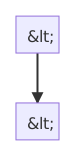 Looking at the SVG code I found that escaped characters are escape two times:
 < became &lt; which prevent good rendering.
EDIT:
Mermaid-cli was installed with npm. Here are the Npm and Mermaid-cli version used on Ubuntu 20.04 OS:
- Npm: 6.14.4
- Mermaid-cli: 8.14.0
Full version log is available here: versions.log


@craigmac : please, create a PR if you think that the documentation can be improved. We have already a section with known issues 👍 Thank you for your help! 😄