

 matt-wu
Doesn't work after windows 10 creators update

Downgrade to 0.68 will works.
but 0.68 could corrupt your data, so I switch to Paragon ExtFS.

@dd-han Ext2Fsd 0.69 was released 3 days after the issue was opened. What problem did you encounter with 0.69?

@ngkaho1234 When I install ext2fsd without reboot, Ext2 Volume Manager unable to regcognized my ext4 partitison as following screenshot.

After reboot, Ext2 Volume Manager can regcognized my ext4 partition and Ext2Fsd start success (It fail when Win 10 16299.64 still for Windows Insider only. Maybe reinstall fix that problem).
Then I add driver letter for my ext4 partition. But it unable to show capacity or any infomation in explorer.

If i double click on my ext4 volume (F:), just format dialog.

That's problem I encounter with 0.69, and 0.68 fine.
I have the same issue,firstly I thought something going wrong during the installation. But after trying several times I changed my mind. As @dd-han said, 0.68 is fine ,but it causes superlock during linux booting. However 0.69 cannot work properly.It really heart-broken.

Same here, ext4 is broken on 0.69. Couldn't even get it to work by reinstalling 0.68, strangely enough.

It works perfectly for me, and I am using the latest insider preview for Windows 10 and the latest Ext2Fsd. No write privileges, but I can read...
Target partition is a 64-bit EXT4 partition.

@DaJakerBoss which win version? Now I am using win 10.0.17074 and ext3fsd 0.69. The issue is still not fixed.
@DaJakerBoss weird, insider slow here. My Linux portion is ext4. But it shows ext3 in ext3fsd. :cry:
I am using build 17063 (updating to 17083 as we speak), and I think it identifies it as EXT4, what did you use to make the partition?
@DaJakerBoss I don't make the partition. I just formatted the partition during installing the linux system. I cannot wait for the latest version to fix this. This issue bothers me for a long time.
@DaJakerBoss :joy: u suggest to update Ubuntu?U think thia bug is duo to Linux?
Umm no I was just saying I had a different version of Ubuntu. Do you have a GPT or MBR partition table.

UPDATE: not only GPT problem
looks like MBR (Disk1) works fine and GPT (Disk0) not working
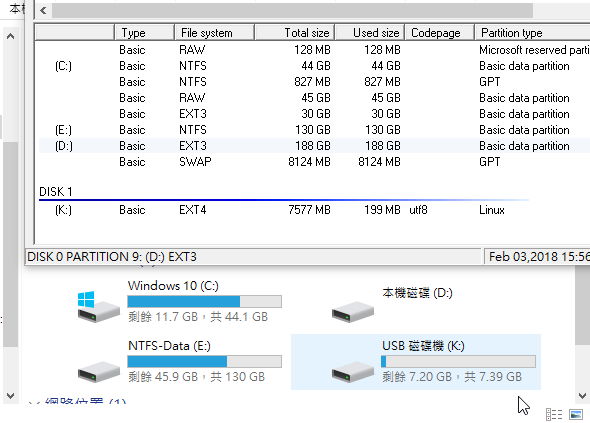
but reproduce fail on my removable storage device...

I have an MBR system. If it has to do with the partition table than we have issues.
@kid1412621 It shows the filesystem as EXT3 in Ext2Mgr also if the driver refuses to mount it. It can be related to incompatible features, such as 64bit. See https://github.com/matt-wu/Ext3Fsd/commit/e7c1142b0d156d4e8a7639422958bada6b0dfeb2 .
If you want to know more about your EXT4 filesystem, you might use debugfs like this: debugfs -R stats PATH_TO_VOLUME .
Feel free to mail to me if you have any inquiries.

just to be clear we have tried unsigned drivers boot in Windows, correct
On Mar 17, 2018 at 9:18 PM, おとめ座 ひなたぼっこ [email protected] wrote:
Same here, WINDOWS 10 170928, Ubuntu 17.04. Only format dialog?
— You are receiving this because you were mentioned. Reply to this email directly, view it on GitHub https://github.com/matt-wu/Ext3Fsd/issues/14#issuecomment-373967593, or mute the thread https://github.com/notifications/unsubscribe-auth/Afs4zynf4GZTirNbn7iUv2lVNzb4OyPDks5tfcQMgaJpZM4QJfUa .
@ngkaho1234 Thanks for reply.But I have no idea how to use this tool. Could you guys add a wiki page for it?
Hey @DaJakerBoss , I just changed my laptop's motherboard,and reinstalled dual systems(Win 10 and Ubuntu 17.10),still cannot mount ext4 partition properly.
Hey @kid1412621 You didn't really have to do all that (and hope you didn't) just so you could mount your ext4. IIRC an update had some issues with 64-bit EXT4 mounting, and had potential to mess up your partition data. The latest update (0.69) should fix that, so make sure you update.
Don't use Ext2Fsd 0.68 or earlier versions with latest Ubuntu or Debian systems. Ext2Fsd 0.68 cannot process EXT4 with 64-BIT mode enabled, then it could corrupt your data. Very sorry for this disaster issue, I'm working on an improvement.
Also, one quick question, are you using an MBR or GPT partition table? I don't know if this would be any cause but I'm collecting info. I will look for more info regarding your situation.
@dd-han going back to your comment from earlier, USB and SSD/HDD are handled differently by the system as far as I know. Different drivers and such. I will try to recreate this with my computer at home.
Does anyone have a system that uses different inputs for USB (2.0, 3.0, 3.1/Thunderbolt)? It would be interesting to see if interfacing has any effect on this. I'm going to try SATA and SATA->USB-3 connectors to see myself.
@DaJakerBoss I done that because of fixing hardware issue. I didn't do that for mount ext4 on purpose. I am using the latest version of Ext3Fsd. And of course,GPT. If there is possibility to relate to unsigned drivers boot?
Using Ext2fsD 0.69 on Windows 10 build 1803, my system stop booting after installing it. Solved by killing ext2fsd.sys on system32/drivers...

As a workaround for the now dropped 64-bit volume support, it might be worth a try to simply convert the file system to 32-bit using resize2fs -s from a Linux system. Worked fine for my 2 TB drive; with the default block size of 4 KiB, 64-bit block counts would only really be necessary for ≥16 TB drives.
Should not be easier and better compat to ignore 64-bit enabled partitions? Anyways, I'll check if it is the cause, because I have the same HD config on my desktop (Win10 + Deb8 Ext4) and it worked fine.
On Fri, Jul 27, 2018 at 1:49 PM Nmlgc [email protected] wrote:
As a workaround for the now dropped 64-bit volume support, it might be worth a try to simply disable the 64-bit flag using resize2fs with the -s option from a Linux system. Worked fine for my 2 TB drive; with the default block size of 4 KiB, 64-bit blocks would only really be necessary for ≥16 TB drives.
— You are receiving this because you commented. Reply to this email directly, view it on GitHub https://github.com/matt-wu/Ext3Fsd/issues/14#issuecomment-408476138, or mute the thread https://github.com/notifications/unsubscribe-auth/AAFCFhvptLF_fW52-MptKg3cCTozYKZtks5uK0SEgaJpZM4QJfUa .
-- Marcos Silva Cunha
Celular: +55 71 91348243 (TIM)
https://blogs.msdn.microsoft.com/commandline/2019/02/15/whats-new-for-wsl-in-windows-10-version-1903/
Does this mean windows have native support for ext4?
Seems no. As they clearly mentioned that the functionality was implemented with 9p protocol.
On Sat, Feb 16, 2019, 12:50 PM kid1412621 <[email protected] wrote:
https://blogs.msdn.microsoft.com/commandline/2019/02/15/whats-new-for-wsl-in-windows-10-version-1903/
Does this mean windows have native support for ext4?
— You are receiving this because you were mentioned. Reply to this email directly, view it on GitHub https://github.com/matt-wu/Ext3Fsd/issues/14#issuecomment-464290534, or mute the thread https://github.com/notifications/unsubscribe-auth/ALUjKDGDUUx3QusEKlhqFEVFR5JEh0rxks5vN44cgaJpZM4QJfUa .
What is 9p protocol?
On Sat, Feb 16, 2019, 12:55 Ka Ho Ng <[email protected] wrote:
Seems no. As they clearly mentioned that the functionality was implemented with 9p protocol.
On Sat, Feb 16, 2019, 12:50 PM kid1412621 <[email protected] wrote:
https://blogs.msdn.microsoft.com/commandline/2019/02/15/whats-new-for-wsl-in-windows-10-version-1903/
Does this mean windows have native support for ext4?
— You are receiving this because you were mentioned. Reply to this email directly, view it on GitHub https://github.com/matt-wu/Ext3Fsd/issues/14#issuecomment-464290534, or mute the thread < https://github.com/notifications/unsubscribe-auth/ALUjKDGDUUx3QusEKlhqFEVFR5JEh0rxks5vN44cgaJpZM4QJfUa
.
— You are receiving this because you were mentioned. Reply to this email directly, view it on GitHub https://github.com/matt-wu/Ext3Fsd/issues/14#issuecomment-464290745, or mute the thread https://github.com/notifications/unsubscribe-auth/AZD4pifjH-H2FG3M46V_ty_5sGIFujbUks5vN49UgaJpZM4QJfUa .

Are you guys getting this mismatch too? If you try to click start in Ext2's Service Management, it says the service could not be started.

I'm seeing exactly this behaviour as well, @achan-pancan. Windows 10, trying to mount an EXT3 (Linux Mint) partition on an external M.2 NVMe drive.

I have the same issue as @achan-pancan and @isolationism - Windows 10 Pro v1803, I just get a format disk message when I try to access a drive, windows shows the service as running, but Ext2 shows it as not running and says it can't be started.

For what it's worth @AdamSFX, my explorations online uncovered that an older release of ext2fsd, ext2fsd-0.53, works for me (and others similarly afflicted) in Windows 10 — though I have so far only entrusted it with read-only operations. YMMV.
Thank you! Yes this works for me also. I am using an external SSD to transfer large video files from a LINUX based camera so I don't have OS corruption issues to worry about and I have been able to read and write to the drive without problems using ext2fsd 0.53
I have the same issues on Windows 10 Pro as pointed out by others, solved using ext2fsd-0.53.


I have the same issues on Windows 10 Pro build Version 1909 when used the newest version 0.69. The issue was solved by switched back to version 0.68

DON'T use the version 0.68 with Ubuntu on ext4. It will corrupt Ubuntu file system. https://askubuntu.com/questions/849872/how-can-i-prevent-windows-10-from-corrupting-the-ext4-superblock-every-time

In my case it was all due to Secure Boot. I had to disable it, enter Windows and modify a policy: bcdedit.exe /set {current} nx AlwaysOff (if this command does not run, fire below command:) bcdedit.exe /set nx AlwaysOff Then rebooted and enabled Secure Boot again. Ext2fsd just started back again. Windows 10 Pro 10.0.18363 here.


I am using 0.68 as my data (external drive) and OS are on different partitions. Running on Version 10.0.18363.836. This thread was helpful.

Cannot get ext2fsd service to start at all even without any other drive only Win 10 C:\
