

 mapbox
Received status code 401 from server:Unauthorized Disable Gradle 'offline mode' and sync project
I want to build new SDK for Android,but I got the following error :"Could not GET 'https://api.mapbox.com/downloads/v2/releases/maven/com/mapbox/gradle/plugins/sdk-registry/0.3.0/sdk-registry-0.3.0.pom'. Received status code 401 from server: Unauthorized Disable Gradle 'offline mode' and sync project" after opening the project with AS. How to solve it?

Hi @lcf001 , did you set up valid Mapbox access token? https://docs.mapbox.com/android/maps/overview/#install-the-maps-sdk


@nhatphuong97 I experienced the same problem.
Don't use the "Default public token", but create a new token following the A secret access token with the Downloads:Read scope instructions.
Unfortunately, you will hit another wall down the downloading street, see https://github.com/mapbox/mapbox-gl-native-android/issues/631 and I'm hoping someone at Mapbox will help sooner than later.

Make sure you didn't paste your token in your project-level build.gradle.
The line should literally be password = project.properties['MAPBOX_DOWNLOADS_TOKEN'] ?: "", you should not replace the MAPBOX_DOWNLOADS_TOKEN string with your actual token.

Anyone get this to work? I have verified everything is correct but i get recieved status code 401 from server Unauthorized

I had the same issue and was able to fix by replacing
password = System.getenv("MAPBOX_DOWNLOADS_TOKEN") ?: project.property("MAPBOX_DOWNLOADS_TOKEN") as String
// password = project.hasProperty('SDK_REGISTRY_TOKEN') ? project.property('SDK_REGISTRY_TOKEN') : System.getenv('SDK_REGISTRY_TOKEN')
Then you set MAPBOX_DOWNLOADS_TOKEN=PASTE_YOUR_SECRET_TOKEN_HERE in $HOME/.gradle/gradle.properties as noted in the installation guide
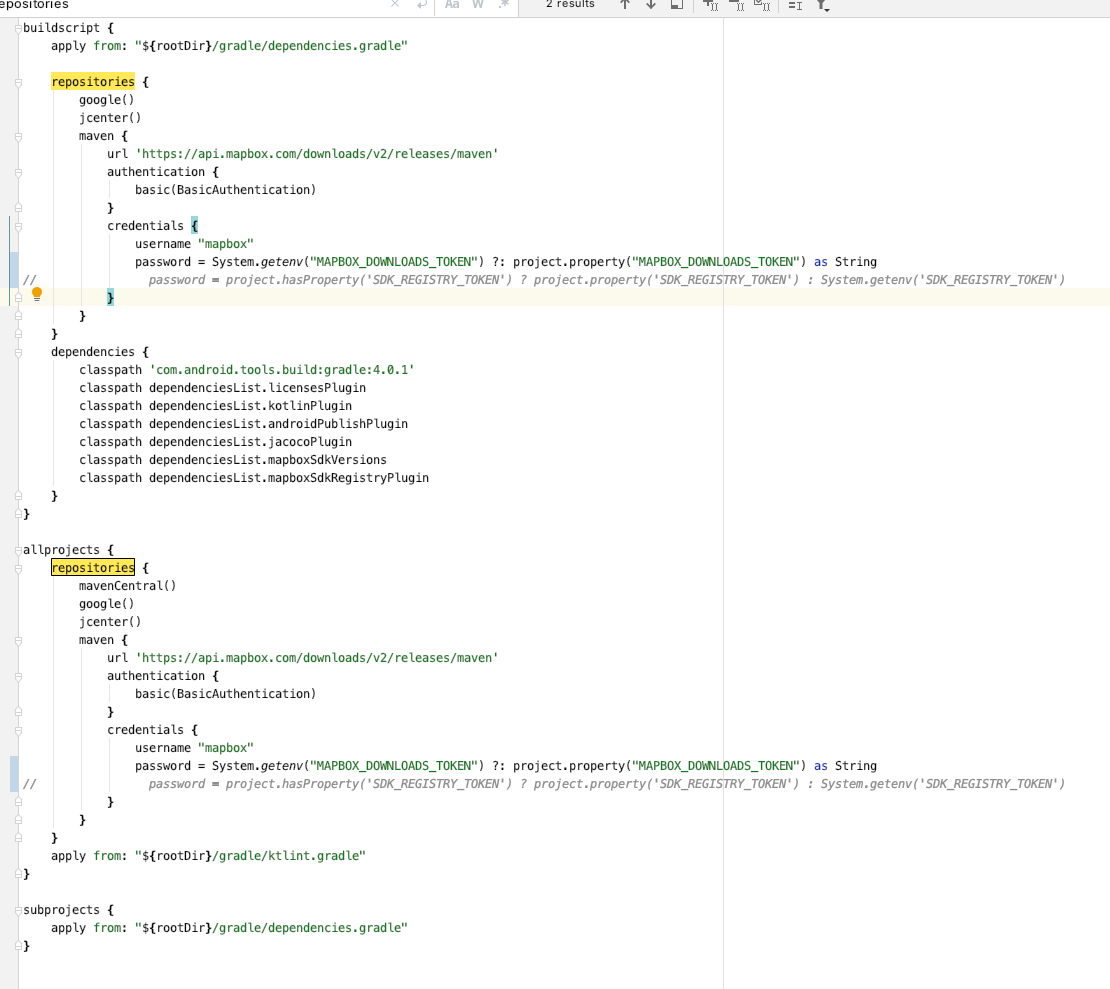

read the passages carefully
From the token creation page, give your token a name and make sure the box next to the Downloads:Read scope is checked

i had the same problem check your token. it must have permission to DOWNLOAD: READ

check your token. it must have permission to DOWNLOAD: READ
The ternary suggested by tsuz failed to work for. Where can the permission be changed to DOWNLOAD:READ?
