

 malcommac
Compatibility issue with NightNight library
Hi,
I always had this very simple style with a simple string, and the alignment always worked. Now after upgrading to 2.10 the alignment does not work anymore?
let smaller = Style {
  $0.font = Global.Font.RegularFont12
  $0.alignment = .center
}
EDIT: I downgraded to 2.0.5, now it works again.
Thanks!

Hi, can you provide me an example?
I've tried right now both with play Style and StyleGroup and it works.
let normal = Style {
	$0.font = UIFont.systemFont(ofSize: 12)
}
let smaller = Style {
	$0.font = SystemFonts.Menlo_Bold.font(size: 20)
	$0.alignment = .center
}

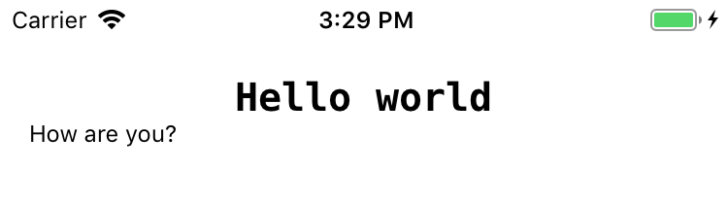
let text = "<c>Hello world</c>\nHow are you?"
let style = StyleGroup(base: normal, ["c" : smaller])
self.textView?.attributedText = text.set(style: style)

Hi,
basically, I'm doing this:
public class TitleLabel: UILabel {

    init() {

        super.init(frame: CGRect.zero)

        self.semibold(18)
        self.textColor = Global.Colors.Text.InfoHeavy.getThemeColor()
        self.numberOfLines = 2
        self.textAlignment = .center // I also tried commenting this - has no effect on the bug
    }

		(...)

		func xyz() {

			(...)

			let smaller = Style {
					$0.font = Global.Font.RegularFont12
					$0.alignment = .center
			}

			textColor = Global.Colors.BaseCI.getThemeColor()
			attributedText = "text1".localized() + "\n" + "text2".localized().set(style: smaller)
		}
}
Hi, I've tried reproducing your issue.
I've created my custom UILabel class with your settings:
class MyLabel: UILabel {
	override func awakeFromNib() {
		self.textColor = UIColor.red
		self.numberOfLines = 2
		self.textAlignment = .center
	}
}
Now I've tried using your code:
let smaller = Style {
  $0.font = SystemFonts.Menlo_Bold.font(size: 20)
  $0.alignment = .center
}

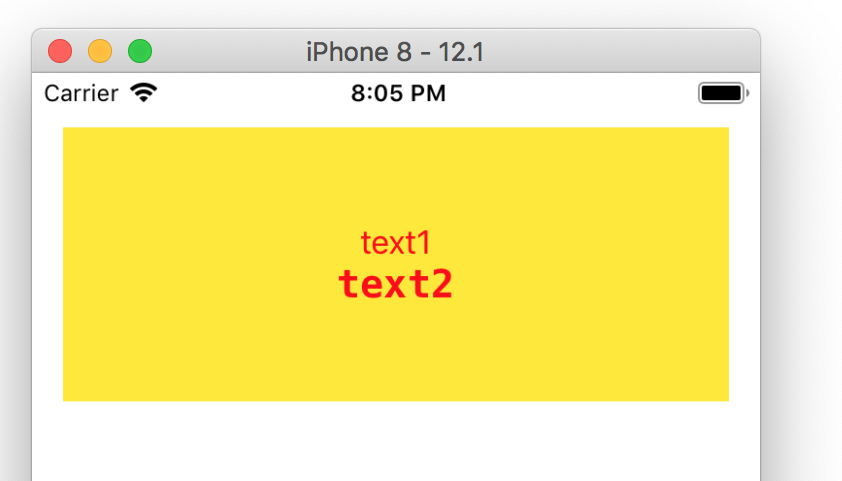
let attributedText = "text1" + "\n" + "text2".set(style: smaller)
self.label?.attributedText = attributedText
The result is correct (don't mind the yellow background color, its just for debug purposes):
Are you sure haven't some other settings which overrides your style?
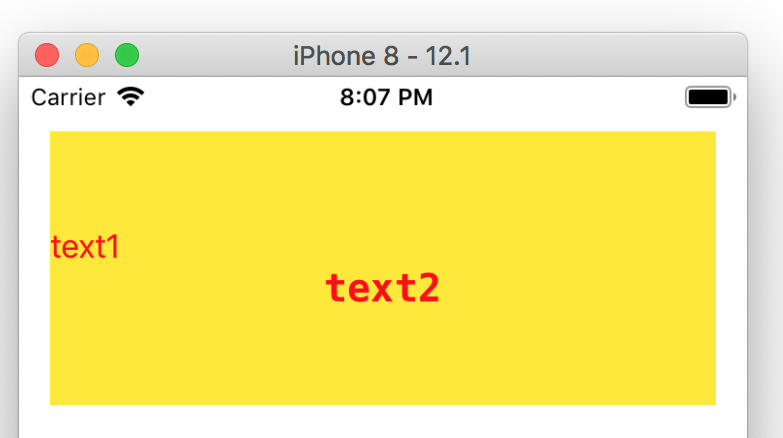
Also removing the self.textAlignment = .center in my label I get the correct result:
Hi,
thanks for your help! I tried again, without changing anything other in my code. The issue comes up again with 2.10.0. Furthermore, I see other strange effects, e.g. some messed up background colors etc.
BUT I think I know now what the problem is: I'm also using a pod called "NightNight", and I think this one causes the problem, or to be precise, the interaction between your pod and NightNight seems to be the issue. So I guess you can close this here, I would "attribute" (pun intended) this issue more to NightNight. I am currently perfectly fine with 2.0.5.
And thank you for all your great work, we are also using SwiftDate :-)
If you didn't solve it and you have enough spare time you can make a small example project with the mix of the both libs so I'll try to keep an eye and check if it easy to sovle (I can't promise it but I'll try).
After version 2.0.1 I also get alignment issues within a NSButton. Going back to version 2.0.1 fixes it.

I'll throw together a standalone project just to make sure there's nothing special about what I'm doing that could be impacting things. In the meantime here's a snippet from inside a NSButton class. This NSButton has a custom NSButtonCell for positioning the text, but for debugging I removed that custom cell and it didn't seem to make any difference.
            let style: Style
            if !isSelected {
                style = Style {
                    $0.color = NSColor.labelColor.withAlphaComponent(0.6)
                    $0.font = NSFont.systemFont(ofSize: 9)
                    $0.alignment = .center
                }
                layer?.borderColor = NSColor.inactiveBorderColor.cgColor
            } else {
                style = Style {
                    $0.color = NSColor.labelColor.withAlphaComponent(0.7)
                    $0.font = NSFont.semiboldFont(ofSize: 9)
                    $0.alignment = .center
                }
                layer?.borderColor = NSColor.activeBorderColor.cgColor
            }

            attributedTitle = attributedTitle.string.set(style: style)