

 kiswa
kiswa
Can't Log In After Installation
Describe the bug Hey there, I installed TaskBoard as described:
- I downloaded the .zip file
- Unzipped it
- Loaded it up to my webhost (Hostpoint.ch) via FTP
Now when I visit my site https://todo.teqly.ch I can see TaskBoards login page but I can't log in with the credentials admin/admin. After I enter the credentials and press "Sign In" the page freezes.
To Reproduce Steps to reproduce the behavior:
- Go to https://todo.teqly.ch
- Log In with admin/admin
- Page freezes
Expected behavior I should be able to start the application, see the dashboard and work with TaskBoard
Please complete the following information:
- OS: MacOS Catalina
- Tested in Safari, Brave & Firefox

Couple of questions:
- Did you download the TaskBoard_v1.0.2.zip file (it looks like you did, I just want to be sure)?
- Did you verify the
api/directory is writable?
From the error message in the console, the API is failing. If there's anything in api/logs/ it would help if you post it here.

I've got the same issue over at https://atomswarm.com/Taskboard/
Followed the same process as sandrobuetler and have the same results.
For the questions you asked them: Yes, 1.0.2 zip that is at the top of the list. API directory had 0755 permissions with 0644 permissions for files, changed /api folder to 0777 for all files and folders to test and still no luck.

I have the same problem. I have tried the latest release, but then the older releases as well - the result is the same. The api/ directory is set as writable. OS: Win10 Browsers: Opera, Firefox, MS Edge
As the server I have used Apache with the localhost address. AllowOverride is set and mod_rewrite is installed and enabled following the instruction. However the page freezes after I try to log in, same as above.

Hi out there,
on my home system (Synology NAS) I have the problem:
I can login to taskboard when the files are on the main webroot, eg: .../www/taskboardfiles with: http://myURL/
I can not login to taskboard when the files are on a subfolder, eg: ... /www/taskboard/taskboardfiles with: http://myURL/taskboard/
on my Web-provider System ( Plesk ? ), I had no success to use a subdomain, but on the regular ...www.URL... i was able to login (again only without subfolder),
Once you are logged in, its just perfect, simple, thanks to Matthew Ross.

Hi,
i had the same problem or similar one. My mistake was that in rules for the api folder the php file is called api.php and in the downloaded code it's called index.php. Perhaps you made the same stupid mistake.

Hi,
i had the same problem or similar one. My mistake was that in rules for the api folder the php file is called api.php and in the downloaded code it's called index.php. Perhaps you made the same stupid mistake.
Can you specify which 'rules for the api-folder' you mean?
Hi, i had the same problem or similar one. My mistake was that in rules for the api folder the php file is called api.php and in the downloaded code it's called index.php. Perhaps you made the same stupid mistake.
Can you specify which 'rules for the api-folder' you mean?
Okay, yeah of course
So if you look into the installation guide for the IIS and you will find this
ExpiresActive Off RewriteEngine On RewriteCond %{REQUEST_URI}::$1 ^(.?/)(.)::\2$ RewriteRule ^taskboard.db$ /TaskBoard/api/api.php [QSA,L] RewriteCond %{REQUEST_FILENAME} !-f RewriteRule ^(.*)$ /TaskBoard/api/api.php [QSA,L]
Now the thing is that in the download folder that you get is this file /TaskBoard/api/api.php named "index.php" so you have to rename that file or change the name in the rule.
That's an issue with the documentation for IIS not being updated. Just change api.php to index.php in the rules.
As for the previous issues, are any of you using PHP_FPM? If so, there is a mention in the README of changes that will need to be made for TaskBoard to work with that setup.
I have the same issue. As an administrator (admin/admin) I cannot log in. If I search with the browser developer tools, I find that there are two files that cannot be accessed within ./api, they are: authenticate and login.

Those are not files, but endpoints on the API. Are they giving a 403, 404, or 500 error? If 500, there is an issue with permissions on the api directory that is preventing your web server from creating the DB. If it's a 403, ignore that. If it's a 404, you need to setup mod_rewrite to allow the .htaccess file to redirect virtual endpoints (like authenticate and login) to the index.php file.
mod_rewrite and mod_expires are enabled. These are the errors that appear in firefox:
zone.js:3324 POST http://taskboard/taskboard/api/authenticate 404 (Not Found) ... zone.js:3324 POST http://taskboard/taskboard/api/login 404 (Not Found) ... core.js:4197 ERROR TypeError: Cannot read property 'forEach' of undefined at n._next (login.component.ts:51) at n.value (Subscriber.js:183) at n.value (Subscriber.js:122) at n.value (Subscriber.js:72) at n.value (Subscriber.js:49) at n.Zone.__load_patch.e.Subscriber.next (zone-patch-rxjs.js:163) at n.value (innerSubscribe.js:42) at n.value (innerSubscribe.js:10) at n.value (Subscriber.js:49)
Did you follow this section on Apache config?
The fact that it's a 404 means mod_rewrite isn't working correctly. In the config you need something for the directory like AllowOverride all.
Same on my side. Error 500 on api/authenticate and api/login. I checked and I put 777 on all /api folder.
I already use mod_rewrite on other projects on this server. So I don't see why it may not work here.

Just to make sure it was noticed before: are you using PHP_FPM? There are changes that must be made for the API to work if you are.
Hello, I have the exact same problem here. Since I'm trying to make it run on a obsolete PHP installation (5.6), I was wondering if it could be the problem. Do you have any hint on how to check which could be the cause?

I had the same problem and solved. The reason was the absence of sqlite and php7-sqlite3. After installing it, it works well. Hello, kiwa. Thank you for your great application.

@ffranchina I doubt very much that it will work at all on an unsupported version of PHP.
And yeah, @venicrea, a SQLite setup is kind of necessary seeing as how that's the DB used. ;) Glad you got it working.
Hello,
Same issue with just installed version 1.0.2
Getting 500 error in browser console
But I have checked my api folder is writable
drwxrwxrwx 5 www-data www-data 4096 Oct 17 10:54 api/
Please any other idea ?
There is no log folder in api for now

Hello, kiswa! I have the same problem core.js:4197 ERROR TypeError: Cannot read property 'forEach' of undefined in Chrome Console on login admin/admin.
Application work by offline local network IIS.
What could be the problem?
Sorry my english (:

So I seem to also be having the issue when trying to log in. I followed this guide for the .htaccess: https://hostadvice.com/how-to/how-to-enable-apache-mod_rewrite-on-an-ubuntu-18-04-vps-or-dedicated-server/
It looks like the api folder is writeable as I am able to create new files there.
What is the best way to debug this? Is there some error log I can look at to hone in on the problem?
Thanks.
P.S. Here is what appears in my Chromium console:
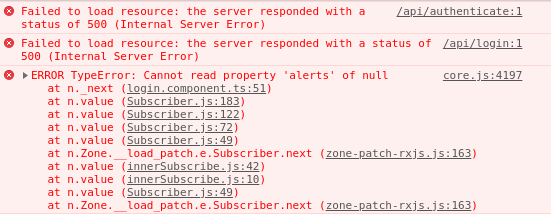

OK I used chmod to make api 777 whereas before it was 755. This seemed to fix the problem.
Having the identical issue as solarflarefx ... verified 1.0.2 zip file, unzipped and ftp'd into www/<site.com>/TB chmod /api and sub-folders to 777 completed.
I'm on InMotion hosting and only have cpanel access. While I can open a terminal, I do not have sudo access.
Anyone out there have Taskboard working on an InMotion hosted server?
