

 junegunn
/home/{user}/.fzf/shell/key-bindings.zsh:emulate:35: unknown argument -o
- [x] I have read through the manual page (
man fzf) - [x] I have the latest version of fzf
- [x] I have searched through the existing issues
Info
- OS
- [x] Linux
- [ ] Mac OS X
- [ ] Windows
- [ ] Etc.
- Shell
- [ ] bash
- [x] zsh
- [ ] fish
Problem / Steps to reproduce
I have followed the instruction to install fzf using git way.
I have selected to use key binding.
After installation and source ~/.zshrc, I have this error:
/home/{my-user-name}/.fzf/shell/key-bindings.zsh:emulate:35: unknown argument -o
And it keeps popping up every time I login to the host.


I can't reproduce the problem, tested on zsh 5.4 and 5.8
$ echo $ZSH_VERSION
5.4.2
$ source ~/.fzf.zsh
$ bindkey | grep fzf
"^I" fzf-completion
"^R" fzf-history-widget
"^T" fzf-file-widget
"^[c" fzf-cd-widget
I have this correctly:
~ ➜ bindkey | grep fzf
"^I" fzf-completion
"^R" fzf-history-widget
"^T" fzf-file-widget
"^[c" fzf-cd-widget
But I just keeps getting the error when logon to the host:
/home/{user}/.fzf/shell/key-bindings.zsh:emulate:35: unknown argument -o
I too see the same error whenever I do login:
/home/$USER/fzf/shell/key-bindings.zsh:emulate:35: unknown argument -o


Same issue.
zsh --version: zsh 4.3.11 (x86_64-redhat-linux-gnu)
fzf is the latest.
$ cat /etc/centos-release CentOS release 6.9 (Final)
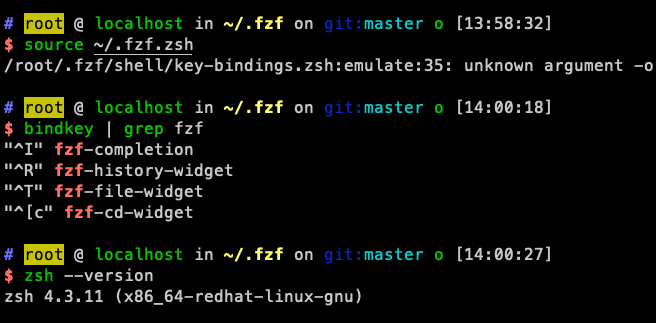

Same issue.
zsh --version:zsh 4.3.11 (x86_64-redhat-linux-gnu)fzf is the latest.$ cat /etc/centos-release CentOS release 6.9 (Final)
I have the same problem withe the exact same output.

I can't reproduce the problem, tested on zsh 5.4 and 5.8
Confirmed, with the default zsh version or the latest brew version the issue is not reproducible on macOS.
Building zsh from source
- instructions: https://sourceforge.net/p/zsh/code/ci/master/tree/INSTALL
- clone
git clone https://git.code.sf.net/p/zsh/code zsh-code
cd zsh-code
- pre-configure
If the
configurescript does not already exist -- e.g., if you've got a snapshot of the bare sources just checked out from a git repository -- some things need to be built before the configuration can proceed. Run the script./Util/preconfigto do this.
./Util/preconfig
- Configure
- define the location where the binary shall be placed
./configure --prefix=$HOME/.local/zsh-test
- check out the desired commit/tag
git checkout zsh-4.3.17
- Make the binary
make && make install.bin
- Optionally add the binary to your PATH
# .zshrc
export PATH="$HOME/.local/zsh-test/bin:$PATH"
- Run the binary
zsh --version
# zsh 4.3.17 (x86_64-apple-darwin19.6.0)
I can produce the error by running the following command with zsh version 4.3.17 non-interactively.
zsh --version
# zsh 4.3.17-dev-0 (x86_64-apple-darwin19.6.0)

# prints the current options flags set for that shell session
zsh -c 'echo $-'
# 569Xd

zsh -c 'source /Users/paria/Developer/fzf/shell/key-bindings.zsh'
# /Users/paria/Developer/fzf/shell/key-bindings.zsh:emulate:35: unknown argument -o
❯ git tag --sort="-creatordate" --format="%(creatordate:format:%d/%b/%y) - %(refname:short)" | grep -C 2 'zsh-4.3.17'
# 16/Dec/12 - zsh-5.0.0-test-1
# 21/Jul/12 - zsh-5.0.0
# 15/Jul/12 - zsh-4.3.17-test-2
# 23/Feb/12 - zsh-4.3.17
# 20/Feb/12 - zsh-4.3.16
# 17/Dec/11 - zsh-4.3.15
When bisecting the zsh source code the issue was fixed with zsh / Code / Commit [fa8a0e] (7/Mar/12)
# Commit [fa8a0e]
git checkout fa8a0e >/dev/null
make install.bin >/dev/null
zsh -c 'source ~/Developer/fzf/shell/key-bindings.zsh'

# Commit prior to [fa8a0e]
git checkout fa8a0e^ >/dev/null
make install.bin >/dev/null
zsh -c 'source /Users/paria/Developer/fzf/shell/key-bindings.zsh'
# /Users/paria/Developer/fzf/shell/key-bindings.zsh:emulate:35: unknown argument -o
- the line was added with #1944
- merged in b1b916ce157df4fe1299edfdd012676419e2263c
'emulate' 'zsh' '-o' 'no_aliases'
- @romkatv can you help here ?
workaround
- if you use the version prior to the merged commit, I assume you will not have the issue
- History for shell/key-bindings.zsh - junegunn/fzf
wget -qO key-zsh-old.zsh https://raw.githubusercontent.com/junegunn/fzf/18261fe31cf1270f9aa783f99bbdbca343f89479/shell/key-bindings.zsh

zsh --version
zsh -c 'source key-zsh-old.zsh '

~~possible fix, check if interactive~~ EDIT: No, this is not the right fix.
--- a/shell/key-bindings.zsh
+++ b/shell/key-bindings.zsh
@@ -32,7 +32,7 @@ else
   }
 fi

-'emulate' 'zsh' '-o' 'no_aliases'
+[[ -o interactive ]] && 'emulate' 'zsh' '-o' 'no_aliases'

 {
EDIT: use two lines
--- a/shell/key-bindings.zsh
+++ b/shell/key-bindings.zsh
@@ -32,7 +32,8 @@ else
   }
 fi

-'emulate' 'zsh' '-o' 'no_aliases'
+builtin emulate  zsh
+builtin setopt no_aliases

 {
the line was added with [zsh] Ensure that fzf code always parses the same way #1944
- merged in b1b916c
'emulate' 'zsh' '-o' 'no_aliases'
- @romkatv can you help here ?
The -o flag was added to emulate in zsh 5.0.2. If you want to support zsh older than that, you'll have to avoid this flag and use setopt to set options.
'builtin' 'emulate' 'zsh' && 'builtin' 'setopt' 'no_aliases'
