
docker-handbrake
 docker-handbrake copied to clipboard
 jlesage
Ignored files get deleted when AUTOMATED_CONVERSION_KEEP_SOURCE is 0
Setting AUTOMATED_CONVERSION_KEEP_SOURCE to 0 deletes all file the script looks at, even if they're ignored via AUTOMATED_CONVERSION_NON_VIDEO_FILE_ACTION / AUTOMATED_CONVERSION_NON_VIDEO_FILE_EXTENSIONS / AUTOMATED_CONVERSION_VIDEO_FILE_EXTENSIONS. This makes it impossible to transcode in place using SAME_AS_SRC without also deleting secondary files like .srt or .nfo files.

What are you trying to achieve exactly ? If you want to keep the non-video files, you should set AUTOMATED_CONVERSION_NON_VIDEO_FILE_ACTION to copy. At the end, you should have in your output folder the converted video along with other files (.srt1, .nfo`, etc).

I have setup the variables
- AUTOMATED_CONVERSION_OUTPUT_SUBDIR=SAME_AS_SRC
- AUTOMATED_CONVERSION_KEEP_SOURCE=0
- AUTOMATED_CONVERSION_NON_VIDEO_FILE_ACTION=copy
- AUTOMATED_CONVERSION_NON_VIDEO_FILE_EXTENSIONS=srt jpg jpeg bmp png gif txt nfo
But it still removes the .jpg or .srt files. It recognizes that that file extension is in the exclusion list, and copies the file into the output folder. ( my /watch folder and /output folder are the same. I don't know if that is why it deletes it)
Here is what I see in the log: [autovideoconverter] Skipping '/watch/Raya.and.the.Last.Dragon.(2021)/Raya.and.the.Last.Dragon.(2021).WEBRip-720p.mp4' (50695218196c3d430b3970f863c5bd44): already processed with failure. [autovideoconverter] Waiting 5 seconds before processing '/watch/Raya.and.the.Last.Dragon.(2021)/fanart.jpg'... [autovideoconverter] File '/watch/Raya.and.the.Last.Dragon.(2021)/fanart.jpg' (17a35fdd50e5579087fe5e5e4e6e0c9f) has an extension part of the exclusion list. [autovideoconverter] File '/watch/Raya.and.the.Last.Dragon.(2021)/fanart.jpg' (17a35fdd50e5579087fe5e5e4e6e0c9f) is not a video, copying (unchanged) to output... cp: '/watch/Raya.and.the.Last.Dragon.(2021)/fanart.jpg' and '/output/Raya.and.the.Last.Dragon.(2021)/fanart.jpg' are the same file [autovideoconverter] Removed /watch/Raya.and.the.Last.Dragon.(2021)/fanart.jpg'.

Ok, this is your issue: the output folder can't be the same as the watch folder. If your "original" folder on the host is your output folder in the container, you can then move it to the watch folder: after the conversion, it will be back into your original location (the output folder).
I had the same question. I'd love if there were a way to make the watch folder and the output folder the same, and it seems like it'd work if there were a way to tell Handbrake to delete converted files, but not ignored files.
The reason I'm trying it this way is because of sonarr. I can currently use Handbrake to convert a file prior to sonarr importing it. Most times, sonarr sees the new file and imports it. However, sometimes sonarr cannot find the file due the new file extension. So instead, I'm trying to have sonarr import the file first, then Handbrake convert it and put it back in the same location.
Could this be possible or is it simply a no-go? Alternatives I've heard of is using Slickbeard (there's a container with it built into sonarr/radarr), however I'd much prefer Handbrake if it can work automatically.

Ok, this is your issue: the output folder can't be the same as the watch folder. If your "original" folder on the host is your output folder in the container, you can then move it to the watch folder: after the conversion, it will be back into your original location (the output folder).
Hi Jocelyn,
For many folks using media servers, it is common for live TV/DVR to record directly into the hosts "tv" folder. In this case, if I am converting the recoded show using handbrake, then output folder has to also be the hosts "tv" folder with all the included subdirectories and such to let the media server organize and display things properly.
At the same time, I would like the host tv folder to be watched, so newly recorded shows trigger the automatic conversion.
How would you recommend configuring handbrake to watch "folder X" for .ts files (common DVR format), and when new .ts files are detected, convert them and save them in the same directory?

Can an intermediate folder be used ? I mean:
- The live TV/DVR could record to the "recording" folder on the host.
- This same folder would be the watch folder of HandBrake.
- The encoded video would be written into the "tv" folder on the host.
Yes, this is what I have done. It's not quite as clean, as Emby (and likely other media servers) seem to auto-create media libraries into the system to handle the intermediate folders, but it's not a deal breaker.
However, allowing the same folder for watch and output would be very cool. It seems to me files and hashes are stored in the HB database to prevent re-processing of the same files in loops? If so, is there a technical barrier to allowing the 2 folders to be the same?
as Emby (and likely other media servers) seem to auto-create media libraries into the system to handle the intermediate folders
Does this intermediate folder need to be handled by Emby ?
If so, is there a technical barrier to allowing the 2 folders to be the same?
With the current implementation, the encoded file would be detected as a new file. Thus, the system will try to re-encode it again.
In Emby, you specify a path for recording shows (for example). I now have this path set as a watch folder. After conversion, files are moved to the "actual" shows library. Unfortunately, Emby insists that the recording location be it's own library.
As you can see here, the "dvr" folders where I record automatically appear as libraries, even though they are always empty (after conversion of course).
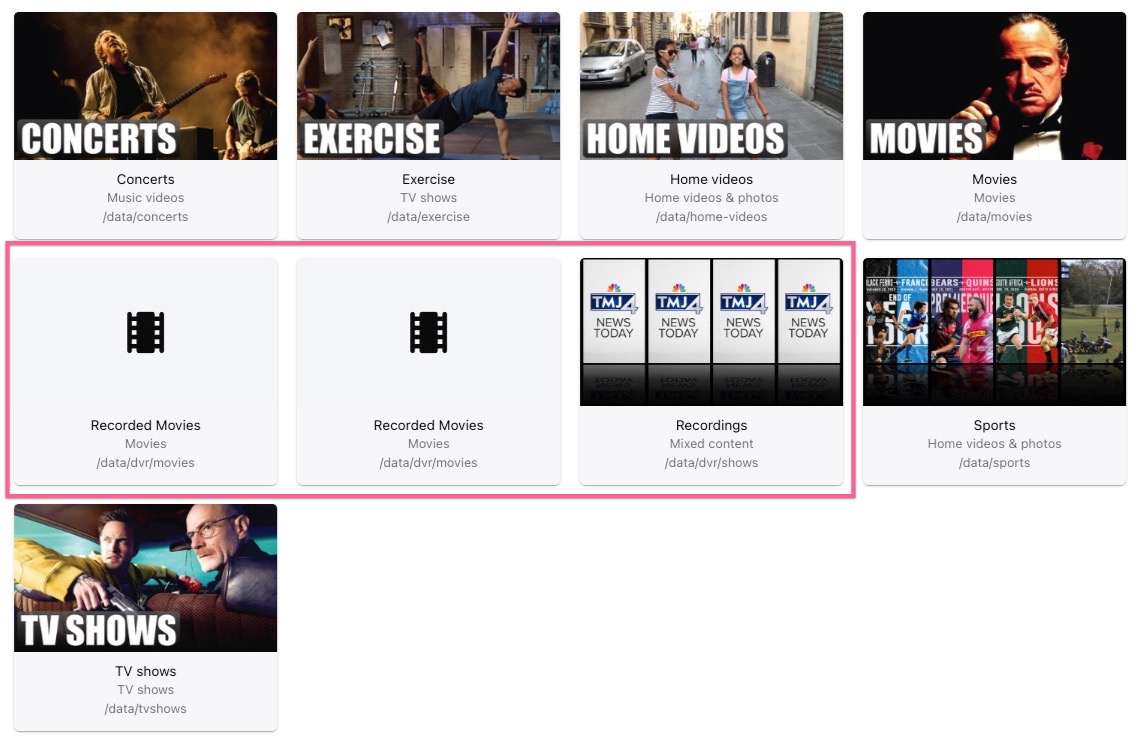
In a typical setup, the DVR paths are set to the library paths for shows/movies, and so you record into the same folder as you store the data:
Here is my Emby DVR config showing the "intermediate" folders.
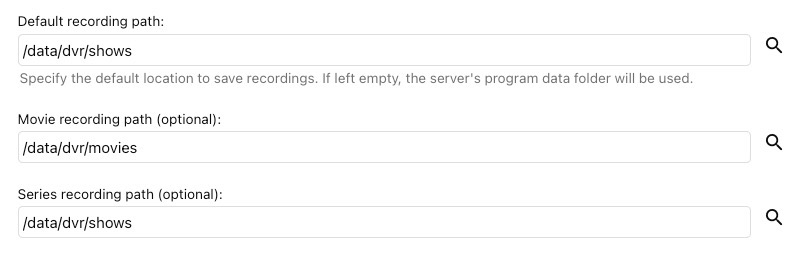
I suppose most folks get around this by using an Emby post-processing script to control handbrake once a recording is complete, avoiding the complication of watch and output folders. Maybe I'll dig into that one day :)