

 henrypp
Feature: Allow/Block (only) once
There should be a feature to allow/block access only once - for that specific PID, that specific IP and that specific port only until the connection is closed or reattempted again.
This is useful when trying to discover which are the ips an app is connecting to - in a granular way (while checking DNS name) by blocking and potentially unblocking the ips to discover whether blocking them is breaking any functionality in the app or that unblocking it restores the functionality.
One example would be for games, where nowadays they attempt a lot of connections, and it is difficult to distinguish between telemetry and needed endpoints for the game to work. For example, I run the game, then, as it attempts connections, i block the telemetry endpoints and once I figure out that there are no other telemetry endpoints attempted, I eventually allow full HTTPS + UDP (let's say).

The behaviour i suggest is similar to ESET EIS's firewall in interactive mode. It is quite hard to explain until experiencing this feature and its benefits. One can install the trial to see it in action. I find ESET EIS's firewall to be the most versatile i ever used, but it's proprietary.
Nowadays, a lot of apps use CDNs and other cloud providers such as Google (*.bc.googleusercontent.com) or AWS etc. and also querying OCSP for certificates revocations and other stuff which have a lot of IPs resolving to similar dns and are used for milion different reasons.
To give another example to highlight why this feature si needed:
Let's say I want to allow port 80 for a specific IP which resolves to Google cloud (*.bc.googleusercontent.com) and let's say i want to allow it but only once to allow the app to download some stuff it needs from the cloud, but I do not want the app to make (leak) any other http (80) traffic.
Now this is extremely difficult to set a permanent rule, because there are only 2 options:
--- if I permently/temporarilly allow port 80 - then maybe i will leak other http data --- if i allow port 80 only for that IP - then, since this is not a DNS based firewall, i cannot wildcard the domain, neither i can whitelist the whole needed range as sometimes it is hard to determine it, and thus it is impossible to allow the app each times it connects under different cloud IP (since there are a gazzillion IPs in google cloud) as that would mean to create too many rules. Just clicking 'allow once' is much faster and gets the job done whenever needed.
I hope my example is relevant.
A representation of the previous example, where I would like to allow firefox update temporarily, but not permanently allowing http traffic:
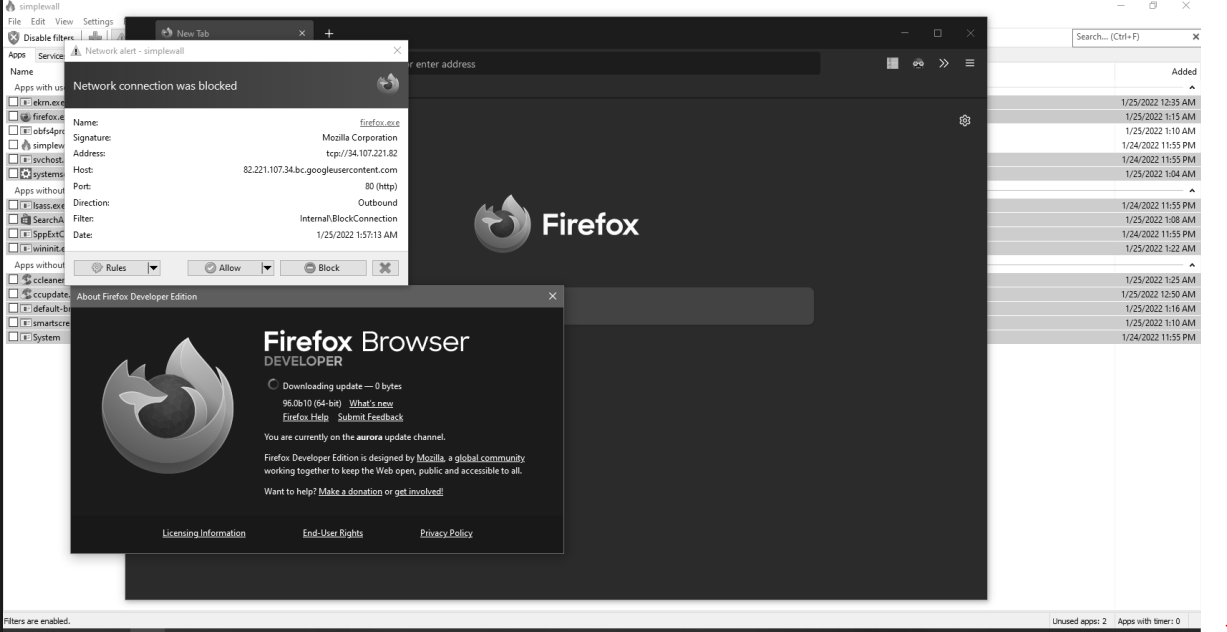
This might not be the best example, as i could temporarilly allow 80 for 2 minutes, but even though, I cannot know for sure it won't leak any other http traffic. there are other more untrustful apps which would be better examples (eg. games)
Let me know If I am missing something, as I just started experimenting with simplewall in a sandboxed environment, and it really looks promising, but it is lacking this important feature.

Yes, i think it would be great if you could find a way to prevent process Execution until we took our decision, that could prevents errors like that.

Until the process/pid exist is good, but if you want to log the IPs that apps/services want to connect to, then just enable logging! simplewall will log them all in a file for you

could you please also provide details of why you closed this issue?
I believe @henrypp is closing all issues related to PID identification because of this comment:
It cannot be done because of microsoft (as always), not any of FWPM_NET_EVENT have PID information.
If the events that Simplewall receives doesn't contain the PID, then it must take a much more robust solution (like an entirely from-the-ground-up software firewall).
