

 firasdib
.NET (PowerShell) flavor
Flavor Request
I'm requesting a flavor ".NET (PowerShell)".
The major difference to ".NET (C#)" is, that you don't have to escape " and \.
The backslash can be used unescaped in any string literal. In single-quoted string literals, the double-quotation mark can be used unescaped as well. Likewise, in double-quoted string literals the single-quotation mark can be used unescaped. In mixed cases you can use a here-string.
That being said, in my opinion a sensible implied quoting would be '...' as this is the typical way of using RegEx patterns in PowerShell. In this case the single-quotation mark has to be escaped by doubling it.
PowerShell examples:
$testInput = '"foo" bar "baz"'
[regex]::Matches( $testInput, '"[^"]+"' ).Value

$testInput = "foo 'baz'"
$testInput -match "\S+\s'baz'"

$testInput = "foo'baz"
# How to escape single-quotation mark in the typical, single-quoted RegEx pattern:
$testInput -match '.*?''.*'

# Here-string is delimited by @' and '@
$testInput = @'
'foo' "bar"
'@
$testInput -match @'
'.*?' ".*?"
'@
PowerShell documentation: about Quoting Rules

It would seem excessive to have an entire flavor if the only difference is the escaping. Perhaps in the code gen..

In my opinion, code gen seems to be a good way for beginners to get started only. If all I need is the actual regex, it would seem to be too cumbersome to use. Two clicks to open the code sample for the language I'm interested in, then make out the regex within the code sample and more clicks to highlight and copy it.
Alternative idea: Could you add more delimiters for .NET, similar to Python?
-
" (C#) -
' (PowerShell)
When ' is choosen, apply the PowerShell escaping rules.
Unfortunately, it isn't just escaping that is the problem, but also what options are selected by default.
In short: only gi should be set by default, to match PowerShell's case-insensitive default behavior, which it overlays on the .NET APIs.
- As an aside: the
gmdefault isn't great for the.NET (C#)flavor either, given thatmis not set by default in .NET regexes; thegdefault makes sense, even though there's no direct .NET equivalent.
Ideally, any other options wouldn't even be selectable in the GUI, because native PowerShell regex features (unlike direct use of the underlying .NET APIs) allow only the use of inline regex options (e.g., (?s)). The - nontrivial - alternative would be to auto-translate the GUI option selections into their equivalent inline regex options.
Having .NET support in general is great, but for PowerShell users it's currently a non-obvious struggle against the default settings of the .NET (C#) flavor: I've provided detailed guidance based on the status quo in this Stack Overflow answer, which illustrates that struggle.

When
'is choosen, apply the PowerShell escaping rules.
It's more complicated than quoted pairs, for example:
- First there's one double-quoted string starting
“and ending with"
| Codepoint | Rune | Category |
|---|---|---|
| 0x201c | “ |
InitialQuotePunctuation |
| 0x22 | " |
OtherPunctuation |
- with an inner
"to escape the„
| Codepoint | Rune | Category |
|---|---|---|
| 0x22 | " |
OtherPunctuation |
| 0x201e | „ |
OpenPunctuation |
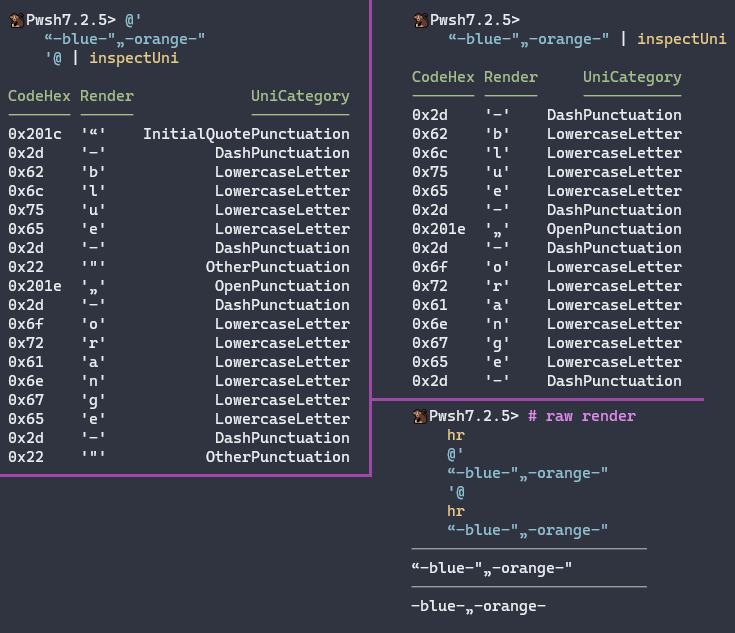
Maybe the UI could give hints or link to docs or examples. Or maybe an opt-in button? I think automatically switching would add complexity,

@ninmonkey, yes, PowerShell is regrettably permissive when it comes to interchangeable use of quoting characters - this Stack Overflow answer lists all equivalents (including for whitespace and hyphen-like chars.)
Personally, I think it's sufficient for PowerShell support on this site to assume that both the REGULAR EXPRESSION and SUBSTITUTION fields are implicitly '...'-enclosed, which the UI should clearly reflect.
Ideally, the need to escape the following ' equivalents by doubling them would also be recognized, but I don't think the need will arise often in practice.
-
‘- [LEFT SINGLE QUOTATION MARK (U+2018)] -
’- [RIGHT SINGLE QUOTATION MARK (U+2019)] -
‚- [SINGLE LOW-9 QUOTATION MARK (U+201A)] -
‛- [SINGLE HIGH-REVERSED-9 QUOTATION MARK (U+201B)]