

 facebookresearch
Bash script got killed suddenly
Hi,
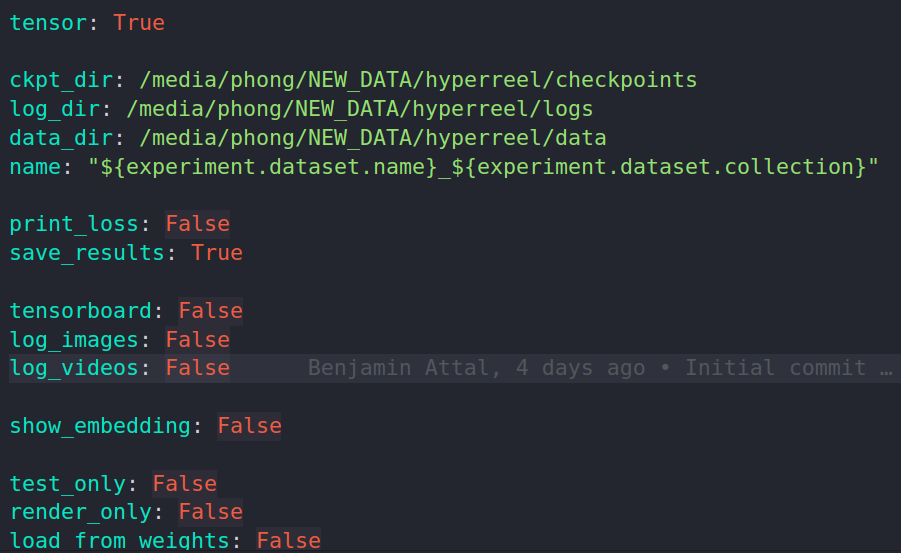
Thanks for the code ! I am trying to run the experiment on the immersive dataset but the script got killed suddenly without any warnings or errors ! I have also properly adjust the data path in the local.yaml file like this:
bash scripts/run_one_immersive.sh 0 02_Flames 10
This is the error:
scripts/run_one_immersive.sh: line 19: 14469 Killed CUDA_VISIBLE_DEVICES=$1 python main.py experiment/dataset=immersive experiment/training=immersive_tensorf experiment.training.val_every=5 experiment.training.test_every=10 experiment.training.ckpt_every=10 experiment.training.render_every=30 experiment.training.num_epochs=30 experiment/model=immersive_sphere experiment.params.print_loss=True experiment.dataset.collection=$2 +experiment/regularizers/tensorf=tv_4000 experiment.dataset.start_frame=$3 experiment.params.name=immersive_$2_start_$3

Hi!
A couple of questions:
- How much RAM does your machine have?
- At what point does this script get killed? Do you see any command line print statements saying something like "Full res images loaded: ...:"?
I suspect this might be due to a silent python out-of-memory error. Training a model on high-res multiview videos with many frames requires loading a lot of data into RAM. We already have a training ray subsampling scheme (algorithm outlined in the appendix of our paper), which helps reduce memory requirements somewhat. You can adjust the parameters of this subsampling scheme in conf/experiment/dataset/immersive.yaml:
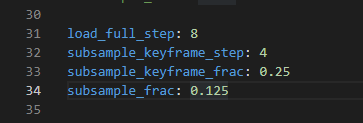
Frames divisible by load_full_step will be loaded in full. Frames divisible by subsample_keyframe_step will load subsample_keyframe_frac * the total number of pixels in each image . All other frames will load subsample_frac * the total number of pixels in each image. You can also adjust num_frames in this file to train on a smaller number of frames.
Hi,
- Currently my machine has 32GB RAM
- Right after loading the data, the scripts got killed.
I have observed the consumption of RAM in my computer and the dataloder is kind a storing all rays in the beginning of the training. I found the subsample function here but it seems like it didnt help much in my computer.
Gotcha. What's the upper bound on the number of frames you can use before getting an out of memory error?
FYI: I ran into the same problem on a machine with a 3090 (24gb GPU mem) and 64GB of RAM.
Changed load_full_step: 8 to load_full_step: 16 and subsample_frac: 0.125 to subsample_frac: 0.0336 in immersive.yaml, and now the command bash scripts/run_one_immersive.sh 0 02_Flames 0 works :tada:

@breuckelen for me I can only train 4 frame sequence using the original code. My computer only have 32 GB of RAM. One more question: should I increase the number of training epochs if I sample less pixels based on the strategy you mentioned above. I wonder if sampling less data would decrease the performance.
@nlml Thanks ! I have to further decrease the numbers to make it work in my case.
@phongnhhn92 Yeah sampling fewer pixels will likely make performance worse. And that's interesting -- given that, on my workstation with 128GB of RAM, I can load 50 frames, I would've expected you to be able to load ~12-ish frames.
Honestly, I think the solution here is to overhaul the data-loaders. Right now, we load everything into memory at the beginning of training. But it should be possible to load, for example, a random subset of the training rays into memory at one epoch, and then take another random subset at the next epoch, etc., etc.
I don't have a concrete timeline for this, but it's something I'd like to get around to soon. I'll keep you posted, and in the meantime subsampling / using fewer frames may be your best bet.
@breuckelen
Actually I have implemented a new dataloader to load a subset of rays per iteration. Doing so significantly reduced the amount of RAM required to start training. I will check the performance and compare the results that you have using the original codebase. Closing this issue for now ! Thanks for the support !