
qimgv
 qimgv copied to clipboard
 easymodo
Support for RAW image formats?
Hi,
I have a large collection of RAW camera images. Most are in dng/rw2/arw formats. I usually use Darktable to view them but Darktable is a huge pain. Would it be possible to add RAW support to qimgv? Most of the Win/Mac image viewers also support RAW formats.
Most popular library seems to be https://github.com/LibRaw/LibRaw and is available for pretty much every distro. It's written in C++ too.
Thanks!

You can get CR2 support (and more) with this https://gitlab.com/mardy/qtraw
Didn't work with dng / arw though
nevermind, misread rw2 as cr2. but you could still try
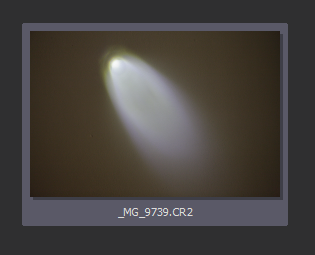
In the current version 0.9.1, this is what happens with CR2:
The thumbnail is generated correctly however

@Richard-L I could never get it to work. A while back I installed qtraw myself and only .arw files actually show in qimgv browser but no images are displayed. qimgv doesn't even recognize .rw2 RAW files for some reason. I have no idea what I'm doing wrong.
@nick-s-b @Richard-L Seems to be a scaling issue. Setting it to Bilinear in Settings -> Scaling seems to solve it for .arw and .dng files.
Raw files for reproducibility: https://img.photographyblog.com/reviews/sony_a7_iii/photos/sony_a7_iii_01.arw https://www.kenrockwell.com/trips/2009-10/images/L1004220.DNG Tested on qimgv 0.9.1 with qtraw 1.1 installed.
...But there are still some flickering and transparency issues while zooming in.

@drocheam Hi, I gave it another try and it seems that changing the scaling did the trick. I guess qtraw and OpenCV don't work well together so picking non-OpenCV options does work. However, while it did work with the DNG off the Ken's site, this DNG did not work for me: https://filesamples.com/formats/dng (sample1.dng). And I can't get rw2 files to work either: https://filesamples.com/formats/rw2
I think the flickering is an issue with how buffering is set by qtraw. Neither of these is the fault of qimgv however. Making RAW files work without a good library is not trivial at all.
I think the flickering is an issue with how buffering is set by qtraw. Neither of these is the fault of qimgv
Flickering with opencv during zoom was my fault
Are you still planning to add some RAW formats? Everyone with a DSLR eventually ends up with tons of CR2 images, and what would be a better way than previewing them with a snappy image viewer like qimgv...
