

 dotnet
Microsoft.EntityFrameworkCore.DbUpdateConcurrencyException
ok so my EF Core suddently stopped working when updating Microsoft.EntityFramework.Tools, Design to 7.0.0-rc.1.22426.7 and i am using the Postgres SQL provider which is updated to 7.0.0-rc.1... i am using the same modals as i had on the lasted updated and i thought the DB was beging weird so i created a new Table and the problem is still, it seems to be working with some modal classes but not my main ones My Modal Class https://pastebin.com/iHWN54Fh i have a method directly into my Context that checks if the member is added or not
    public async Task<KurumiMember> GetOrAddMemberAsync(Snowflake guildId, Snowflake memberId)
    {
        KurumiMember? member = await GetMemberAsync(guildId, memberId);

        if (member is not null)
            return member;

        member = new(guildId, memberId);

        return member;
    }
Microsoft.EntityFrameworkCore.DbUpdateConcurrencyException: The database operation was expected to affect 1 row(s), but actually affected 0 row(s); data may have been modified or deleted since entities were loaded. See http://go.microsoft.com/fwlink/?LinkId=527962 for information on understanding and handling optimistic concurrency exceptions.
   at Npgsql.EntityFrameworkCore.PostgreSQL.Update.Internal.NpgsqlModificationCommandBatch.ThrowAggregateUpdateConcurrencyExceptionAsync(RelationalDataReader reader, Int32 commandIndex, Int32 expectedRowsAffected, Int32 rowsAffected, CancellationToken cancellationToken)
   at Npgsql.EntityFrameworkCore.PostgreSQL.Update.Internal.NpgsqlModificationCommandBatch.ConsumeAsync(RelationalDataReader reader, CancellationToken cancellationToken)
   at Microsoft.EntityFrameworkCore.Update.ReaderModificationCommandBatch.ExecuteAsync(IRelationalConnection connection, CancellationToken cancellationToken)
   at Microsoft.EntityFrameworkCore.Update.ReaderModificationCommandBatch.ExecuteAsync(IRelationalConnection connection, CancellationToken cancellationToken)
   at Microsoft.EntityFrameworkCore.Update.Internal.BatchExecutor.ExecuteAsync(IEnumerable`1 commandBatches, IRelationalConnection connection, CancellationToken cancellationToken)
   at Microsoft.EntityFrameworkCore.Update.Internal.BatchExecutor.ExecuteAsync(IEnumerable`1 commandBatches, IRelationalConnection connection, CancellationToken cancellationToken)
   at Microsoft.EntityFrameworkCore.Update.Internal.BatchExecutor.ExecuteAsync(IEnumerable`1 commandBatches, IRelationalConnection connection, CancellationToken cancellationToken)
   at Microsoft.EntityFrameworkCore.ChangeTracking.Internal.StateManager.SaveChangesAsync(IList`1 entriesToSave, CancellationToken cancellationToken)
   at Microsoft.EntityFrameworkCore.ChangeTracking.Internal.StateManager.SaveChangesAsync(StateManager stateManager, Boolean acceptAllChangesOnSuccess, CancellationToken cancellationToken)
   at Npgsql.EntityFrameworkCore.PostgreSQL.Storage.Internal.NpgsqlExecutionStrategy.ExecuteAsync[TState,TResult](TState state, Func`4 operation, Func`4 verifySucceeded, CancellationToken cancellationToken)
   at Microsoft.EntityFrameworkCore.DbContext.SaveChangesAsync(Boolean acceptAllChangesOnSuccess, CancellationToken cancellationToken)
   at Microsoft.EntityFrameworkCore.DbContext.SaveChangesAsync(Boolean acceptAllChangesOnSuccess, CancellationToken cancellationToken)
   at KurumiBot.Services.InteractionsService.SetPartnerAsync(Snowflake guildId, Snowflake memberId, Snowflake partnerId) in C:\Users\Tim\RiderProjects\kurumi-bot\src\KurumiBot\Services\InteractionsService.cs:line 243
   at KurumiBot.Services.InteractionsService.SetPartnerAsync(Snowflake guildId, Snowflake memberId, Snowflake partnerId) in C:\Users\Tim\RiderProjects\kurumi-bot\src\KurumiBot\Services\InteractionsService.cs:line 244
   at KurumiBot.Services.InteractionsService.SetPartnerAsync(Snowflake guildId, Snowflake memberId, Snowflake partnerId) in C:\Users\Tim\RiderProjects\kurumi-bot\src\KurumiBot\Services\InteractionsService.cs:line 245
   at KurumiBot.Commands.Modules.TextModules.UserInteractionModule.MarryAsync(IMember partner) in C:\Users\Tim\RiderProjects\kurumi-bot\src\KurumiBot\Commands\Modules\TextModules\UserInteractionModule.cs:line 145
   at Qmmands.ReflectionCommandCallback.ExecuteAsync(ICommandContext context)
   at Qmmands.ReflectionCommandCallback.ExecuteAsync(ICommandContext context)
   at Qmmands.Default.DefaultExecutionSteps.ExecuteCommand.OnExecuted(ICommandContext context)
PS C:\Users\Tim\RiderProjects\kurumi-bot\src\KurumiBot> dotnet ef dbcontext list --verbose
Using project 'C:\Users\Tim\RiderProjects\kurumi-bot\src\KurumiBot\KurumiBot.csproj'.
Using startup project 'C:\Users\Tim\RiderProjects\kurumi-bot\src\KurumiBot\KurumiBot.csproj'.
Writing 'C:\Users\Tim\RiderProjects\kurumi-bot\src\KurumiBot\obj\KurumiBot.csproj.EntityFrameworkCore.targets'...
dotnet msbuild /target:GetEFProjectMetadata /property:EFProjectMetadataFile=C:\Users\Tim\AppData\Local\Temp\tmp12F1.tmp /verbosity:quiet /nologo C:\Users\Tim\RiderProjects\kurumi-bot\src\KurumiBot\KurumiBot.csproj
Writing 'C:\Users\Tim\RiderProjects\kurumi-bot\src\KurumiBot\obj\KurumiBot.csproj.EntityFrameworkCore.targets'...
dotnet msbuild /target:GetEFProjectMetadata /property:EFProjectMetadataFile=C:\Users\Tim\AppData\Local\Temp\tmp1553.tmp /verbosity:quiet /nologo C:\Users\Tim\RiderProjects\kurumi-bot\src\KurumiBot\KurumiBot.csproj
Build started...
dotnet build C:\Users\Tim\RiderProjects\kurumi-bot\src\KurumiBot\KurumiBot.csproj /verbosity:quiet /nologo

Der Buildvorgang wurde erfolgreich ausgeführt.
    0 Warning(s)
    0 Errors

Verstrichene Zeit 00:00:03.78
Build succeeded.
dotnet exec --depsfile C:\Users\Tim\RiderProjects\kurumi-bot\src\KurumiBot\bin\Debug\net6.0\KurumiBot.deps.json --additionalprobingpath C:\Users\Tim\.nuget\packages --runtimeconfig C:\Users\Tim\RiderProjects\kurumi-bot\src\KurumiBot\bin\Debug\net6.0\KurumiBot.runtimeconfig.json C:\Users\Tim\.dotnet\tools\.store\dotnet-ef\7.0.0-rc.1.22426.7\dotnet-ef\7.0.0-rc.1.22426.7\tools\net6.0\any\tools\netcoreapp2.0\any\ef.dll dbcontext list --assembly C:\Users\Tim\RiderProjects\kurumi-bot\
src\KurumiBot\bin\Debug\net6.0\KurumiBot.dll --project C:\Users\Tim\RiderProjects\kurumi-bot\src\KurumiBot\KurumiBot.csproj --startup-assembly C:\Users\Tim\RiderProjects\kurumi-bot\src\KurumiBot\bin\Debug\net6.0\KurumiBot.dll --startup-project C:\Users\Tim\RiderProjects\kurumi-bot\src\KurumiBot\KurumiBot.csproj --project-dir C:\Users\Tim\RiderProjects\kurumi-bot\src\KurumiBot\ --root-namespace KurumiBot --language C# --framework net6.0 --nullable --working-dir C:\Users\Tim\Rider
Projects\kurumi-bot\src\KurumiBot --verbose
Using assembly 'KurumiBot'.
Using startup assembly 'KurumiBot'.
Using application base 'C:\Users\Tim\RiderProjects\kurumi-bot\src\KurumiBot\bin\Debug\net6.0'.
Using working directory 'C:\Users\Tim\RiderProjects\kurumi-bot\src\KurumiBot'.
Using root namespace 'KurumiBot'.
Using project directory 'C:\Users\Tim\RiderProjects\kurumi-bot\src\KurumiBot\'.
Remaining arguments: .
Finding DbContext classes...
Finding IDesignTimeDbContextFactory implementations...
Finding application service provider in assembly 'KurumiBot'...
Finding Microsoft.Extensions.Hosting service provider...
Using environment 'Development'.
Microsoft.Extensions.Hosting.HostAbortedException: The host was aborted.
   at Microsoft.Extensions.Hosting.HostFactoryResolver.HostingListener.ThrowHostAborted()
   at Microsoft.Extensions.Hosting.HostFactoryResolver.HostingListener.OnNext(KeyValuePair`2 value)
   at System.Diagnostics.DiagnosticListener.Write(String name, Object value)
   at Microsoft.Extensions.Hosting.HostBuilder.Write[T](DiagnosticSource diagnosticSource, String name, T value)
   at Microsoft.Extensions.Hosting.HostBuilder.ResolveHost(IServiceProvider serviceProvider, DiagnosticListener diagnosticListener)
   at Microsoft.Extensions.Hosting.HostBuilder.Build()
   at Program.<Main>$(String[] args) in C:\Users\Tim\RiderProjects\kurumi-bot\src\KurumiBot\Program.cs:line 62
Using application service provider from Microsoft.Extensions.Hosting.
Found DbContext 'KurumiContext'.
Finding DbContext classes in the project...
EF Core version: Database provider: Npgsql.EntityFrameworkCore.PostgreSQL Target framework:.NET6.0 Operating system: IDE: JetBrains Rider newest version
My Service code https://pastebin.com/p8FZgLPq
Last one i am really new to this, and sorry for my bad english.

@LedgendODST there indeed have been changes around this area in the provider, a bug here is possible.
However, it's hard to piece together the exact scenario from the above code snippets. Any chance you can narrow it down to a minimal console program that reproduces the issue?

@LedgendODST there indeed have been changes around this area in the provider, a bug here is possible.
However, it's hard to piece together the exact scenario from the above code snippets. Any chance you can narrow it down to a minimal console program that reproduces the issue?
Ofc once i get home from work I will make a test project and test it and post it in here
Hello i came back home and worked on the Project, as modal i only added a list and a Id as Snowflake with Converter.
Rider show me when runing the program. "C:\Program Files\JetBrains\JetBrains Rider 2022.2.2\plugins\dpa\DotFiles\JetBrains.DPA.Runner.exe" --handle=5528 --backend-pid=9576 --detach-event-name=dpa.detach.5528 C:/Users/Tim/RiderProjects/ConsoleApp2/ConsoleApp2/bin/Debug/net6.0/ConsoleApp2.exe
Process finished with exit code 0.
but the DB shows me this
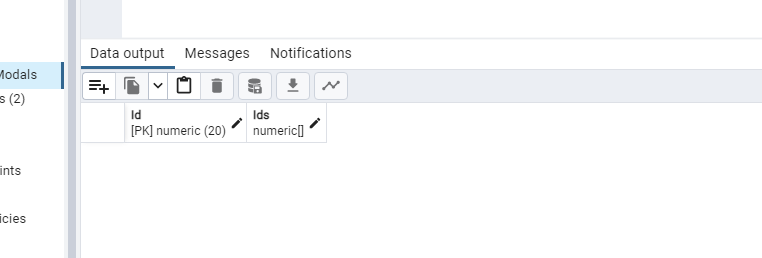
also this is my Connection string maybe this is wrong?
"Host=;Database=;Username=;Password=;Include Error Detail=true"
Program.cs https://pastebin.com/2GkM58FG DbContext https://pastebin.com/2yXM7XZ4 ModalClass https://pastebin.com/HEpUJXeN
@LedgendODST the Snowflake type is missing. In addition, in Program.cs you load the DatabaseModel with a given ID, but then you create a new instance with the same ID. You then change a property on that new instance (user.Ids.Add(1)), but EF isn't aware of that new instance. As a result SaveChangesAsync doesn't seem to do anything at all... Below, I've tried to recreate a simple version of your code sample - please tweak that (or submit a similar, full code sample) to show the problem.
Note: it seems like Snowflake is being used as an ID wrapper for ulong (as a type converter); PostgreSQL doesn't have a ulong type (nor do other databases in general), so EF value-converts that yet again to a numeric, which isn't a good idea for an ID. I'd recommend simply using long as your ID.
Attempted repro
@LedgendODST the Snowflake type is missing. In addition, in Program.cs you load the DatabaseModel with a given ID, but then you create a new instance with the same ID. You then change a property on that new instance (
user.Ids.Add(1)), but EF isn't aware of that new instance. As a result SaveChangesAsync doesn't seem to do anything at all... Below, I've tried to recreate a simple version of your code sample - please tweak that (or submit a similar, full code sample) to show the problem.Note: it seems like Snowflake is being used as an ID wrapper for ulong (as a type converter); PostgreSQL doesn't have a ulong type (nor do other databases in general), so EF value-converts that yet again to a numeric, which isn't a good idea for an ID. I'd recommend simply using long as your ID.
Attempted repro
Github dosen't show the code sample, but yeah as i said it worked all well before i updated it (i also tried to downgrade the Tools, Psql, and Designe to the old versions and it still was not working) and it needed to be a ulong since a long would not work with a Discord ID i tried to send my Code Sample in here but github wont let me Attach it.
@LedgendODST I believe you and I'm very interested in seeing the possible bug - but I need a code sample to reproduce this.
Please expand my attempted repro above, and try to produce a similar, standalone runnable code sample. You can simply put everything in the same Program.cs (no need for separate files).
@LedgendODST I believe you and I'm very interested in seeing the possible bug - but I need a code sample to reproduce this.
Please expand my attempted repro above, and try to produce a similar, standalone runnable code sample. You can simply put everything in the same Program.cs (no need for separate files).
wait a minute did you guys changed something on the Update Method? Like
DbContext.Entity.Update? it seems like on the old versions you had it tried to find the modal and update it otherwise it add it into the Db, Sorry for the fast topic change but i am on my way to fix it.
Here the Update Method Docs so it should instert the Entity if it not exitst or update it
For entity types with generated keys if an entity has its primary key value set then it will be tracked in the Modified state. If the primary key value is not set then it will be tracked in the Added state. This helps ensure new entities will be inserted, while existing entities will be updated. An entity is considered to have its primary key value set if the primary key property is set to anything other than the CLR default for the property type.
My New Code faily with i will poost below.
it fails with
Unhandled exception. Microsoft.EntityFrameworkCore.DbUpdateConcurrencyException: The database operation was expected to affect 1 row(s), but actually affected 0 row(s); data may have been modified or deleted since entities were loaded. See http://go.microsoft.com/fwlink/?LinkId=527962 for information on understanding and handling optimistic concurrency exceptions.
   at Npgsql.EntityFrameworkCore.PostgreSQL.Update.Internal.NpgsqlModificationCommandBatch.ThrowAggregateUpdateConcurrencyExceptionAsync(RelationalDataReader reader, Int32 commandIndex, Int32 expectedRowsAffected, Int32 rowsAffected, CancellationToken cancellationToken)
   at Npgsql.EntityFrameworkCore.PostgreSQL.Update.Internal.NpgsqlModificationCommandBatch.ConsumeAsync(RelationalDataReader reader, CancellationToken cancellationToken)
   at Microsoft.EntityFrameworkCore.Update.ReaderModificationCommandBatch.ExecuteAsync(IRelationalConnection connection, CancellationToken cancellationToken)
   at Microsoft.EntityFrameworkCore.Update.ReaderModificationCommandBatch.ExecuteAsync(IRelationalConnection connection, CancellationToken cancellationToken)
   at Microsoft.EntityFrameworkCore.Update.Internal.BatchExecutor.ExecuteAsync(IEnumerable`1 commandBatches, IRelationalConnection connection, CancellationToken cancellationToken)
   at Microsoft.EntityFrameworkCore.Update.Internal.BatchExecutor.ExecuteAsync(IEnumerable`1 commandBatches, IRelationalConnection connection, CancellationToken cancellationToken)
   at Microsoft.EntityFrameworkCore.Update.Internal.BatchExecutor.ExecuteAsync(IEnumerable`1 commandBatches, IRelationalConnection connection, CancellationToken cancellationToken)
   at Microsoft.EntityFrameworkCore.ChangeTracking.Internal.StateManager.SaveChangesAsync(IList`1 entriesToSave, CancellationToken cancellationToken)
   at Microsoft.EntityFrameworkCore.ChangeTracking.Internal.StateManager.SaveChangesAsync(StateManager stateManager, Boolean acceptAllChangesOnSuccess, CancellationToken cancellationToken)
   at Npgsql.EntityFrameworkCore.PostgreSQL.Storage.Internal.NpgsqlExecutionStrategy.ExecuteAsync[TState,TResult](TState state, Func`4 operation, Func`4 verifySucceeded, CancellationToken cancellationToken)
   at Microsoft.EntityFrameworkCore.DbContext.SaveChangesAsync(Boolean acceptAllChangesOnSuccess, CancellationToken cancellationToken)
   at Microsoft.EntityFrameworkCore.DbContext.SaveChangesAsync(Boolean acceptAllChangesOnSuccess, CancellationToken cancellationToken)
   at Program.<Main>$(String[] args) in C:\Users\Tim\RiderProjects\ConsoleApp2\ConsoleApp2\Program.cs:line 14
   at Program.<Main>$(String[] args) in C:\Users\Tim\RiderProjects\ConsoleApp2\ConsoleApp2\Program.cs:line 15
but when i call AddAsync and Save it, and then use the updae method it works and instert succesfully.
Here everything in 1 File and i removed the snowflake because it would need a special nuget package https://pastebin.com/LN4juuMQ
@LedgendODST that code indeed fails with "The database operation was expected to affect 1 row(s), but actually affected 0 row(s)"; however, it fails in the same way in 6.0.
The reason for that is that the DatabaseModel does not exist in the database (user is null), but then you use context.DatabaseModals.Update, which starts tracking something as "Modified". You're effectively telling EF to update an existing row in the database, after having checked that no such row actually exists; when the SQL update fails to update the non-existent row, EF throws a concurrency exception.
It looks like you want to use Add instead of Update here, to insert a new row rather than update an existing one.
@LedgendODST that code indeed fails with "The database operation was expected to affect 1 row(s), but actually affected 0 row(s)"; however, it fails in the same way in 6.0.
The reason for that is that the DatabaseModel does not exist in the database (
user is null), but then you usecontext.DatabaseModals.Update, which starts tracking something as "Modified". You're effectively telling EF to update an existing row in the database, after having checked that no such row actually exists; when the SQL update fails to update the non-existent row, EF throws a concurrency exception.It looks like you want to use Add instead of Update here, to insert a new row rather than update an existing one.
well but context.DatabaseModals.Update should check if the modal exitst if it exitst then update otherwise it insert you or no? because i tried like Adding the modal with context.DatabaseModals.AddAsync and then use the Update one, but i can not like call context.DatabaseModals.AddAsync when the modal already exitst and i don't want to make the code more unclean and context.DatabaseModals.Update where working before why is it not anymore?
@LedgendODST Update doesn't check the database for anything - it simply starts tracking the instance you give it, as Modified. See the docs for that.
In any case, you've just checked the line above whether that row exists in the database (user is null), and it doesn't; so why would you want to check again? You may be looking for an AddOrUpdate (AKA Upsert) operation, that's not yet implemented in EF (see #4526).
Are you sure you have code which actually worked in 6.0, and fails in 7.0.0-rc.1? If so, could you please make a minimal runnable sample for that?
this is like how i had it and it was always working since i updated the versions, i got confused about
this is the exact thing i did on my old code https://pastebin.com/yAmGNEty
and i don't really want to call APIs that often (Like 1 time on the GetMemberAsync, on GetOrAddMemberAsync (Like if i want to mkae it work i would need to do this
    public async Task<DatabaseModal> GetOrAddMemberAsync(ulong Id)
    {
        DatabaseModal? member = await GetMemberAsync(Id);

        if (member is not null)
            return member;

        member = new(Id);
await AddAsync(member);
await SaveChangesAsync();
        return member;
    }
and then calling wait SaveChangesAsync(); and the update method (new code above) on my implamented method
@LedgendODST at this point I'm pretty confused about exactly what worked and stopped working in 7.0. You'll have to submit a clear code sample, since the one you submitted uses EF incorrectly and also fails on 6.0.
@LedgendODST at this point I'm pretty confused about exactly what worked and stopped working in 7.0. You'll have to submit a clear code sample, since the one you submitted uses EF incorrectly and also fails on 6.0.
i use .NET6 as mentioned above.
Working Cocde : https://pastebin.com/BQdjFXyS Non Working Code https://pastebin.com/yAmGNEty
but the non working code worked back when i used Npgsql.EntityFrameworkCore.PostgreSQL" Version="5.0.10" "Microsoft.EntityFrameworkCore.Design" Version="5.0.11"
with Dotnet 5 and it worked.
@LedgendODST you didn't mention anything above about version 5.0; but regardless, your non-working code fails for me using Npgsql.EntityFrameworkCore.PostgreSQL 5.0.10 as well - as expected. I've taken your code and added EnsureDeleted/EnsureCreated at the beginning - since I have no idea what the starting state of your database is - and tried running the code both when the row already exists and when it doesn't (see comment below).
Once again, you probably want to read up on EF's change tracking, and exactly what Update does. Your code shouldn't be working in any version of EF. However, if you can submit code that actually works on an older version and fails on a newer one, I can take another look.
Attempted repro
await using var context = new BloggerContext();
await context.Database.EnsureDeletedAsync();
await context.Database.EnsureCreatedAsync();

var user = await context.GetOrAddMemberAsync(604729455818309643);

user = new DatabaseModal(604729455818309643);
user.Userids.Add(1);
context.DatabaseModals.Update(user);
await context.SaveChangesAsync();


public class BloggerContext : DbContext
{
    public DbSet<DatabaseModal> DatabaseModals { get; set; }

    protected override void OnConfiguring(DbContextOptionsBuilder optionsBuilder)
    {
        optionsBuilder.UseNpgsql("Host=localhost;Username=test;Password=test;Include Error Detail=true");
        base.OnConfiguring(optionsBuilder);
    }

    public Task<DatabaseModal?> GetMemberAsync(ulong Id)
        => DatabaseModals.FirstOrDefaultAsync(m => m.Id == Id);

    public async Task<DatabaseModal> GetOrAddMemberAsync(ulong Id)
    {
        DatabaseModal? member = await GetMemberAsync(Id);

        if (member is not null)
            return member;

        member = new(Id);

        return member;
    }
}

public sealed class DatabaseModal
{
    public ulong Id { get; set; }
    public List<int> Userids { get; set; } = new();

    public DatabaseModal(ulong id) => Id = id;

    [EditorBrowsable(EditorBrowsableState.Never)]
    public class EntityTypeConfiguration : IEntityTypeConfiguration<DatabaseModal>
    {
        public void Configure(EntityTypeBuilder<DatabaseModal> builder)
        {
            builder.HasKey(u => new {u.Id });

            builder.Property(u => u.Id);
            builder.Property(u => u.Userids);
        }
    }
}
EF Team Triage: Closing this issue as the requested additional details have not been provided and we have been unable to reproduce it.
BTW this is a canned response and may have info or details that do not directly apply to this particular issue. While we'd like to spend the time to uniquely address every incoming issue, we get a lot traffic on the EF projects and that is not practical. To ensure we maximize the time we have to work on fixing bugs, implementing new features, etc. we use canned responses for common triage decisions.
